卡拉彼丘(Calabiyau)是一款令人失望的游戏——从各种方面来说。或许您有不同的意见,好在这次我不必跟您争论游戏性。
当您使用官方启动器更新游戏时,就算只下载了几十 MB 到几百 MB 的更新包,依然会在补丁时吃掉磁盘 20G+ 的空间。
它要么是补丁方案有问题;要么是补丁过程出了 Bug;不然只能是安装了某种小型黑洞,把在 2026 年本就岌岌可危的储存空间吞噬殆尽,最终毁灭一切(与 UE 配合得很好)。
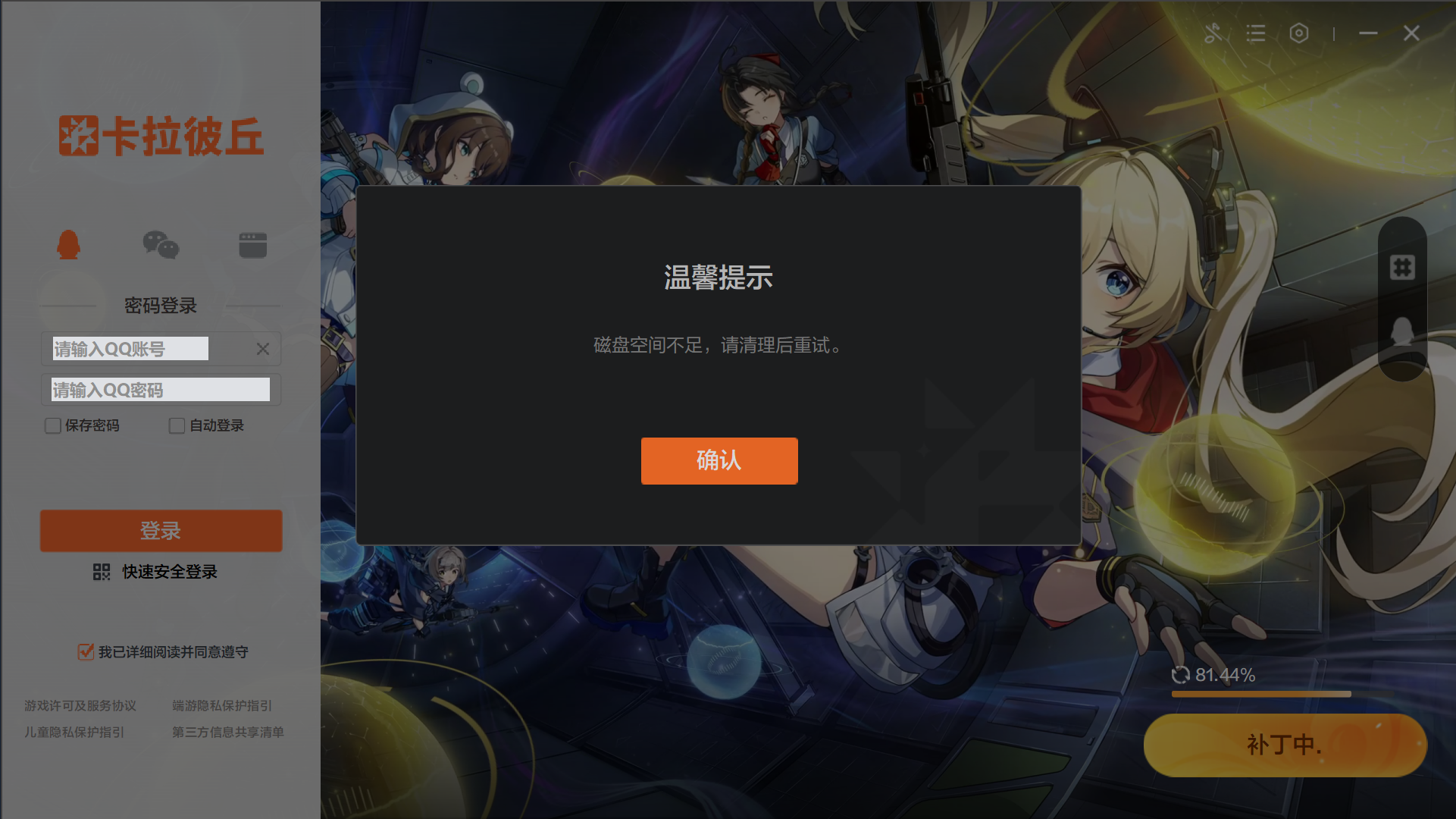
大家都遇到了相同的问题
-
大家都在关心活动,就我为了磁盘空间发愁。每次更新都得给狗卡腾40g出来
-
电脑小白,已经把存储最大的盘内所有东西都删光了,有30个G却还更新不了(电脑磁盘空间不足),怎么办
记录贴:900MB的更新内容却需要36GB临时空间的游戏《卡拉彼丘》
这个问题前年就反馈过了,但是这个却像底层代码一样,卡拉彼丘官方对此毫无所谓。
卡丘启动器到底干了什么
以下分析,不涉及针对启动器的抓包和逆向。这么说似乎剧透了问题的复杂度,但为了避免潜在的法律争议,提前说一句总是好的。
我在 Windows 上运行游戏,在 Linux 下挂载 Windows 分区对文件进行分析,有必要时使用 Wine 临时运行启动器,希望您不会对路径和命令感到疑惑。
所有敏感信息均已消毒。实际上也没有什么真正敏感的,所有内容在每个玩家的电脑上都能直接访问。
启动器目录结构
| 文件 | 功能 |
|---|---|
CalabiYau.exe |
启动器入口 |
config.ini |
启动器配置 |
profile |
渠道元数据 |
channelArgs |
渠道命令行参数 |
autostart.bat |
自启动脚本 |
Core.dll |
启动器核心逻辑库 |
Qt5.dll |
Qt5 UI 框架 |
avcodec*.dll. avformat*.dll, swscale*.dll |
FFmpeg,用于播放启动器背景视频/音频 |
7z.exe |
解压工具,用于解压缩更新包 |
hpatchz.exe |
HDiffPatch,补丁工具 |
uninst.exe, uninstdata.ini |
卸载程序 |
log/ |
日志 |
UpdateGUI/ |
独立的更新程序,有自己完整的 Qt5 运行时,用来更新启动器自身 |
Tenprotect/ |
腾讯 ACE 反作弊 |
TQM64/, wesight, perfsignt/ |
腾讯质量和性能监控,用来侵犯用户隐私 |
启动器配置
[General]
IsAutoStart=false
IsOpenBgMusic=true
IsPopWhenQuitGame=true
IsMinWhenCloseLauncher=true
LimitSpeed=-1
MusicVolume=0
IsSkipInstallPlugin=true
MusicLanguage=chinese
SystemExplorer=false
NewAgreementCheckedFlag=true
InstallPath=D:/CalabiYau/Calabiyau/
CurrentGameVersion=1.16.1.4
TransitionGameVersion=1.16.3.6
TargetGameVersion=1.16.3.6
CurrentStage=PATCHSTAGE
GamePath=D:/CalabiYau/Calabiyau/CalabiyauGame
bPatchFinished=false
AutoUpdateGame=false
DxMode=1
backgroundPic=D:\\CalabiYau\\ImageCache\\b9795272e0e7cd363552c4745f0625cb.jpg
MusicUUID=b3c0b621-450f-4ce8-a98b-b6d47cbef502
SaveExitMethod=false
PatchTime=1779218065391
大多数配置名一目了然,有三个版本号字段稍微需要说明:CurrentGameVersion 是当前游戏版本,TransitionGameVersion 是更新过渡的游戏版本,TargetGameVersion 是最终要更新到的游戏版本,在非更新状态下,后两者都为空。
如您所见,我的启动器安装在 D:/CalabiYau,而我的游戏安装在启动器文件夹内的 D:/CalabiYau/CalabiYau/,很不好的习惯,我肯定是犯了个懒。
启动器日志
log/launcher.log 是当前最新一次启动器会话的日志,每次启动时重新创建,下一次启动时会将其归档为 log_YYYYMMDDHHMM.log。
日志相当详细,基本完整描述了启动器的行为,我把它们按照功能分了类。其中不包含登录逻辑,不确定有没有必要分析这方面,至少不需要在这篇文章里展开吧。
初始化
05-23 02:07:28.146: Debug/(0): "[Serializer]:IniPath is D:/CalabiYau/config.ini"
05-23 02:07:28.153: Debug/(0): profile  "-Channel=channel=10439382*0.9.1.764*Launcher_Release*Game_Release*Launcher_Release"
05-23 02:07:28.154: Debug/(0): "-Channel=channel=10439382"
05-23 02:07:28.160: Debug/(0): CHANNELARGS "-Channel=channel=10439382"
05-23 02:07:28.798: Debug/(0): "[LauncherWindowHelper]:checkLastUpdater OldPath is D:/CalabiYau/UpdateGUI NewPath is D:/CalabiYau/UpdateGUITemp "
启动器刚运行时,加载启动器配置 config.ini 和更新渠道配置 profile。
-Channel=channel=10439382*0.9.1.764*Launcher_Release*Game_Release*Launcher_Release
profile 的内容用星号 * 分隔,分别是:
- 渠道参数:
-Channel=channel=10439382 - 启动器版本:
0.9.1.764 - 启动器发布渠道:
Launcher_Release - 游戏发布渠道:
Game_Release - 未知:
Launcher_Release,又重复了一遍启动器发布渠道,作用暂时不清楚
渠道参数同时也存放在 channelArgs 文件里,渠道 ID 10439382 应该代表从官网下载的腾讯启动器版本,如果是官网下载的普通 PC 客户端版本,profile 里的文件内容为:
-Channel=channel=PCCNGF80001*0.9.1.811*Launcher_IDSRelease*Game_Release*Launcher_Release
渠道 ID 为 PCCNGF80001,启动器发布渠道变为 Launcher_IDSRelease,两种启动器共用一个游戏发布渠道 GameRelease。
获取首页内容
05-23 02:07:28.169: Debug/(0): url  "https://klbq-prod-www.***.com/api/launch"
05-23 02:07:28.172: Debug/(0): "[Downloader]:download content from url is https://klbq-prod-www.***.com/api/launch?timestamp=1779473248"
启动器从 https://klbq-prod-www.***.com/api/launch 获取首页内容,包括背景图片/视频、轮播信息(界面左下角)、背景音乐。
日志中几乎所有的卡丘服务器 API 都可以直接请求,不需要任何请求头,也没有鉴权。
您可以用 cURL 直接访问这个 API,返回一段 JSON:
{
  "msg": "success",
  "code": 0,
  "data": {
    "kv": {
      "desktopType": "video",
      "desktopVideoPosterSrc": "https://klbqcp-web-cdn.***.com/klbq-admin/prod/images/202605/749803dc-b43d-45e1-9f94-c771ce9f6b61.jpg",
      "desktopVideoPosterMd5": "c9537735a19a8a0fe80939ad0add7564",
      "desktopVideoSrc": "https://klbqcp-web-cdn.***.com/klbq-admin/prod/images/202605/8298bd0f-5fec-412c-aa63-65b6feac5926.mp4",
      "desktopVideoMd5": "9de56ef73379719b585cd049dbea1967",
      "desktopTitle": "KV背景图"
    },
    "carousel": [
      {
        "name": "5月19日赛季更新公告",
        "link": "https://klbq.***.com/newsDetails?id=x8zJoSRMlTzflN7HOoGK4Q",
        "openWithDefaultBrowser": true,
        "desktopCarouselSrc": "https://klbqcp-web-cdn.***.com/klbq-admin/prod/images/202605/d512cc9c-4d79-4a78-a23d-bf0a619300b6.png",
        "desktopCarouselMd5": "65015849eccea937afe7e89dc1da0188",
        "createdTime": 1779097539,
        "id": "d2c3c3ee-e9e4-44e0-8b5d-166743176290"
      },
      // ...
    ],
    "news": [
      {
        "title": "千代「花游舞夜」",
        "url": "https://www.***.com/opus/1199532828364111877",
        "open_in_brower": true,
        "start_time": 1779165228,
        "first_start_time": 1779165228,
        "index": 2,
        "created_at": 1779165129,
        "id": "3955ae82-f333-4f62-8054-43ab8483001d"
      },
      // ...
    ],
    "bgm": [
      {
        "id": "b3c0b621-450f-4ce8-a98b-b6d47cbef502",
        "title": "版本主题曲",
        "url": "https://klbqcp-web-cdn.***.com/klbq-admin/prod/images/202605/0b2a2f5b-3319-4484-8ffb-a8d29274a944.mp3",
        "md5": "113811eadb6a791fe234fcaf78b3e995",
        "created_at": 1779139266
      },
      // ...
    ]
  }
}
封面、音乐等资源文件都存储在腾讯 COS,很显然卡丘把所有类型的文件都放在 /prod/images/ 路径下,mp4、mp3……足够懒。本地缓存也不出意外,全部塞进了 ImageCache/ 目录。
每个资源都附有 MD5 校验值,说明客户端有缓存校验机制,这倒是好事情。
启动器版本更新
05-23 02:07:28.161: Debug/(0): "[main]:host https://klbqcp-client-cdn.***.cn/Client/Win/GameDepot, channel Game_Release launcher channel Launcher_Release"
05-23 02:07:29.064: Debug/(0): "[LauncherWindow]: GetLauncherVersion hostandchannel is https://klbqcp-client-cdn.***.cn/Client/Win/GameDepot/Launcher_Release/manifest.txt"
05-23 02:07:29.064: Debug/(0): "[Downloader]:download content from url is https://klbqcp-client-cdn.***.cn/Client/Win/GameDepot/Launcher_Release/manifest.txt?timestamp=1779473249"
05-23 02:07:29.737: Debug/(0): "[stdUtil]:newestManifestUrl is https://klbqcp-client-cdn.***.cn/Client/Win/GameDepot/Launcher_Release/0.9.1.764/manifest.txt, size is 148252160, CurrentManifestUrl is https://klbqcp-client-cdn.***.cn/Client/Win/GameDepot/Launcher_Release/0.9.1.764/manifest.txt"
05-23 02:07:29.737: Debug/(0): "[LauncherWindow]: OnGetLauncherVersion launcher currentversion is 0.9.1.764 last version is 0.9.1.764"
启动器以及游戏更新的 API 都以 https://klbqcp-client-cdn.***.cn/Client/Win/GameDepot 开头,拼接发布渠道的值,比如:https://klbqcp-client-cdn.***.cn/Client/Win/GameDepot/Launcher_Release。
检查启动器更新时,先从 Launcher_Release/manifest.txt 获得更新清单,它的内容大致如下:
--last_version--
0.9.1.764
--download_version--
0.8.1.91->0.8.1.91|/Launcher/0.8.1.91/full_0.8.1.91.7z|7718e53a70c8f0f1456f4ecd981d8011|103761694
0.8.1.115->0.8.1.115|/Launcher/0.8.1.115/full_0.8.1.115.7z|31aed0dd4381287c7ee748a313b48b4a|150579285
0.8.1.142->0.8.1.142|/Launcher/0.8.1.142/full_0.8.1.142.7z|7605335567e7930bf3741302e2146384|150583766
...
0.9.1.762->0.9.1.762|/Launcher/0.9.1.762/full_0.9.1.762.7z|d73fb5973b05b06d69936ad53714c36a|162320760
0.9.1.763->0.9.1.763|/Launcher/0.9.1.763/full_0.9.1.763.7z|b6d926deaa04afee64260f013311f902|147638835
0.9.1.764->0.9.1.764|/Launcher/0.9.1.764/full_0.9.1.764.7z|ae9afb36a8b18e49129471c9eee93989|148252160
非常便于解析的文本格式。启动器先获取 --last_version-- 后的版本号与本地 profile 文件中的版本号进行对比,然后从 --download_version-- 后的内容中读取更新包信息。
更新包信息逐行分隔,每一行内又由 | 分隔,分别是版本升级、更新包文件路径、文件 MD5 校验值和文件大小。
old_version->new_version|/path/to/file|MD5|size
由于启动器不采用“补丁”(新增或修改文件)的方式进行更新,所以 old_version 与 new_version 相同,不会出现类似 0.8.1.91->0.8.1.115 这样的版本升级,启动器会选择最新的软件包,下载后直接解压覆盖。
从文件名 full_x.x.x.7z 也能看出是全量安装包。
获得了最新版本号 0.9.1.764 后,启动器还获取了对应的文件清单 Launcher_Release/0.9.1.764/manifest.txt,里面是各文件的文件名、MD5 和大小,用来校验完整性。
7z.dll|794b240dda0d4a673c2281ba99d61ec5|1835312
7z.exe|8409316a92a247aba8997578a5ce5f75|566576
api-ms-win-crt-heap-l1-1-0.dll|01370c79ebabd534e7b58d35072d2866|20360
api-ms-win-crt-locale-l1-1-0.dll|bacb72fa56de18d5ac63e4a0a3fe768f|19856
api-ms-win-crt-math-l1-1-0.dll|85893a96a568ba9781f50f876ed303cd|28552
...
UpdateGUI/vcruntime140.dll|11d9ac94e8cb17bd23dea89f8e757f18|97160
UpdateGUI/vcruntime140_1.dll|7667b0883de4667ec87c3b75bed84d84|37256
vccorlib140.dll|7ef7eab654df53e087ac4703c9ea0b16|334728
vcruntime140.dll|11d9ac94e8cb17bd23dea89f8e757f18|97160
vcruntime140_1.dll|7667b0883de4667ec87c3b75bed84d84|37256
为了测试启动器实际的更新行为,我把 profile 里的版本号改为上个版本 0.9.1.763,手动触发更新。点击确认更新后,原窗口关闭,弹出了一个新的窗口 UpdateGUI.exe:
更新很顺利,但日志中没有下载 /Launcher/0.9.1.764/full_0.9.1.764.7z 的记录,我尝试手动运行 UpdateGUI.exe 但没有任何窗口出现,于是我重新来过,在更新过程中查看了进程列表:
l3m0n4de  252635 26.7  3.1 2775280 498952 ?      Ssl  20:21   0:06 Z:\home\l3m0n4de\Games\CalabiYau\UpdateGUI\UpdateGUI.exe Z:/home/l3m0n4de/Games/CalabiYau https://klbqcp-client-cdn.***.cn/Client/Win/GameDepot/Launcher_Release/0.9.1.763/manifest.txt https://klbqcp-client-cdn.***.cn/Client/Win/GameDepot/Launcher_Release/0.9.1.764/manifest.txt https://klbqcp-client-cdn.***.cn/Client/Win/GameDepot/Launcher_Release/0.9.1.764/full_0.9.1.764.7z 148252160 --sleep=2000
l3m0n4de  255465 90.0  1.0 629960 158020 ?       Ssl  20:21   0:00 Z:\home\l3m0n4de\Games\CalabiYau\UpdateGUI\7z.exe x -bsp1 -y -oZ:/home/l3m0n4de/Games/CalabiYau/TempLauncher/UnZip Z:/home/l3m0n4de/Games/CalabiYau/TempLauncher/Launcher.zip
您可能需要更易于阅读的命令行:
Z:\home\l3m0n4de\Games\CalabiYau\UpdateGUI\UpdateGUI.exe \
    Z:/home/l3m0n4de/Games/CalabiYau \
    https://klbqcp-client-cdn.***.cn/Client/Win/GameDepot/Launcher_Release/0.9.1.763/manifest.txt \
    https://klbqcp-client-cdn.***.cn/Client/Win/GameDepot/Launcher_Release/0.9.1.764/manifest.txt \
    https://klbqcp-client-cdn.***.cn/Client/Win/GameDepot/Launcher_Release/0.9.1.764/full_0.9.1.764.7z \
    148252160 \
    --sleep=2000
Z:\home\l3m0n4de\Games\CalabiYau\UpdateGUI\7z.exe \
    x \
    -bsp1 \
    -y \
    -oZ:/home/l3m0n4de/Games/CalabiYau/TempLauncher/UnZip \
    Z:/home/l3m0n4de/Games/CalabiYau/TempLauncher/Launcher.zip
UpdateGUI.exe 需要几个命令行参数才能启动,分别是游戏目录、旧版本清单 URL、新版本清单 URL、更新包 URL 和更新包大小。
我在本地搭建 HTTP 服务器替换这几个参数测试了一番:
- 更新包会下载为
TempLauncher/Launcher.zip(尽管它是 7z 格式) - 更新包解压到
TempLauncher/UnZip/,之后放入实际的游戏目录,而不是我指定的第一个参数(很奇怪,不清楚是不是 Wine 的原因,我尝试过多种不同的路径种类) manifest.txt中的哈希值似乎没有用于校验,尤其是旧版本manifest.txt
弄清楚实际的行为需要更多手段,也更加离题,不在这里展开了。
启动器安装包
顺带一提,所有官网下载的启动器安装 EXE 也在同一个 URL 下,GameDepot/{channel}/{version}/Calabiyau_Installer_Release_{version}.exe
https://klbqcp-client-cdn.***.cn/Client/Win/GameDepot/Launcher_Release/0.9.1.764/Calabiyau_Installer_Release_0.9.1.764.exe
https://klbqcp-client-cdn.***.cn/Client/Win/GameDepot/Launcher_IDSRelease/0.9.1.811/Calabiyau_Installer_IDSRelease_0.9.1.811.exe
新版本由 NSIS (Nullsoft Scriptable Install System) 打包,所以可以直接作为压缩包格式打开,能看到原始的文件结构。
PE32
    Linker: Microsoft Linker(6.0)
    Compiler: Microsoft Visual C/C++(13.10.4035)[C]
    Sign tool: Windows Authenticode(2.0)[PKCS #7, after overlay]
    Installer: Nullsoft Scriptable Install System(3.10)[lzma]
而古早些的版本则是由 Inno Setup 打包。
PE32
    Linker: Turbo Linker(2.25)
    Compiler: Embarcadero Delphi(10.3 Rio)[Enterprise]
    Sign tool: Windows Authenticode(2.0)[PKCS #7, after overlay]
    Installer: Inno Setup Module(6.1.0)[unicode]
得以窥见早期卡丘更加草台班子的模样
ExifTool Version Number         : 13.55
File Name                       : Calabiyau_Installer_Release_0.8.1.91.exe
Directory                       : .
File Size                       : 124 MB
File Modification Date/Time     : 2026:05:31 07:19:16+08:00
File Access Date/Time           : 2026:05:31 07:19:50+08:00
File Inode Change Date/Time     : 2026:05:31 07:19:17+08:00
File Permissions                : -rw-r--r--
File Type                       : Win32 EXE
File Type Extension             : exe
MIME Type                       : application/octet-stream
Machine Type                    : Intel 386 or later, and compatibles
Time Stamp                      : 2021:06:13 02:16:47+08:00
Image File Characteristics      : No relocs, Executable, No line numbers, No symbols, Bytes reversed lo, 32-bit, Bytes reversed hi
PE Type                         : PE32
Linker Version                  : 2.25
Code Size                       : 679936
Initialized Data Size           : 130560
Uninitialized Data Size         : 0
Entry Point                     : 0xa6ed0
OS Version                      : 6.1
Image Version                   : 6.0
Subsystem Version               : 6.1
Subsystem                       : Windows GUI
File Version Number             : 0.0.0.0
Product Version Number          : 0.0.0.0
File Flags Mask                 : 0x003f
File Flags                      : (none)
File OS                         : Win32
Object File Type                : Executable application
File Subtype                    : 0
Language Code                   : Chinese (Simplified)
Character Set                   : ASCII
Comments                        : 此安装程序由 Inno Setup 构建。
Company Name                    : D1
File Description                : 卡拉彼丘 Setup
File Version                    :
Legal Copyright                 :
Original File Name              :
Product Name                    : 卡拉彼丘
Product Version                 : 0.1
小彩蛋
我在最老版(0.8.1.91)启动器中找到了卡丘早期 PV,可能是内测时期的,美术风格相当不同。

游戏版本更新
经过了如此漫长的铺垫,希望您没有感到困倦。我本想插入一些卡丘表情包来调整阅读节奏,让您更轻松一些,但一想到 org 仓库中要一直留着卡丘的二次元大头,我就又退缩了。
总而言之,接下来是重头戏。
获取更新清单
与启动器更新相同,首先获取更新清单 Game_Release/manifest.txt。
05-21 22:51:37.825: Debug/(0): "[LauncherWindow]:hostandchannel is https://klbqcp-client-cdn.***.cn/Client/Win/GameDepot/Game_Release"
05-21 22:51:37.826: Debug/(0): url  "https://klbqcp-client-cdn.***.cn/Client/Win/GameDepot/Game_Release/manifest.txt"
05-21 22:51:37.826: Debug/(0): "[Downloader]:download content from url is https://klbqcp-client-cdn.***.cn/Client/Win/GameDepot/Game_Release/manifest.txt?timestamp=1779375097"
文件内容与 Launcher_Release/manifest.txt 格式相同:old_version->new_version|/path/to/file|MD5|size。
当新旧版本相同时,列出的文件都属于 {version}/full_zip/,我猜测它们共同组成完整的游戏程序;而在跨版本升级时只有 {new_version}/patch_zip/{old_version}.7z 这一个文件,也就是唯一的更新包。
--last_version--
1.16.3.6
--download_version--
0.10.1.1->0.10.1.1|/Game_Release/0.10.1.1/full_zip/MinZipSingle29.7z|c294a1903baf8b8859b182a0b4a85181|154162788
0.10.1.1->0.10.1.1|/Game_Release/0.10.1.1/full_zip/MinZipSingle19.7z|55756fde6bb6009b4549ed01eced5a34|541842646
0.10.1.1->0.10.1.1|/Game_Release/0.10.1.1/full_zip/MultFile4.7z|7a13f9ebbabd821e471ad55ce99fd4b0|11461436
...
0.10.1.1->0.10.1.1|/Game_Release/0.10.1.1/full_zip/MinZipSingle24.7z|3d0243096e9f619ff414f711c76a379b|118706355
0.10.1.1->0.10.1.1|/Game_Release/0.10.1.1/full_zip/MinZipSingle8.7z|d72ca5cc20e226f46f1c4bca3a440799|494101659
0.10.1.1->0.10.1.2|/Game_Release/0.10.1.2/patch_zip/0.10.1.1.7z|d52a9a82a260dbd90a23d295563d6fb6|8493195
...
寻找最短升级路径
接着,从清单获得最新的版本号 1.16.3.6,为每个版本建立整数索引,找到更新的最短路径 1.16.1.4->1.16.3.6。我猜测它用清单的 old_version->new_version 信息构建了一张有向图,将整数索引作为节点 ID,最后利用了某种图算法,计算从当前版本到目标版本的最短升级路径。
(show Discretization 的说法很奇怪,有些机翻味道)
05-21 22:51:38.021: Debug/(0): "[config]:the newest version 1.16.3.6"
05-21 22:51:38.044: Debug/(0): "[StdUtil]:show all patch infomation!"
05-21 22:51:38.045: Debug/(0): "[StdUtil]:show Discretization"
05-21 22:51:38.046: Debug/(0): "[StdUtil]:0.8.1.0: the index is 0"
05-21 22:51:38.046: Debug/(0): "[StdUtil]:0.8.1.2: the index is 1"
05-21 22:51:38.046: Debug/(0): "[StdUtil]:0.8.1.3: the index is 2"
...
05-21 22:51:38.105: Debug/(0): "[StdUtil]:1.15.7.17: the index is 182"
05-21 22:51:38.105: Debug/(0): "[StdUtil]:1.16.1.4: the index is 183"
05-21 22:51:38.106: Debug/(0): "[StdUtil]:1.16.3.6: the index is 184"
05-21 22:51:38.116: Debug/(0): "[StdUtil]:show the shortest update path from 1.16.1.4 to 1.16.3.6"
做法是好的,但实际上它只有一条升级路径,换句话说只有相邻的小版本有升级包,您可以运行下面的命令来验证:
curl "https://klbqcp-client-cdn.***.cn/Client/Win/GameDepot/Game_Release/manifest.txt" \
    | rg -o '(\d+\.\d+\.\d+\.\d+)->(\d+\.\d+\.\d+\.\d+)' \
    | awk -F'->' '$1 != $2' \
    | sort -V
得知升级路径 1.16.1.4->1.16.3.6 后,下载文件 /Game_Release/1.16.3.6/patch_zip/1.16.1.4.7z,它的大小为 142306220 字节,就是这 142 MB 榨干了磁盘的剩余价值,pretty evil 哈。
同步下载的还有新版本的清单文件 Game_Release/1.16.3.6/manifest.txt。
05-21 22:51:38.116: Debug/(0): filesize  142306220
05-21 22:51:38.118: Debug/(0): GetNewestVersionManifest :  "https://klbqcp-client-cdn.***.cn/Client/Win/GameDepot/Game_Release/1.16.3.6/manifest.txt"
05-21 22:51:38.118: Debug/(0): url  "https://klbqcp-client-cdn.***.cn/Client/Win/GameDepot/Game_Release/1.16.3.6/manifest.txt"
05-21 22:51:38.119: Debug/(0): "[Downloader]:download content from url is https://klbqcp-client-cdn.***.cn/Client/Win/GameDepot/Game_Release/1.16.3.6/manifest.txt?timestamp=1779375098"
验证补丁包文件
每次阶段切换,启动器都会把当前进度写入 config.ini 以便意外退出后从上一阶段恢复。
校验阶段很简单:计算 1.16.1.4.7z 的 MD5,与清单中记录的值核对。
05-21 22:52:24.901: Debug/(0): StartVerify
05-21 22:52:24.902: Debug/(0): "[LauncherWindow]:Begin to Verify"

05-21 22:52:24.902: Debug/(0): "[SerializerTag]:save key is InstallPath, value is D:/CalabiYau/Calabiyau/"
05-21 22:52:24.902: Debug/(0): "[SerializerTag]:save key is CurrentGameVersion, value is 1.16.1.4"
05-21 22:52:24.903: Debug/(0): "[SerializerTag]:save key is TransitionGameVersion, value is "
05-21 22:52:24.903: Debug/(0): "[SerializerTag]:save key is TargetGameVersion, value is "
05-21 22:52:24.903: Debug/(0): "[SerializerTag]:save key is CurrentStage, value is VERIFYSTAGE"
05-21 22:52:24.903: Debug/(0): "[SerializerTag]:save key is GamePath, value is D:/CalabiYau/Calabiyau/CalabiyauGame"

05-21 22:52:24.904: Debug/(0): "[DownloaderManager]:filePtr<<<<<<<<< D:/CalabiYau/Calabiyau/CalabiyauCache/1.16.1.4.7z :ReleaseReply"

05-21 22:52:24.904: Debug/(0): "[VerifyThread]:Md5 is 597e8c58c9774492957387a3053e962a, file is D:/CalabiYau/Calabiyau/CalabiyauCache/1.16.1.4.7z"
05-21 22:52:24.905: Debug/(0): begin to verify zip file
05-21 22:52:24.905: Debug/(0): "[VerifyThread]:begin verify zipfile, the totalBytes of files is 142306220"
05-21 22:52:25.175: Debug/(0): md5Str :  "597e8c58c9774492957387a3053e962a"
05-21 22:52:25.175: Debug/(0): "[VerifyThread]:verify zip file is D:/CalabiYau/Calabiyau/CalabiyauCache/1.16.1.4.7z, md5 is 597e8c58c9774492957387a3053e962a calculate md5 is 597e8c58c9774492957387a3053e962a"
05-21 22:52:25.175: Debug/(0): "[VerifyThread]:verify zipfile is success !"

05-21 22:52:25.178: Debug/(0): "[LauncherWindow]:Verify success"
解压补丁包
校验通过,进入解压阶段。1.16.1.4.7z 被解压到 CalabiyauCache/UnZip/:
05-21 22:52:25.178: Debug/(0): StartUnZip

05-21 22:52:25.178: Debug/(0): "[SerializerTag]:save key is InstallPath, value is D:/CalabiYau/Calabiyau/"
05-21 22:52:25.179: Debug/(0): "[SerializerTag]:save key is CurrentGameVersion, value is 1.16.1.4"
05-21 22:52:25.179: Debug/(0): "[SerializerTag]:save key is TransitionGameVersion, value is "
05-21 22:52:25.179: Debug/(0): "[SerializerTag]:save key is TargetGameVersion, value is "
05-21 22:52:25.179: Debug/(0): "[SerializerTag]:save key is CurrentStage, value is UNZIPSTAGE"
05-21 22:52:25.180: Debug/(0): "[SerializerTag]:save key is GamePath, value is D:/CalabiYau/Calabiyau/CalabiyauGame"

05-21 22:52:25.180: Debug/(0): "[LauncherWindow]:Begin to StartUnZip"

05-21 22:52:25.181: Debug/(0): DeleteFileOrFolder path "D:/CalabiYau/Calabiyau/CalabiyauCache/UnZip"  is empty

05-21 22:52:25.182: Debug/(0): "[ZipThread]:start unzip file, file is D:/CalabiYau/Calabiyau/CalabiyauCache/1.16.1.4.7z, unzip folder is D:/CalabiYau/Calabiyau/CalabiyauCache/UnZip"
05-21 22:52:25.182: Debug/(0): "[Zipthread]:exepath is D:/CalabiYau/7z.exe"
05-21 22:52:25.427: Debug/(0): "[ZipThread]:DecompressFile:percent is -1, output is \r\n7-Zip 22.01 (x64) : Copyright (c) 1999-2022 Igor Pavlov : 2022-07-15\r\n\r\nScanning the drive for archives:\r\n  0M Scan D:\\CalabiYau\\Calabiyau\\CalabiyauCache\\\r                                                \r"
05-21 22:52:25.447: Debug/(0): "[ZipThread]:DecompressFile:percent is 0, output is 1 file, 142306220 bytes (136 MiB)\r\n\r\nExtracting archive: D:\\CalabiYau\\Calabiyau\\CalabiyauCache\\1.16.1.4.7z\r\n--\r\nPath = D:\\CalabiYau\\Calabiyau\\CalabiyauCache\\1.16.1.4.7z\r\nType = 7z\r\nPhysical Size = 142306220\r\nHeaders Size = 2459\r\nMethod = LZMA2:25 BCJ\r\nSolid = +\r\nBlocks = 2\r\n\r\n  0%"
05-21 22:52:25.626: Debug/(0): "[ZipThread]:DecompressFile:percent is 57, output is \r    \r 57% 42"
05-21 22:52:25.815: Debug/(0): "[ZipThread]:DecompressFile:percent is 81, output is \r       \r 81% 42"
05-21 22:52:26.036: Debug/(0): "[ZipThread]:DecompressFile:percent is 90, output is \r       \r 90% 79 - PM\\Content\\Paks.patch"
05-21 22:52:26.251: Debug/(0): "[ZipThread]:DecompressFile:percent is 0, output is \r                               \r100% 83 - Engine\\Binaries\\ThirdParty\\NVID . n64\\GFSDK_Aftermath_Lib.x64.dll"
05-21 22:52:26.317: Debug/(0): "[ZipThread]:DecompressFile:output is \r                                                                           \rEverything is Ok\r\n\r\nFolders: 42\r\nFiles: 102\r\nSize:       185927171\r\nCompressed: 142306220\r\n"
05-21 22:52:26.318: Debug/(0): "[ZipThread]:DecompressFile: exit code is 0"
05-21 22:52:26.318: Debug/(0): crc failed -1
05-21 22:52:26.319: Debug/(0): "[ZipThread]:Unzip D:/CalabiYau/Calabiyau/CalabiyauCache/1.16.1.4.7z Success"
05-21 22:52:26.319: Debug/(0): "[ZipThread]:finishedThread"

05-21 22:52:26.319: Debug/(0): "[Unzipper]:error code is 0"

05-21 22:52:26.321: Debug/(0): "[LauncherWindow]:OnUnZipProcess Complete"
其中包含一份新的 manifest.txt,列出了本次更新需要删除的文件、直接替换的新文件,以及需要打补丁的文件:
--del_file--
--new_file--
Calabiyau.exe|1d2cf26c2589ff1d392a41b8cc5fe3fe|768304
Engine/Binaries/ThirdParty/NVIDIA/NVaftermath/Win64/GFSDK_Aftermath_Lib.x64.dll|ccf6c4eda1cb79fd11499d499e51d571|139056
Engine/Binaries/ThirdParty/Ogg/Win64/VS2015/libogg_64.dll|618d14c810328ed2da6c7f485b6f3b69|70448
...
PM/Binaries/Win64/zlibwapi.dll|e409204dc0c7dbdd0abe616b8c623ff8|133936
PM/Plugins/Wwise/ThirdParty/x64_vc160/Release/bin/DolbyStereoRenderer.dll|447317b8fd5d7d3dac7ae43e7b1db4bf|36144
Version.txt|c2910cf47f30620beda8163f1a6156d2|6
--patch_file--
Engine/Binaries/ThirdParty/PhysX3/Win64/VS2015/ApexFramework_x64.dll.patch|dc5c9caa215700c3936e3b5c219772c0|1622
Engine/Binaries/ThirdParty/PhysX3/Win64/VS2015/APEX_Clothing_x64.dll.patch|98d93db1637fd6b8ea870048091939aa|1365
Engine/Binaries/ThirdParty/PhysX3/Win64/VS2015/APEX_Legacy_x64.dll.patch|e8c109ea14c9a7d5ae7ae4771b70b110|1626
...
PM/Content/Movies/UI_Hall.mp4.patch|653e3fc083df41de62fbd57f12e74832|8681956
PM/Plugins/Wwise/ThirdParty/x64_vc160/Release/bin/DolbyAtmosRenderer.dll.patch|3174ba9b835a64830b0ee11027fcbf21|1623
PM/Content/Paks.patch|bfe7c44e92d88fa409d7f012e261bb21|50361805
开始补丁
启动器读取 UnZip/manifest.txt,列出其中所有 .patch。
05-21 22:52:26.321: Debug/(0): StartPatch

05-21 22:52:26.321: Debug/(0): "[SerializerTag]:save key is InstallPath, value is D:/CalabiYau/Calabiyau/"
05-21 22:52:26.321: Debug/(0): "[SerializerTag]:save key is CurrentGameVersion, value is 1.16.1.4"
05-21 22:52:26.322: Debug/(0): "[SerializerTag]:save key is TransitionGameVersion, value is "
05-21 22:52:26.322: Debug/(0): "[SerializerTag]:save key is TargetGameVersion, value is "
05-21 22:52:26.322: Debug/(0): "[SerializerTag]:save key is CurrentStage, value is PATCHSTAGE"
05-21 22:52:26.322: Debug/(0): "[SerializerTag]:save key is GamePath, value is D:/CalabiYau/Calabiyau/CalabiyauGame"

05-21 22:52:26.323: Debug/(0): "[Patcher]:manifestFilePath is D:/CalabiYau/Calabiyau/CalabiyauCache/UnZip/manifest.txt"

05-21 22:52:26.323: Debug/(0): "[MergeThread]:manifestFilePath is "
05-21 22:52:26.323: Debug/(0): "[MergeThread]:_targetPath is D:/CalabiYau/Calabiyau/CalabiyauGame"
05-21 22:52:26.324: Debug/(0): "[MergeThread]:_tempPath is D:/CalabiYau/Calabiyau/CalabiyauCache/TempMerge"

05-21 22:52:26.326: Debug/(0): "[mergethread]:patchFile begin"
05-21 22:52:26.326: Debug/(0): "[mergethread]:=> Engine/Binaries/ThirdParty/PMCEF3/Win64/Resources/swiftshader/libGLESv2.dll.patch"
05-21 22:52:26.326: Debug/(0): "[mergethread]:=> Engine/Binaries/ThirdParty/PMCEF3/Win64/chrome_elf.dll.patch"
05-21 22:52:26.326: Debug/(0): "[mergethread]:=> Engine/Binaries/ThirdParty/PMCEF3/Win64/libGLESv2.dll.patch"
...
05-21 22:52:26.336: Debug/(0): "[mergethread]:=> PM/Content/Movies/UI_Hall.mp4.patch"
05-21 22:52:26.336: Debug/(0): "[mergethread]:=> PM/Content/Paks.patch"
05-21 22:52:26.336: Debug/(0): "[mergethread]:=> PM/Plugins/Wwise/ThirdParty/x64_vc160/Release/bin/DolbyAtmosRenderer.dll.patch"
05-21 22:52:26.336: Debug/(0): "[mergethread]:patchFile end"
使用 hpatchz.exe 逐个进行补丁合并,命令行为:D:/CalabiYau/hpatchz.exe path/to/file path/to/patch path/to/file -f -s-1m -C-old-new-diff。
05-21 22:52:26.337: Debug/(0): "[MergeTag]:MergeThread Run"

05-21 22:52:26.337: Debug/(0): "[MergeThread]:MergeIndex:1"
05-21 22:52:26.337: Debug/(0): MergeThread  "D:/CalabiYau/hpatchz.exe"   "D:/CalabiYau/Calabiyau/CalabiyauGame/Engine/Binaries/ThirdParty/PMCEF3/Win64/Resources/swiftshader/libGLESv2.dll D:/CalabiYau/Calabiyau/CalabiyauCache/UnZip/Engine/Binaries/ThirdParty/PMCEF3/Win64/Resources/swiftshader/libGLESv2.dll.patch D:/CalabiYau/Calabiyau/CalabiyauGame/Engine/Binaries/ThirdParty/PMCEF3/Win64/Resources/swiftshader/libGLESv2.dll -f -s-1m -C-old-new-diff"
05-21 22:52:26.623: Debug/(0): read patch progress: "\r\nDirPatch CopySameFileAsMove : No\r\nNOTE: outNewPath temp file will be rename to oldPath name after patch!\r\nold : \"D:/CalabiYau/Calabiyau/CalabiyauGame/Engine/Binaries/ThirdParty/PMCEF3/Win64/Resources/swiftshader/libGLESv2.dll\"\r\ndiff: \"D:/CalabiYau/Calabiyau/CalabiyauCache/UnZip/Engine/Binaries/ThirdParty/PMCEF3/Win64/Resources/swiftshader/libGLESv2.dll.patch\"\r\nout : \"D:/CalabiYau/Calabiyau/CalabiyauGame/Engine/Binaries/ThirdParty/PMCEF3/Win64/Resources/swiftshader/libGLESv2.dll001.tmp\"\r\n  input oldDataSize: 2767152\r\n       diffDataSize: 1625\r\n       diffDataType: HDiff \r\n  saved oldDataSize: 2767152\r\n  saved newDataSize: 2767152\r\n       compressType: \"\" (need decompress 0)\r\n\r\nprogress:(6)\rprogress:(12)\rprogress:(18)\rprogress:(25)\rprogress:(31)\rprogress:(37)\rprogress:(44)\rprogress:(50)\rprogress:(56)\rprogress:(63)\rprogress:(69)\rprogress:(75)\rprogress:(82)\rprogress:(88)\rprogress:(94)\rprogress:(100)\r"
05-21 22:52:27.074: Debug/(0): read patch progress: "  patch ok!\r\n\r\nhpatchz time: 0.004 s\r\noutNewPath temp file renamed to oldPath name!\r\n"
05-21 22:52:27.074: Debug/(0): hpatch.exe output: ""
05-21 22:52:27.075: Debug/(0): MergeThread exitCode: 0
前 35 个补丁都顺利完成。第 36 个补丁 PM/Content/Paks.patch 合并时磁盘空间耗尽,报出了错误 No space left on device。
启动器没有立即放弃,又重试了两次,结果相同。
05-21 22:52:52.675: Debug/(0): "[MergeThread]:MergeIndex:36"
05-21 22:52:52.676: Debug/(0): MergeThread  "D:/CalabiYau/hpatchz.exe"   "D:/CalabiYau/Calabiyau/CalabiyauGame/PM/Content/Paks D:/CalabiYau/Calabiyau/CalabiyauCache/UnZip/PM/Content/Paks.patch D:/CalabiYau/Calabiyau/CalabiyauGame/PM/Content/Paks -f -s-1m -C-old-new-diff -c"
05-21 22:52:53.816: Debug/(0): read patch progress: "\r\nDirPatch CopySameFileAsMove : Yes\r\nNOTE: all in outNewPath temp directory will be move to oldDirectory after patch!\r\nold  dir: \"D:/CalabiYau/Calabiyau/CalabiyauGame/PM/Content/Paks\\\"\r\ndiffFile: \"D:/CalabiYau/Calabiyau/CalabiyauCache/UnZip/PM/Content/Paks.patch\"\r\nout  dir: \"D:/CalabiYau/Calabiyau/CalabiyauGame/PM/Content/Paks001.tmp\\\"\r\n         diffDataSize: 50361805\r\n         diffDataType: DirHDiff\r\n         checksumType: \"fadler64\"\r\n         oldPathIsDir: true\r\n         newPathIsDir: true\r\n       new path count: 195 (fileCount:194)\r\n  copy from old count: 132 (copySize: 36419324844)\r\n   ref old file count: 64 (oldRefSize: 18044811079)\r\n   ref new file count: 62 (newRefSize: 18042695204)\r\n           oldSumSize: 54464135923\r\n           newSumSize: 54462020048\r\n       diffDataType: HDiff (in DirHDiff)\r\n  saved oldDataSize: 18044811079\r\n  saved newDataSize: 18042695204\r\n       compressType: \"\" (need decompress 0)\r\n\r\nhpatchz run with checksum plugin: \"fadler64\" (checksumSets: diff old new)\r\nprogress:(1)\r"
05-21 22:52:54.449: Debug/(0): read patch progress: "progress:(2)\r"
...
05-21 22:53:52.803: Debug/(0): read patch progress: "progress:(42)\r\r\nhpatchz dir patch time: 60.085 s\r\n"
05-21 22:53:52.803: Debug/(0): hpatch.exe output: ""
05-21 22:53:52.804: Debug/(0): MergeThread exitCode: 24
05-21 22:53:52.804: Debug/(0): "[MergeThread error]:output is call import system api error! errno: 28, errmsg: No space left on device.\r\ncheck _file_append_part(self,writeToPos,data,data+writeLen) error!\r\ndir_patch TDirPatcher_patch() patch_decompress_with_cache error!\r\ndir_patch check _tryCloseNewFile(self) error!\r\ncheck _TDirPatcher_closeNewFileHandles(self) error!\r\ndir patch run ERROR!\r\ndir patch file ERROR!\r\n"


05-21 22:53:53.942: Debug/(0): read patch progress: "\r\nDirPatch CopySameFileAsMove : Yes\r\nNOTE: all in outNewPath temp directory will be move to oldDirectory after patch!\r\nold  dir: \"D:/CalabiYau/Calabiyau/CalabiyauGame/PM/Content/Paks\\\"\r\ndiffFile: \"D:/CalabiYau/Calabiyau/CalabiyauCache/UnZip/PM/Content/Paks.patch\"\r\nout  dir: \"D:/CalabiYau/Calabiyau/CalabiyauGame/PM/Content/Paks001.tmp\\\"\r\n         diffDataSize: 50361805\r\n         diffDataType: DirHDiff\r\n         checksumType: \"fadler64\"\r\n         oldPathIsDir: true\r\n         newPathIsDir: true\r\n       new path count: 195 (fileCount:194)\r\n  copy from old count: 132 (copySize: 36419324844)\r\n   ref old file count: 64 (oldRefSize: 18044811079)\r\n   ref new file count: 62 (newRefSize: 18042695204)\r\n           oldSumSize: 54464135923\r\n           newSumSize: 54462020048\r\n       diffDataType: HDiff (in DirHDiff)\r\n  saved oldDataSize: 18044811079\r\n  saved newDataSize: 18042695204\r\n       compressType: \"\" (need decompress 0)\r\n\r\nhpatchz run with checksum plugin: \"fadler64\" (checksumSets: diff old new)\r\nprogress:(1)\r"
05-21 22:53:54.254: Debug/(0): read patch progress: "progress:(2)\r"
...
05-21 22:54:44.004: Debug/(0): read patch progress: "progress:(42)\r"
05-21 22:54:44.266: Debug/(0): read patch progress: "\r\nhpatchz dir patch time: 51.410 s\r\n"
05-21 22:54:44.267: Debug/(0): hpatch.exe output: ""
05-21 22:54:44.267: Debug/(0): MergeThread exitCode: 24
05-21 22:54:44.267: Debug/(0): "[MergeThread error]:output is call import system api error! errno: 28, errmsg: No space left on device.\r\ncheck _file_append_part(self,writeToPos,data,data+writeLen) error!\r\ndir_patch TDirPatcher_patch() patch_decompress_with_cache error!\r\ndir_patch check _tryCloseNewFile(self) error!\r\ncheck _TDirPatcher_closeNewFileHandles(self) error!\r\ndir patch run ERROR!\r\ndir patch file ERROR!\r\n"


05-21 22:54:45.408: Debug/(0): read patch progress: "\r\nDirPatch CopySameFileAsMove : Yes\r\nNOTE: all in outNewPath temp directory will be move to oldDirectory after patch!\r\nold  dir: \"D:/CalabiYau/Calabiyau/CalabiyauGame/PM/Content/Paks\\\"\r\ndiffFile: \"D:/CalabiYau/Calabiyau/CalabiyauCache/UnZip/PM/Content/Paks.patch\"\r\nout  dir: \"D:/CalabiYau/Calabiyau/CalabiyauGame/PM/Content/Paks001.tmp\\\"\r\n         diffDataSize: 50361805\r\n         diffDataType: DirHDiff\r\n         checksumType: \"fadler64\"\r\n         oldPathIsDir: true\r\n         newPathIsDir: true\r\n       new path count: 195 (fileCount:194)\r\n  copy from old count: 132 (copySize: 36419324844)\r\n   ref old file count: 64 (oldRefSize: 18044811079)\r\n   ref new file count: 62 (newRefSize: 18042695204)\r\n           oldSumSize: 54464135923\r\n           newSumSize: 54462020048\r\n       diffDataType: HDiff (in DirHDiff)\r\n  saved oldDataSize: 18044811079\r\n  saved newDataSize: 18042695204\r\n       compressType: \"\" (need decompress 0)\r\n\r\nhpatchz run with checksum plugin: \"fadler64\" (checksumSets: diff old new)\r\nprogress:(1)\r"
05-21 22:54:45.720: Debug/(0): read patch progress: "progress:(2)\r"
...
05-21 22:55:26.999: Debug/(0): read patch progress: "progress:(42)\r"
05-21 22:55:27.443: Debug/(0): read patch progress: "\r\nhpatchz dir patch time: 43.116 s\r\n"
05-21 22:55:27.443: Debug/(0): hpatch.exe output: ""
05-21 22:55:27.444: Debug/(0): MergeThread exitCode: 24
05-21 22:55:27.444: Debug/(0): "[MergeThread error]:output is call import system api error! errno: 28, errmsg: No space left on device.\r\ncheck _file_append_part(self,writeToPos,data,data+writeLen) error!\r\ndir_patch TDirPatcher_patch() patch_decompress_with_cache error!\r\ndir_patch check _tryCloseNewFile(self) error!\r\ncheck _TDirPatcher_closeNewFileHandles(self) error!\r\ndir patch run ERROR!\r\ndir patch file ERROR!\r\n"

05-21 22:55:27.444: Debug/(0): MergeThread fatalError: "磁盘空间不足,请清理后重试。"
05-21 22:55:27.457: Debug/(0): "[LauncherWindow]:OnPatchProcess Error"
假如一切顺利,启动器最后帮您做一些例如删除文件或修改配置的收尾工作,更新就完全结束,您可以进入卡拉彼丘享受折磨了,真可惜。
补丁程序原理
「唉,可是这并没有解释为什么过量占用啊」
别着急,我们快要触及根源了,原因就在补丁程序的工作原理上。
hpatchz.exe 来自 HDiffPatch,它是一个 C/C++ 库和命令行工具,用于在二进制文件或文件夹之间执行 diff (创建补丁) 和 patch (打补丁)。
hpatchz 不支持原地补丁,它的做法是先将结果写入临时文件,成功后重命名覆盖原文件,失败则原文件不受影响。
以日志里的 libGLESv2.dll 补丁为例,hpatchz 先写出一个临时文件 libGLESv2.dll01.tmp,之后再重命名为 libGLESv2.dll:
DirPatch CopySameFileAsMove : No
NOTE: outNewPath temp file will be rename to oldPath name after patch!
old : "libGLESv2.dll"
diff: "libGLESv2.dll.patch"
out : "libGLESv2.dll001.tmp"
  input oldDataSize: 2767152
       diffDataSize: 1625
       diffDataType: HDiff
  saved oldDataSize: 2767152
  saved newDataSize: 2767152
       compressType: "" (need decompress 0)

  patch ok!00)

hpatchz time: 0.081 s
outNewPath temp file renamed to oldPath name!
对单个文件而言,临时文件最多不过是一个文件的体量,无足轻重。
Paks.patch 与其他补丁不同,它的补丁对象是整个 Paks/ 目录——UE 引擎的资源目录,也是游戏里体量最大的文件夹。
卡丘使用的 hpatchz.exe 不是原版,他们基于 v4.6.9 版本进行了修改,新增了 -c 选项:
-c Force DirPatch copy same files by moving.;
-c 将目录补丁中的“复制不变的文件”改为“移动不变的文件”。
这个区别至关重要:不加 -c,132 个不变的文件(约 36GB)会被整体复制一份进入临时目录,仅这一步就需要 36GB 的额外空间;加了 -c,移动操作不产生额外的空间消耗。
(这是我仅根据程序输出推测的功能,也许它实际上有其他含义,或者根本没用)
卡丘做了一些努力,但即便如此,问题依然存在:
DirPatch CopySameFileAsMove : Yes
NOTE: all in outNewPath temp directory will be move to oldDirectory after patch!
old  dir: "PM/Content/Paks\"
diffFile: "Paks.patch"
out  dir: "PM/Content/Paks001.tmp\"
         diffDataSize: 50361805
         diffDataType: DirHDiff
         checksumType: "fadler64"
         oldPathIsDir: true
         newPathIsDir: true
       new path count: 195 (fileCount:194)
  copy from old count: 132 (copySize: 36419324844)
   ref old file count: 64 (oldRefSize: 18044811079)
   ref new file count: 62 (newRefSize: 18042695204)
           oldSumSize: 54464135923
           newSumSize: 54462020048
       diffDataType: HDiff (in DirHDiff)
  saved oldDataSize: 18044811079
  saved newDataSize: 18042695204
       compressType: "" (need decompress 0)

hpatchz run with checksum plugin: "fadler64" (checksumSets: diff old new)
call import system api error! errno: 28, errmsg: No space left on device.
check _file_append_part(self,writeToPos,data,data+writeLen) error!
dir_patch TDirPatcher_patch() patch_decompress_with_cache error!
dir_patch check _tryCloseNewFile(self) error!
check _TDirPatcher_closeNewFileHandles(self) error!
dir patch run ERROR!
dir patch file ERROR!

hpatchz dir patch time: 53.646 s
64 个需要打补丁的旧文件(oldRefSize,约 18GB)在读取期间必须留在 Paks/ 里,与此同时,62 个新文件(newRefSize,同样约 18GB)正在被写入临时目录 Paks001.tmp/。两份 18GB 同时占据磁盘,这就是额外 20GB 的来源。
我真的很想更新
就我对 UE4 的浅显了解,卡丘只给 Paks/ 目录打一个补丁其实挺有道理的,Pak 文件本身结构不适合文件级 Diff,微小改动都会导致文件内大量字节发生变化,而目录级的 Diff 可以跨文件利用相似性,复用率更高。
但,整包替换的方案也挺不错吧,直接删除旧 Pak,下载新 Pak,虽然会比 HDiffPatch 方案占用更多的带宽,但好歹磁盘峰值占用可以降下来了,为什么卡丘不用呢?
鉴于这个问题存在多年未根本解决,我认为不该期待官方改进,要在现有条件下制作自己的解决方案。我设想了三种:
- 获取新旧版本
Paks/目录,逐文件重新制作补丁- 需要同时持有新旧两版
Paks/(50G + 50G) - 需要自动化流水线跑
hdiffz - 需要服务器托管文件补丁
- 需要自定义更新器
- 需要同时持有新旧两版
- 解析
Paks.patch,从中拆出逐文件的补丁- 旧文件有,官方补丁也有,如果能把 DirHDiff 格式弄懂,就能从里面提取每个文件的差分数据,逐文件应用
- DirHDiff 是流式格式,不一定能随机寻址
- 序列化很容易出错,要对 Diff 算法理解深刻,一不小心就可能破坏文件
- 需要自定义更新器
- 修改 HDiffPatch 源码,改变目录补丁行为
- 把所有新文件写入临时目录再整体替换,改成逐文件处理。补一个、移走一个、释放旧文件。临时空间就只需要最大单文件的大小,而不是所有新文件的总和
- 只涉及目录补丁的调度逻辑,不需要动 diff 算法本身
- 只需要替换游戏目录下的
hpatchz.exe,可以继续使用官方启动器更新 - 跨文件引用时,释放旧文件会破坏数据
综上分析,方案三更加实际一些,但是否可行还得看 HDiffPatch 源码实现。工作量预计会很大,在下一篇文章继续吧。
题外话
启动器会不定期向 https://common.klbq.**.com:8001 发送 POST 请求,包含启动器版本号、时间、客户端 IP 等信息。
LoginClientFlowNew|2026-05-21 22:51:37|10439382|0.9.1.764||0|||2001|Ip_Not_Found|2|91217B95-B604-4CB3-8829-41018DB775FB|||
如果不想被收集“改进”数据,可以在 Hosts 里将此域名解析到本地。
总结
卡拉彼丘也太好玩了,不启动游戏都能开心地玩几个小时。老实说,这几个小时比实际玩卡丘的时候要有趣得多。
好吧不开玩笑,虽然这篇文章我明里暗里对卡丘发表了一些抱怨,但从某种意义上讲,卡丘的确让我又找到了新乐趣——仅次于在公频复读。
同时也让我回想起在学校的日子,乱七八糟的网安比赛,对着应急响应的日志文件过滤再过滤,眼睛都看花了,还好卡丘的日志文件足够清晰。这么一说,我好像还得感谢它呢。