eza 是命令行程序 ls 的现代替代品,提供了更多功能和更好的显示效果。我在 Fish 配置中把 ls 别名到 eza,就这样用了两年,印象里它从来没有破坏过脚本执行——这很可疑。
alias ls="eza --icons auto"
alias ll="eza --icons --long --git"
alias la="eza --icons --long --git --all"
alias lt="eza --icons --tree"
alias l.="eza --icons --grid --all --no-filesize --no-user --no-time | rg '^\.'"
alias lg="eza --icons --git --git-repos --long --header"
在这篇文章里,我会尝试只靠阅读源码和注释文档,不用搜索引擎和 AI 检索答案,尽可能钻入底层实现,直到兔子洞见底。
您可以想象这是潜水,希望您没有深海恐惧症。(认真的,接下来会出现不少海洋生物照片)
为了让潜水更有趣,我决定增加一些限制:阅读源码时不使用 LSP,只用字符串过滤11.指 grep 命令和编辑器查找文本功能,具体些就是 ripgrep 和 Neovim 的 Pattern。定位代码位置。
grep is all you need.
eza 似乎知道我在终端盯着它

当执行 ls 或 ls -la 时,我的 eza 别名命令会给出这样的结果:

eza --icons auto src/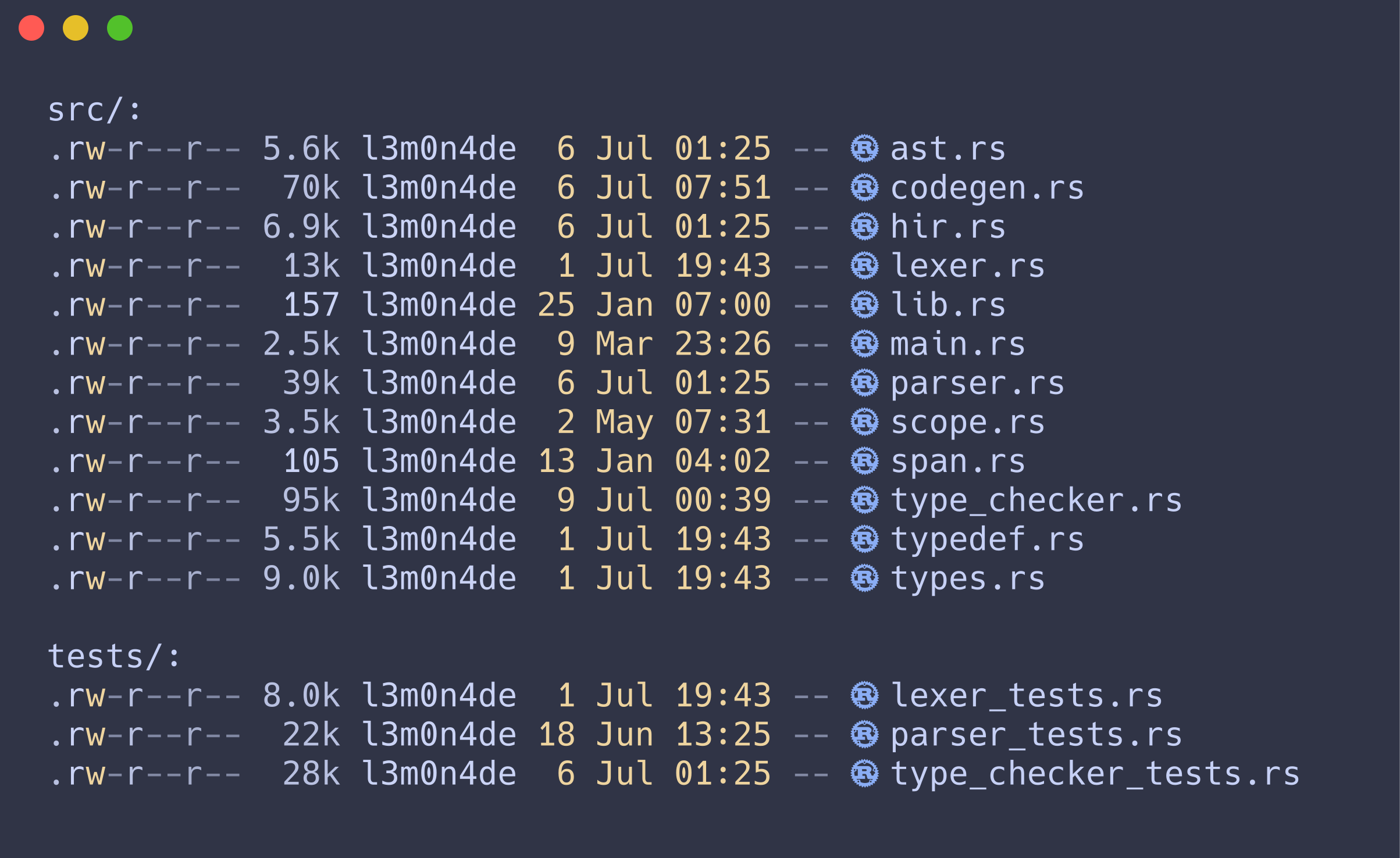
eza --icons auto --long --git --all src/ tests/颜色高亮、文件类型图标、Git 状态一应俱全,非常好看。
但有时候我想要把 ls 的结果复制到别处,比如在博客文章中展示“文件列表”,如果从终端直接复制粘贴就会带上多余的图标和样式。
所以我通常的歪招是:
ast.rs
codegen.rs
hir.rs
lexer.rs
lib.rs
main.rs
parser.rs
scope.rs
span.rs
type_checker.rs
typedef.rs
types.rs
看出哪里不对了么22.不对其实是对的,我本就期待这样的结果,只是为什么会这样期待呢?这不对。,管道到 cat 之后那些文件图标没有了。
所以说,eza 能检测自己接上了管道?这听起来不像是管道两端的程序能做到的事,它理应只知道自己在向 stdout 写数据而已……

ls 不也一样么 《蘑菇拟态日常》贴纸包
的确,ls 也一样,不带参数时逐列显示,传递到管道就变成逐行显示,输出完全换了种格式:
ast.rs codegen.rs hir.rs lexer.rs lib.rs main.rs parser.rs scope.rs span.rs type_checker.rs typedef.rs types.rs
ast.rs codegen.rs hir.rs lexer.rs lib.rs main.rs parser.rs scope.rs span.rs type_checker.rs typedef.rs
这一切发生得太自然,“少见”的我两年之后才开始“多怪”,长久以来只觉得它理所应当。它们的内部一定有某种魔法,注定要被科学性巫术栏目收录。
eza 源码

eza 的入口函数很早就记录了 stdout 是否为终端:
48let stdout_istty = io::stdout().is_terminal();
这个布尔值随后被传入 options.theme.to_theme:
81let theme = options.theme.to_theme(stdout_istty);
在 to_theme 中,如果配色模式是自动(Automatic)且输出为非 tty(!isatty),就应用普通主题,同时不加载额外扩展样式。(这一点在 UseColours 的注释中也有说明)
69impl Options {
70    #[must_use]
71    pub fn to_theme(&self, isatty: bool) -> Theme {
72        if self.use_colours == UseColours::Never
73            || (self.use_colours == UseColours::Automatic && !isatty)
74        {
75            let ui = UiStyles::plain();
76            let exts = Box::new(NoFileStyle);
77            return Theme { ui, exts };
78        }
所以 eza 用 io::stdout().is_terminal() 判断是否为终端设备,从而改变它的输出主题,也就改变了内容格式。
Rust 标准库

io::stdout() 返回当前进程标准输出的一个新句柄,类型是 Stdout,Stdout 实现了 IsTerminal Trait,因此可以调用 is_terminal 方法。
1197#[stable(feature = "is_terminal", since = "1.70.0")]
1198pub impl(crate) trait IsTerminal {
1199    #[doc(alias = "isatty", alias = "atty")]
1200    #[stable(feature = "is_terminal", since = "1.70.0")]
1201    fn is_terminal(&self) -> bool;
1202}
Stdin Stdout Stderr 等类型都通过同一个宏实现了这个 Trait:
1251macro_rules! impl_is_terminal {
1252    ($($t:ty),*$(,)?) => {$(
1253        #[stable(feature = "is_terminal", since = "1.70.0")]
1254        impl IsTerminal for $t {
1255            #[inline]
1256            fn is_terminal(&self) -> bool {
1257                crate::sys::io::is_terminal(self)
1258            }
1259        }
1260    )*}
1261}
1262
1263impl_is_terminal!(File, Stdin, StdinLock<'_>, Stdout, StdoutLock<'_>, Stderr, StderrLock<'_>);
宏展开后,每个类型的方法都转发到 crate::sys::io::is_terminal,这个函数的内部直接调用了 libc 的 isatty 函数:
1use crate::os::fd::{AsFd, AsRawFd};
2
3pub fn is_terminal(fd: &impl AsFd) -> bool {
4    let fd = fd.as_fd();
5    unsafe { libc::isatty(fd.as_raw_fd()) != 0 }
6}
这一层比预想中简单很多。Stdout 实现 IsTerminal Trait,Trait 方法转进平台相关代码,再调用 libc 的 isatty。Rust 标准库到这就把事情交出去了。
我还以为要碰见超级复杂的 Rust 代码,白做那么多心理准备33.我很好奇在没有 libc 的 Windows 上 is_terminal 如何实现,之后肯定要去弄清楚的,倒是也没有白准备。
 。
。
glibc

先确认本机的版本,免得对照代码时版本不符,我的 libc 版本为 2.43:
$ ldd --version
ldd (GNU libc) 2.43
只克隆 glibc 仓库的 glibc-2.43 分支:
git clone git://sourceware.org/git/glibc.git --branch glibc-2.43 --depth 1
我想用 rg isatty -t c 搜索找到 isatty 定义代码,结果却夹杂着许多调用点的噪音。好在这些函数定义都有共同的格式 isatty (int,可以用来筛掉干扰:
termios/isatty.c
23:__isatty (int fd)

sysdeps/mach/hurd/isatty.c
25:__isatty (int fd)

sysdeps/unix/sysv/linux/isatty.c
24:__isatty (int fd)

sysdeps/posix/isatty.c
23:__isatty (int fd)
干扰清除后剩下四个匹配项。
我对 glibc 的项目结构44.glibc 的 sysdeps/ 按 CPU 架构、操作系统、ABI、字长等平台属性组织目录,构建时先由 configure 生成有序目录列表,再由 make 按顺序选择对应源码。详细见 glibc sysdeps。不太了解,从名字上看 sysdeps/ 目录下的文件应该对应不同平台的实现代码,这里有:
- POSIX:
sysdeps/posix/isatty.c - Hurd:
sysdeps/mach/hurd/isatty.c - Linux:
sysdeps/unix/sysv/linux/isatty.c
另外的 termios/isatty.c 是 fallback 占位实现,直接设置错误码并返回 -1。
21/* Return 1 if FD is a terminal, 0 if not.  */
22int
23__isatty (int fd)
24{
25  __set_errno (ENOSYS);
26  return -1;
27}
我的是 Linux 系统,对应实现就是:
19#include <termios_internals.h>
20
21/* Return 1 if FD is a terminal, 0 if not. This simply does a
22   TCGETS2 ioctl into a dummy buffer without parsing the result. */
23int
24__isatty (int fd)
25{
26  struct termios2 k_termios;
27  return INLINE_SYSCALL_CALL (ioctl, fd, TCGETS2, &k_termios) == 0;
28}
29weak_alias (__isatty, isatty)
__isatty 的实现很直接:发起一次 ioctl 系统调用,只看这次调用成不成功,成功(返回 0)就判定为终端,失败则不是。
这次 ioctl 系统调用有三个参数:
fd:文件描述符,由外部传入,stdout 就是1TCGETS2:暂时不清楚含义&k_termios:类型为termios2结构体指针,termios2是内核对外暴露的终端属性结构,包含波特率等信息
据我所知,在更早版本(如 2.39)的 glibc 中,Linux 平台的 isatty 没有单独实现,用的是 POSIX 版本:调用 __tcgetattr 并检查其返回值。
21/* Return 1 if FD is a terminal, 0 if not.  */
22int
23__isatty (int fd)
24{
25  struct termios term;
26
27  return __tcgetattr (fd, &term) == 0;
28}
__tcgetattr 在 Linux 上也是同一个 ioctl(fd, TCGETS2) 调用,只是多包装了一层转换;BSD 上会换成另外的 ioctl op,这里不展开。
termios/tcgetattr.c
24:__tcgetattr (int fd, struct termios *termios_p)

sysdeps/unix/bsd/tcgetattr.c
33:__tcgetattr (int fd, struct termios *termios_p)

sysdeps/unix/sysv/linux/tcgetattr.c
22:__tcgetattr (int fd, struct termios *termios_p)
20/* Put the state of FD into *TERMIOS_P.  */
21int
22__tcgetattr (int fd, struct termios *termios_p)
23{
24  struct termios2 k_termios;
25  long int retval = INLINE_SYSCALL_CALL (ioctl, fd, TCGETS2, &k_termios);
26
27  if (__glibc_likely (retval != -1))
28    {
29      ___termios2_canonicalize_speeds (&k_termios);
30
31      memset (termios_p, 0, sizeof (*termios_p));
32      termios_p->c_iflag  = k_termios.c_iflag;
33      termios_p->c_oflag  = k_termios.c_oflag;
34      termios_p->c_cflag  = k_termios.c_cflag;
35      termios_p->c_lflag  = k_termios.c_lflag;
36      termios_p->c_line   = k_termios.c_line;
37      termios_p->c_ospeed = k_termios.c_ospeed;
38      termios_p->c_ispeed = k_termios.c_ispeed;
39
40      copy_c_cc (termios_p->c_cc, NCCS, k_termios.c_cc, _TERMIOS2_NCCS);
41    }
42
43  return retval;
44}
后面那一大段 if 是因为内核 ioctl 写入的 termios2 结构与 glibc 对外暴露的 termios2 结构不同,大概是这样吧,注释告诉我的:
29/* The the termios2 structure used in the kernel interfaces is not the
30   same as the termios structure we use in the libc.  Therefore we
31   must translate it here.  */
32
33struct termios2
所以在 Linux 上,isatty 的核心是 ioctl(fd, TCGETS2, &k_termios) 系统调用。fd 来自 stdout,&k_termios 用来接收内核写回的终端属性,中间的 TCGETS2 是这次调用真正携带的信息,具体含义还需要进一步查阅。
ioctl(2) Manual

喘口气,休息一下,读会手册55.看手册是允许的,因为它类似于代码注释,属于作者给出的辅助信息。但网络搜索代码含义又是不允许的,因为这是别人从过多信息总结出的结论。我为这个规则找到了合理的解释。。
ioctl (I/O control) 系统调用,用于操作特殊文件,特别是字符特殊文件(例如终端)。
The ioctl() system call manipulates the underlying device parameters of
special files.  In particular, many operating characteristics of
character special files (e.g., terminals) may be controlled with
ioctl() operations.
第一个参数是文件描述符,第二个参数是与设备相关的操作码:
The argument fd must be an open file descriptor.
The second argument is a device-dependent operation code.  The third
argument is an untyped pointer to memory.  It's traditionally char
*argp (from the days before void * was valid C), and will be so named
for this discussion.
操作码是 32-bit 常量,原则上任意取值,但人们尝试在其中构建了一些结构。
Ioctl op values are 32-bit constants.  In principle these constants are
completely arbitrary, but people have tried to build some structure
into them.
通常情况下,成功时返回 0,失败时返回 -1:
Usually, on success zero is returned.  A few ioctl() operations use the
return value as an output parameter and return a nonnegative value on
success.  On error, -1 is returned, and errno is set to indicate the
error.
C 语言签名很简单:
int ioctl(int fd, unsigned long op, ...);
继续查看 op TCGETS2 的手册,发现它用来获取当前串行端口设置:
TCGETS Equivalent to tcgetattr(fd, argp).

       Get the current serial port settings.

The following four ioctls are just like TCGETS, TCSETS, TCSETSW,
TCSETSF, except that they take a struct termios2 * instead of a struct
termios *.  If the structure member c_cflag contains the flag BOTHER,
then the baud rate is stored in the structure members c_ispeed and
c_ospeed as integer values.  These ioctls are not supported on all
architectures.

       TCGETS2
       TCSETS2
       TCSETSW2
       TCSETSF2
手册写明 TCGETS 等同 tcgetattr(fd, argp),与 glibc 内部实现一致。其中 TCGETS2 是 TCGETS 的扩展版,使用 termios2,不过 termios2 与 termios 的区别66.termios2 主要多了显式保存输入、输出波特率的 c_ispeed 和 c_ospeed 字段,并配合 BOTHER 支持任意整数波特率。应该对这次分析影响不大,我就简单地认为它是升级版好了。
用户态能看到的线索差不多到此为止。操作码 TCGETS2 表示这次 ioctl 想要读取终端属性,glibc 只需要根据它的返回值判断 stdout 是否像终端一样响应了这个请求。
至于请求进入内核后怎么被转发,又由哪段代码决定返回值,还得去内核源码里找。
Linux Kernel

获取我的系统内核版本并下载对应的内核源码:
$ uname -r
7.1.3-arch1-2
$ git clone https://github.com/torvalds/linux.git --branch v7.1 --depth=1
ioctl 系统调用
首先我想找到系统调用定义的地方,只过滤 ioctl 得到的结果太多,改换搜索 ioctl 和 syscall 同时出现的一行:
fs/ioctl.c
583:SYSCALL_DEFINE3(ioctl, unsigned int, fd, unsigned int, cmd, unsigned long, arg)
638:COMPAT_SYSCALL_DEFINE3(ioctl, unsigned int, fd, unsigned int, cmd,

security/security.c
2148: * Called when file_setattr() syscall or FS_IOC_FSSETXATTR ioctl() is called on
2163: * Called when file_getattr() syscall or FS_IOC_FSGETXATTR ioctl() is called on

tools/perf/trace/beauty/ioctl.c
175:size_t syscall_arg__scnprintf_ioctl_cmd(char *bf, size_t size, struct syscall_arg *arg)

drivers/scsi/st.c
2994:	ioctl_result = (STp->buffer)->syscall_result;
锁定了 fs/ioctl.c 里的 SYSCALL_DEFINE3 和 COMPAT_SYSCALL_DEFINE3,后者从宏定义的代码看,应该是用来兼容的,比如在 64 位内核上运行 32 位程序。我这是原生的 64 位进程,就完全忽略它吧,只关注 SYSCALL_DEFINE3。
583SYSCALL_DEFINE3(ioctl, unsigned int, fd, unsigned int, cmd, unsigned long, arg)
584{
585        CLASS(fd, f)(fd);
586        int error;
587
588        if (fd_empty(f))
589                return -EBADF;
590
591        error = security_file_ioctl(fd_file(f), cmd, arg);
592        if (error)
593                return error;
594
595        error = do_vfs_ioctl(fd_file(f), fd, cmd, arg);
596        if (error == -ENOIOCTLCMD)
597                error = vfs_ioctl(fd_file(f), cmd, arg);
598
599        return error;
600}
ioctl 系统调用执行过程中,首先会调用 security_file_ioctl 检查这次操作是否具有权限:
2497/**
2498 * security_file_ioctl() - Check if an ioctl is allowed
2499 * @file: associated file
2500 * @cmd: ioctl cmd
2501 * @arg: ioctl arguments
2502 *
2503 * Check permission for an ioctl operation on @file.  Note that @arg sometimes
2504 * represents a user space pointer; in other cases, it may be a simple integer
2505 * value.  When @arg represents a user space pointer, it should never be used
2506 * by the security module.
2507 *
2508 * Return: Returns 0 if permission is granted.
2509 */
2510int security_file_ioctl(struct file *file, unsigned int cmd, unsigned long arg)
2511{
2512        return call_int_hook(file_ioctl, file, cmd, arg);
2513}
2514EXPORT_SYMBOL_GPL(security_file_ioctl);
权限检查通过后,请求会先进 do_vfs_ioctl,处理一批 VFS 层面的通用命令,其中没有 TCGETS2。我猜测 stdout 算不上 REG 或者 ANON_FILE,所以默认分支也不会进入;就算落入默认分支,file_ioctl 函数中还是没有处理 TCGETS2 的分支。
因此 do_vfs_ioctl 最终会返回 -ENOIOCTLCMD,把请求交给 vfs_ioctl。
492static int do_vfs_ioctl(struct file *filp, unsigned int fd,
493                        unsigned int cmd, unsigned long arg)
494{
495        void __user *argp = (void __user *)arg;
496        struct inode *inode = file_inode(filp);
497
498        switch (cmd) {
499        case FIOCLEX:
500                set_close_on_exec(fd, 1);
501                return 0;
502    // ...
503        default:
504                if (S_ISREG(inode->i_mode) && !IS_ANON_FILE(inode))
505                        return file_ioctl(filp, cmd, argp);
506                break;
507        }
508
509        return -ENOIOCTLCMD;
510}
vfs_ioctl 则直接把请求转发给 filp->f_op->unlocked_ioctl:
44static int vfs_ioctl(struct file *filp, unsigned int cmd, unsigned long arg)
45{
46        int error = -ENOTTY;
47
48        if (!filp->f_op->unlocked_ioctl)
49                goto out;
50
51        error = filp->f_op->unlocked_ioctl(filp, cmd, arg);
52        if (error == -ENOIOCTLCMD)
53                error = -ENOTTY;
54 out:
55        return error;
56}
filp->f_op 的类型是 file_operations,一个包含各种文件操作函数的表:
1260struct file {
1261        spinlock_t                      f_lock;
1262        fmode_t                         f_mode;
1263        const struct file_operations    *f_op;
1264    // ...
1265} __randomize_layout
1266  __attribute__((aligned(4)));  /* lest something weird decides that 2 is OK */
1926struct file_operations {
1927        struct module *owner;
1928        fop_flags_t fop_flags;
1929        loff_t (*llseek) (struct file *, loff_t, int);
1930        ssize_t (*read) (struct file *, char __user *, size_t, loff_t *);
1931        ssize_t (*write) (struct file *, const char __user *, size_t, loff_t *);
1932        ssize_t (*read_iter) (struct kiocb *, struct iov_iter *);
1933        ssize_t (*write_iter) (struct kiocb *, struct iov_iter *);
1934        int (*iopoll)(struct kiocb *kiocb, struct io_comp_batch *,
1935                        unsigned int flags);
1936        int (*iterate_shared) (struct file *, struct dir_context *);
1937        __poll_t (*poll) (struct file *, struct poll_table_struct *);
1938        long (*unlocked_ioctl) (struct file *, unsigned int, unsigned long);
1939    // ...
1940} __randomize_layout;
当然了……肯定该是这样……unlocked_ioctl 是个函数指针,我跟丢了。
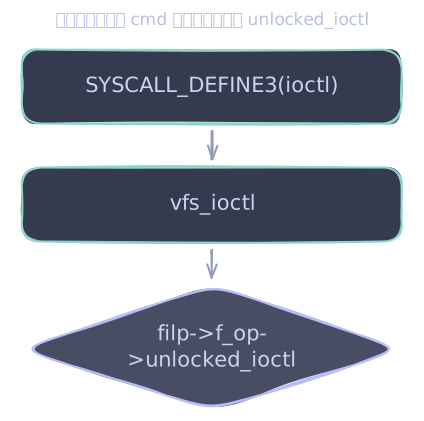
TCGETS2 处理代码
那就换个思路,从底向上,先找到 TCGETS2 的处理分支:
tools/perf/trace/beauty/ioctl.c
30:	[_IOC_NR(TIOCSBRK)] = "TIOCSBRK", "TIOCCBRK", "TIOCGSID", "TCGETS2", "TCSETS2",

drivers/tty/tty_ioctl.c
394:#ifdef TCGETS2
428:#endif /* TCGETS2 */
461:#ifdef TCGETS2
804:#ifndef TCGETS2
816:	case TCGETS2:
836:#ifndef TCGETS2

drivers/tty/tty_io.c
2919:#ifdef TCGETS2
2920:	case TCGETS2:

drivers/net/wwan/wwan_core.c
996:#ifdef TCGETS2
997:	case TCGETS2:
两处 case TCGETS2 都命中在 drivers/tty/ 目录下,看来得进入 tty77.一个熟悉的词,我对它最深印象的是登录界面可以按下快捷键切换到不同“会话”。但它到底是什么,一个能输入字符显示字符的黑白界面?我好像从来没有真正理解过。 驱动程序了。
drivers/tty/tty_io.c 匹配的代码在 #ifdef CONFIG_COMPAT 中,所以又是兼容用的代码,跟之前一样跳过,只关注 drivers/tty/tty_ioctl.c:
816case TCGETS2:
817        copy_termios(real_tty, &kterm);
818        if (kernel_termios_to_user_termios((struct termios2 __user *)arg, &kterm))
819                ret = -EFAULT;
820        return ret;
copy_termios 把这个 tty 当前的终端属性拷进内核内部的 kterm,随后 kernel_termios_to_user_termios 将它翻译成用户态期望的 termios2 布局,写回调用者的缓冲区。
765int tty_mode_ioctl(struct tty_struct *tty, unsigned int cmd, unsigned long arg)
766{
767        struct tty_struct *real_tty;
768        void __user *p = (void __user *)arg;
769        int ret = 0;
770        struct ktermios kterm;
只要这两步都成功,函数一路返回 0,glibc 的 isatty 就会判定为终端。
过滤发现 tty_mode_ioctl 只被 n_tty_ioctl_helper 函数调用:
936int n_tty_ioctl_helper(struct tty_struct *tty, unsigned int cmd,
937                unsigned long arg)
938{
939        int retval;
940
941        switch (cmd) {
942    //...
943        default:
944                /* Try the mode commands */
945                return tty_mode_ioctl(tty, cmd, arg);
946        }
947}
n_tty_ioctl_helper 被很多驱动使用,其中不少是 n_ 打头的文件,翻看它们的注释,发现这些都是跟线路规程(line discipline)88.事后写文章时我才知道它被翻译为“行规程”或“线路规程”,意为终端线路的规则集,与“文本行”没有直接关系。有关的程序。
net/nfc/nci/uart.c
339:		err = n_tty_ioctl_helper(tty, cmd, arg);

drivers/bluetooth/hci_ldisc.c
840:		err = n_tty_ioctl_helper(tty, cmd, arg);

drivers/tty/tty_ioctl.c
936:int n_tty_ioctl_helper(struct tty_struct *tty, unsigned int cmd,
985:EXPORT_SYMBOL(n_tty_ioctl_helper);

drivers/tty/n_tty.c
2496:		return n_tty_ioctl_helper(tty, cmd, arg);

drivers/tty/n_hdlc.c
624:		return n_tty_ioctl_helper(tty, cmd, arg);

drivers/tty/n_gsm.c
3889:		return n_tty_ioctl_helper(tty, cmd, arg);

drivers/net/ppp/ppp_synctty.c
304:		err = n_tty_ioctl_helper(tty, cmd, arg);

drivers/net/ppp/ppp_async.c
312:		err = n_tty_ioctl_helper(tty, cmd, arg);
既然是找 tty 相关代码,顺着 drivers/tty/n_tty.c 查更有价值。进入 n_tty_ioctl 函数:
2479static int n_tty_ioctl(struct tty_struct *tty, unsigned int cmd,
2480                       unsigned long arg)
2481{
2482        struct n_tty_data *ldata = tty->disc_data;
2483        unsigned int num;
2484
2485        switch (cmd) {
2486        case TIOCOUTQ:
2487                return put_user(tty_chars_in_buffer(tty), (int __user *) arg);
2488        case TIOCINQ:
2489                scoped_guard(rwsem_write, &tty->termios_rwsem)
2490                        if (L_ICANON(tty) && !L_EXTPROC(tty))
2491                                num = inq_canon(ldata);
2492                        else
2493                                num = read_cnt(ldata);
2494                return put_user(num, (unsigned int __user *) arg);
2495        default:
2496                return n_tty_ioctl_helper(tty, cmd, arg);
2497        }
2498}
n_tty_ioctl 只被 n_tty_ops 使用:
2500static struct tty_ldisc_ops n_tty_ops = {
2501        .owner           = THIS_MODULE,
2502        .num             = N_TTY,
2503        .name            = "n_tty",
2504        .open            = n_tty_open,
2505        .close           = n_tty_close,
2506        .flush_buffer    = n_tty_flush_buffer,
2507        .read            = n_tty_read,
2508        .write           = n_tty_write,
2509        .ioctl           = n_tty_ioctl,
2510        .set_termios     = n_tty_set_termios,
2511        .poll            = n_tty_poll,
2512        .receive_buf     = n_tty_receive_buf,
2513        .write_wakeup    = n_tty_write_wakeup,
2514        .receive_buf2    = n_tty_receive_buf2,
2515        .lookahead_buf   = n_tty_lookahead_flow_ctrl,
2516};
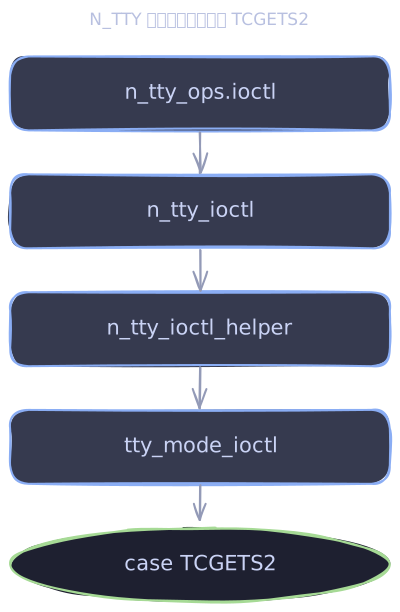
N_TTY 线路规程注册
现在已经知道 n_tty_ops.ioctl 能处理 TCGETS2,但 n_tty_ops 本身还没解释清楚。它在哪里定义,在哪里注册,又会被谁取用,还得继续往回看。
通过搜索 n_tty_ops 的引用,我发现它在 n_tty_init 里被 tty_register_ldisc 注册进了一张全局表 tty_ldiscs。它的编号(n_tty_ops.num)是 N_TTY,因此放在 tty_ldiscs[N_TTY]。99.ldisc 是 line discipline 的缩写,整理文章时我才意识到。
2532void __init n_tty_init(void)
2533{
2534        tty_register_ldisc(&n_tty_ops);
2535}
58int tty_register_ldisc(const struct tty_ldisc_ops *new_ldisc)
59{
60        unsigned long flags;
61
62        if (new_ldisc->num < N_TTY || new_ldisc->num >= NR_LDISCS)
63                return -EINVAL;
64
65        raw_spin_lock_irqsave(&tty_ldiscs_lock, flags);
66        tty_ldiscs[new_ldisc->num] = new_ldisc;
67        raw_spin_unlock_irqrestore(&tty_ldiscs_lock, flags);
68
69        return 0;
70}
71EXPORT_SYMBOL(tty_register_ldisc);
继续追查 n_tty_init 的调用者,只有一处命中,落在 console_init 里:
kernel/printk/printk.c
4396:	n_tty_init();

drivers/tty/n_tty.c
2532:void __init n_tty_init(void)
4384void __init console_init(void)
4385{
4386        int ret;
4387        initcall_t call;
4388        initcall_entry_t *ce;
4389
4390#ifdef CONFIG_NULL_TTY_DEFAULT_CONSOLE
4391        if (!console_set_on_cmdline)
4392                add_preferred_console("ttynull", 0, NULL);
4393#endif
4394
4395        /* Setup the default TTY line discipline. */
4396        n_tty_init();
4397
4398        /*
4399         * set up the console device so that later boot sequences can
4400         * inform about problems etc..
4401         */
4402        ce = __con_initcall_start;
4403        trace_initcall_level("console");
4404        while (ce < __con_initcall_end) {
4405                call = initcall_from_entry(ce);
4406                trace_initcall_start(call);
4407                ret = call();
4408                trace_initcall_finish(call, ret);
4409                ce++;
4410        }
4411}
__init 宏展开为 __attribute__((__section__(".init.text"))),这个标记会把函数塞进 .init.text 代码段。
45#define __init          __section(".init.text") __cold __latent_entropy \
46                                                __no_kstack_erase
321#define __section(section) __attribute__((__section__(section)))
听上去只要加了 __init 就只会在内核的某个“初始化”阶段执行一次,但我不想分心去找它的具体实现,就让我偷个懒继续“听上去”吧。1010.被 __init 标记的函数会在内核初始化时统一调用,并在初始化结束时释放内存。详细见 linux kernel initcall。
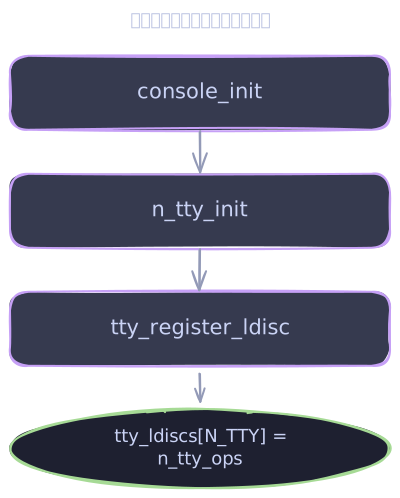
设置 tty 默认线路规程
在 drivers/tty/tty_ldisc.c 里我还找到了 tty_ldisc_init 函数,注释说它会在新分配 tty 的时候为其初始化线路规程,默认从 tty_ldiscs 表中取出 N_TTY 对应的线路规程。
794/**
795 * tty_ldisc_init       -       ldisc setup for new tty
796 * @tty: tty being allocated
797 *
798 * Set up the line discipline objects for a newly allocated tty. Note that the
799 * tty structure is not completely set up when this call is made.
800 */
801int tty_ldisc_init(struct tty_struct *tty)
802{
803        struct tty_ldisc *ld = tty_ldisc_get(tty, N_TTY);
804
805        if (IS_ERR(ld))
806                return PTR_ERR(ld);
807        tty->ldisc = ld;
808        return 0;
809}
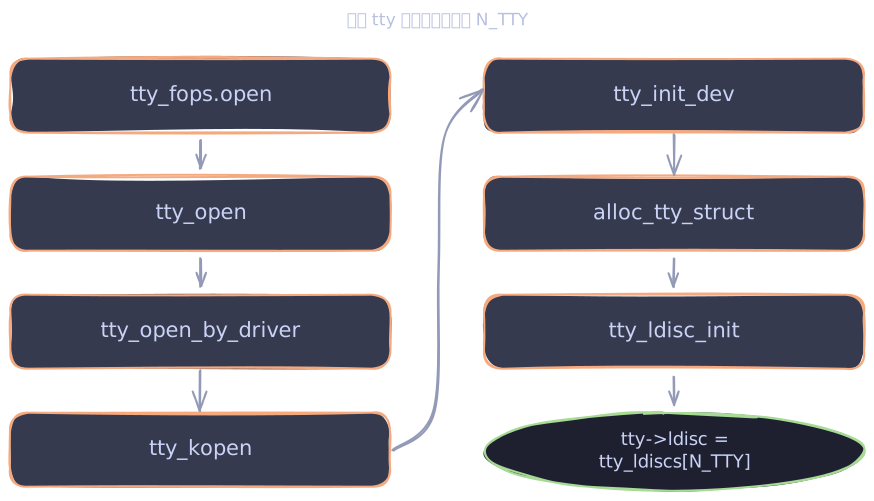
一路跟踪 tty_ldisc_init 的调用代码,找到了这样的调用链:
tty_fops.opentty_opentty_open_by_drivertty_kopentty_init_devalloc_tty_structtty_ldisc_inittty->ldisc = n_tty_ops
所以 tty 设备在打开时(调用 tty_fops.open 时)会设置默认的线路规程,也就是 tty_ldiscs[N_TTY],也就是 n_tty_ops。
unlocked_ioctl
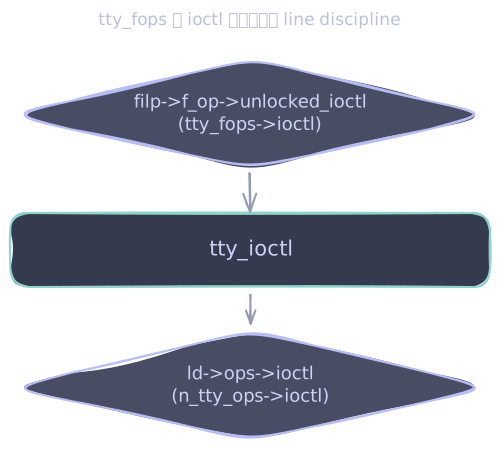
这样 ioctl(fd, TCGETS2) 系统调用前后还是没有连起来,我仍然不知道 .unlocked_ioctl 指针指向什么。
在所有文件名包含 tty 的文件中搜索 .unlocked_ioctl 的赋值代码:
samples/vfio-mdev/mtty.c
924:	.unlocked_ioctl = mtty_precopy_ioctl,

drivers/tty/tty_io.c
465:	.unlocked_ioctl	= tty_ioctl,
479:	.unlocked_ioctl	= tty_ioctl,
490:	.unlocked_ioctl	= hung_up_tty_ioctl,
tty 相关的 file_operations 里,只有 tty_fops 定义了 unlocked_ioctl,合理推测1111.目前还只是推测,我的直觉,稍后会向您证明的。而因为它是可以被证明的,所以很“合理”,事后诸葛亮, filp->f_op 就是 tty_fops。
459static const struct file_operations tty_fops = {
460        .read_iter      = tty_read,
461        .write_iter     = tty_write,
462        .splice_read    = copy_splice_read,
463        .splice_write   = iter_file_splice_write,
464        .poll           = tty_poll,
465        .unlocked_ioctl = tty_ioctl,
466        .compat_ioctl   = tty_compat_ioctl,
467        .open           = tty_open,
468        .release        = tty_release,
469        .fasync         = tty_fasync,
470        .show_fdinfo    = tty_show_fdinfo,
471};
tty_fops.unlocked_ioctl 是 tty_ioctl。它的内部是一个大的 switch(cmd),处理几十种命令,但里面没有 TCGETS2 对应的 case,命令会落进 default 分支,交给 tty_jobctrl_ioctl 处理。
tty_jobctrl_ioctl 之后还有 tty->ops->ioctl 和 ld->ops->ioctl,这三段代码将依次尝试:
2768default:
2769        retval = tty_jobctrl_ioctl(tty, real_tty, file, cmd, arg);
2770        if (retval != -ENOIOCTLCMD)
2771                return retval;
2772}
2773if (tty->ops->ioctl) {
2774        retval = tty->ops->ioctl(tty, cmd, arg);
2775        if (retval != -ENOIOCTLCMD)
2776                return retval;
2777}
2778ld = tty_ldisc_ref_wait(tty);
2779if (!ld)
2780        return hung_up_tty_ioctl(file, cmd, arg);
2781retval = -EINVAL;
2782if (ld->ops->ioctl) {
2783        retval = ld->ops->ioctl(tty, cmd, arg);
2784        if (retval == -ENOIOCTLCMD)
2785                retval = -ENOTTY;
2786}
2787tty_ldisc_deref(ld);
2788return retval;
实际的执行情况:
tty_jobctrl_ioctl:没有TCGETS2tty->ops_ioctl:tty->ops是某种tty_operations,理论上也可能有自己的ioctl分支。搜索所有定义了ioctl字段的tty_operations实现,结果很多,这里暂且先跳过。drivers/tty/pty.c: .ioctl = pty_bsd_ioctl, drivers/tty/pty.c: .compat_ioctl = pty_bsd_compat_ioctl, drivers/tty/pty.c: .ioctl = pty_unix98_ioctl, drivers/tty/pty.c: .compat_ioctl = pty_unix98_compat_ioctl, drivers/tty/vt/vt.c: .ioctl = vt_ioctl, drivers/tty/vt/vt.c: .compat_ioctl = vt_compat_ioctl, drivers/tty/nozomi.c: .ioctl = ntty_ioctl, drivers/tty/amiserial.c: .ioctl = rs_ioctl, drivers/tty/ipwireless/tty.c: .ioctl = ipw_ioctl, drivers/tty/mxser.c: .ioctl = mxser_ioctl, drivers/tty/synclink_gt.c: .ioctl = ioctl, drivers/tty/synclink_gt.c: .compat_ioctl = slgt_compat_ioctl, drivers/tty/n_gsm.c: .ioctl = gsmtty_ioctl, drivers/tty/serial/serial_core.c: .ioctl = uart_ioctl,
ld->ops->ioctl:tty_ldisc_ref_wait获取tty->ldisc,拿到上一小节说的n_tty_ops,并使用n_tty_ops->ioctl执行命令
pts 与 Unix98 pty 驱动
上一节把 tty->ops->ioctl 这个分支放过去了,它能否拦下 TCGETS2,取决于当前 tty 的 tty->ops 到底指向哪个 tty_operations。
tty_operations 的实现太多,直接从源码里枚举下去不太划算。不过别担心,还剩下最后一个线索——stdout1212.在交互式 shell 中启动程序,会默认将文件描述符 0、1、2 用于 stdin、stdout、stderr;如果程序是由 inetd 或类似方式启动,则会继承 socket 作为文件描述符 0。这些值全都可以视为普通的文件描述符,也就是说把它们全部 close 后,您就可以用其他文件占用 fd 0、1、2 了。,它到底是什么?指向哪种设备?知道之后就能缩小源码范围了。
先看看 fd 1 的文件类型:
$ file /proc/self/fd/1
/proc/self/fd/1: symbolic link to /dev/pts/9
哈……符号链接,链接到 /dev/pts/9。继续查看 /dev/pts/9 的类型:
$ file /dev/pts/9
/dev/pts/9: character special (136/9)
/dev/pts/9 是字符设备,设备号是 136/9。其中 136 是 major number,用来区分设备类型;9 是 minor number,对应这一类设备下的具体实例。
继续查当前系统注册的字符设备表:
$ rg '136' /proc/devices
17:136 pts
得知这类字符设备在内核中注册的名称为 pts,使用字符串 pts 作为新的线索,回到源码中找出谁注册了它:
1fs/devpts/inode.c 2118: /* Is a devpts filesystem at "pts" in the same directory? */ 3 4fs/namei.c 53615: /* Find something mounted on "pts" in the same directory as 63620: struct qstr this = QSTR_INIT("pts", 3); 7 8arch/um/drivers/pty.c 9155: .type = "pts", 10 11arch/um/drivers/chan_kern.c 12458: { "pts", &pts_ops }, 13461: { "pts", ¬_configged_ops }, 14 15drivers/tty/pty.c 16885: pts_driver->name = "pts";
结果里 drivers/tty/pty.c:885 这行最相关,往上翻就是 unix98_pty_ini 函数,整段逻辑包在 #ifdef CONFIG_UNIX98_PTYS 里:
586/* Unix98 devices */
587#ifdef CONFIG_UNIX98_PTYS
确认我的系统内核编译配置里这个选项是开着的:
$ zcat /proc/config.gz | rg CONFIG_UNIX98_PTYS
CONFIG_UNIX98_PTYS=y
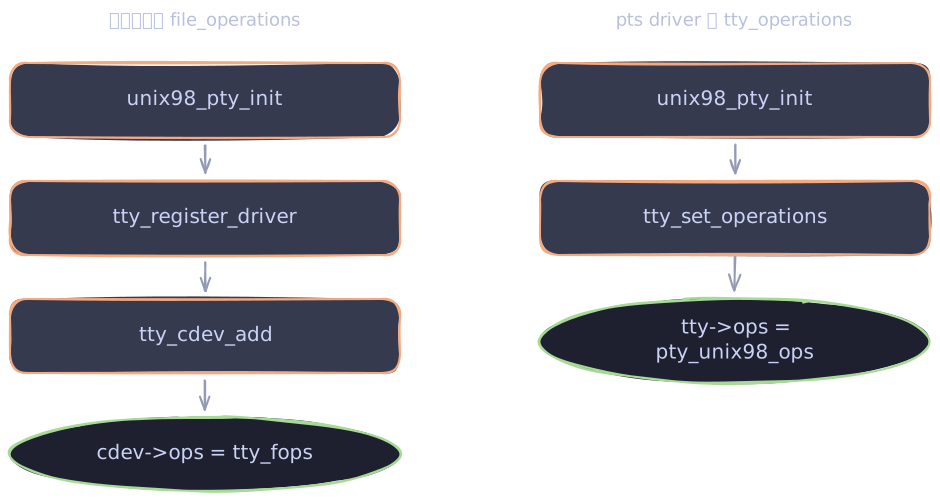
unix98_pty_init 里调用了 tty_set_operations,把 pts_driver->ops 设成 tty_driver->ops:
884pts_driver->driver_name = "pty_slave";
885pts_driver->name = "pts";
886pts_driver->major = UNIX98_PTY_SLAVE_MAJOR;
887pts_driver->minor_start = 0;
888pts_driver->type = TTY_DRIVER_TYPE_PTY;
889pts_driver->subtype = PTY_TYPE_SLAVE;
890pts_driver->init_termios = tty_std_termios;
891pts_driver->init_termios.c_cflag = B38400 | CS8 | CREAD;
892pts_driver->init_termios.c_ispeed = 38400;
893pts_driver->init_termios.c_ospeed = 38400;
894pts_driver->other = ptm_driver;
895tty_set_operations(pts_driver, &pty_unix98_ops);
590static inline void tty_set_operations(struct tty_driver *driver,
591                const struct tty_operations *op)
592{
593        driver->ops = op;
594}
接着是调用 tty_register_driver 函数。
897if (tty_register_driver(ptm_driver))
898        panic("Couldn't register Unix98 ptm driver");
899if (tty_register_driver(pts_driver))
900        panic("Couldn't register Unix98 pts driver");
tty_register_driver 定义在 drivers/tty/tty_io.c,内部会调用 tty_cdev_add,分配 cdev 并将 cdev->ops 设置为 tty_fops:
3158static int tty_cdev_add(struct tty_driver *driver, dev_t dev,
3159                unsigned int index, unsigned int count)
3160{
3161        int err;
3162
3163        /* init here, since reused cdevs cause crashes */
3164        driver->cdevs[index] = cdev_alloc();
3165        if (!driver->cdevs[index])
3166                return -ENOMEM;
3167        driver->cdevs[index]->ops = &tty_fops;
3168        driver->cdevs[index]->owner = driver->owner;
3169        err = cdev_add(driver->cdevs[index], dev, count);
3170        if (err)
3171                kobject_put(&driver->cdevs[index]->kobj);
3172        return err;
3173}
14struct cdev {
15        struct kobject kobj;
16        struct module *owner;
17        const struct file_operations *ops;
18        struct list_head list;
19        dev_t dev;
20        unsigned int count;
21} __randomize_layout;
现在 tty->ops 已经确定是 pty_unix98_ops,可以回头看它的 ioctl 到底处理了什么:
625static int pty_unix98_ioctl(struct tty_struct *tty,
626                            unsigned int cmd, unsigned long arg)
627{
628        switch (cmd) {
629        case TIOCSPTLCK: /* Set PT Lock (disallow slave open) */
630                return pty_set_lock(tty, (int __user *)arg);
631        case TIOCGPTLCK: /* Get PT Lock status */
632                return pty_get_lock(tty, (int __user *)arg);
633        case TIOCPKT: /* Set PT packet mode */
634                return pty_set_pktmode(tty, (int __user *)arg);
635        case TIOCGPKT: /* Get PT packet mode */
636                return pty_get_pktmode(tty, (int __user *)arg);
637        case TIOCGPTN: /* Get PT Number */
638                return put_user(tty->index, (unsigned int __user *)arg);
639        case TIOCSIG:    /* Send signal to other side of pty */
640                return pty_signal(tty, (int) arg);
641        }
642
643        return -ENOIOCTLCMD;
644}
六个 case 都与 TCGETS2 无关,返回 -ENOIOCTLCMD,请求会继续下落到 ld->ops->ioctl,也就是 n_tty_ops->ioctl。
汇总执行链
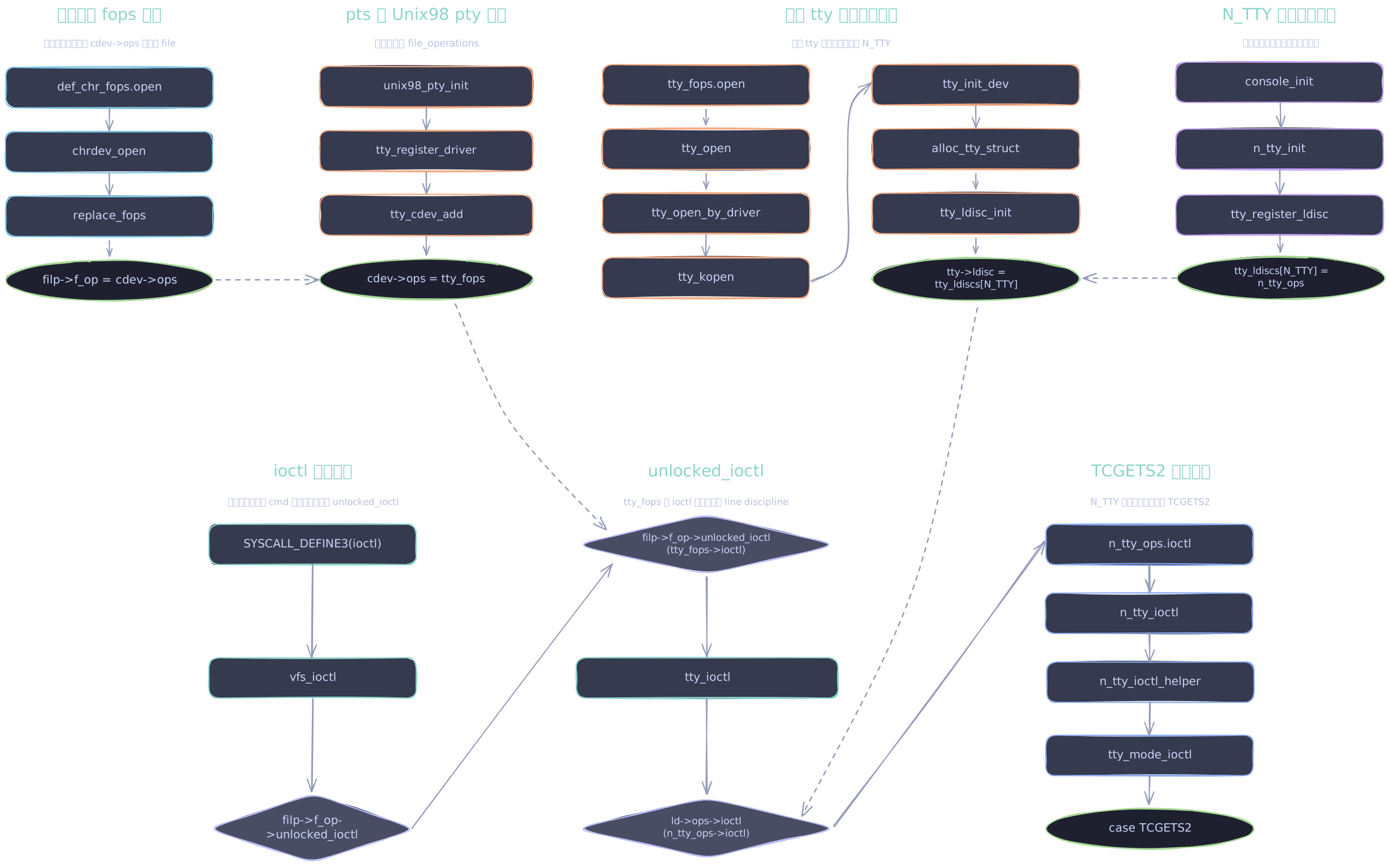
到这里,前面几节得到的几张局部执行链图已经可以拼起来了。
- 系统调用先进入
SYSCALL_DEFINE3(ioctl),拿到fd对应的struct file - VFS 层通过
do_vfs_ioctl处理通用命令,发现TCGETS2不属于它负责的范围 - 请求继续进入
vfs_ioctl,准备调用当前文件的filp->f_op->unlocked_ioctl - 如果这个
fd指向当前终端里的/dev/pts/N,它背后就是 Unix98 pty slave driver - Unix98 pty slave driver 注册出的 tty 字符设备使用
tty_fops,其中unlocked_ioctl指向tty_ioctl tty_ioctl先尝试 tty 自己的tty->ops->ioctl,也就是pty_unix98_ioctlpty_unix98_ioctl不处理TCGETS2,返回-ENOIOCTLCMD- 请求继续落到当前 tty 的线路规程
ld->ops->ioctl - 这个 tty 的默认线路规程是启动阶段注册好的
N_TTY,也就是n_tty_ops n_tty_ops.ioctl最终进入tty_mode_ioctl,处理TCGETS2,把终端属性写回用户态缓冲区
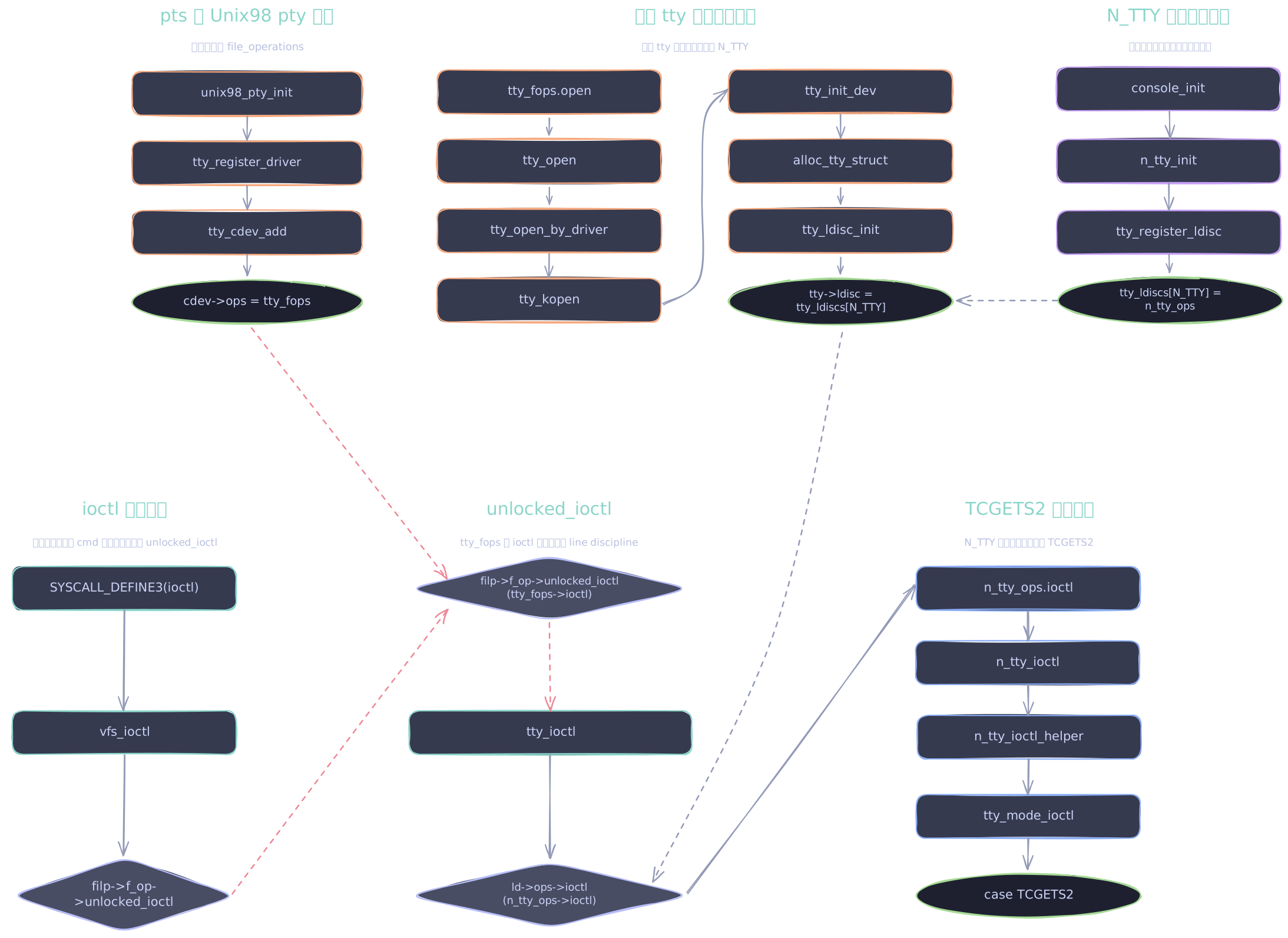
如果只按直觉看这条链已经闭合了, 但其实跳过了关键问题(图中红线):
vfs_ioctl拿到的是struct file *filp,它调用filp->f_op->unlocked_ioctl,我只是推测它为tty_fops->unlocked_ioctl- 我只找到字符设备里的
cdev->ops = &tty_fops,这说明不了什么,除非filp->f_op = cdev->ops
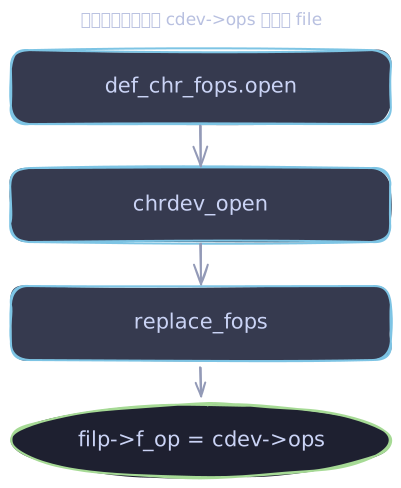
所以最后还需要证明一件事:打开 /dev/pts/N 这个字符设备时,内核把 cdev->ops 塞进了当前文件的 filp->f_op。
最后一块拼图
过滤 filp->f_op = cdev->ops 无果,过滤 cdev->ops 的结果看上去都不相关。倒是过滤 filp->f_op 精确匹配了变量名,逐个翻看,在 fs/char_dev.c 里找到了 chrdev_open 函数:
static int chrdev_open(struct inode *inode, struct file *filp)
{
        p = inode->i_cdev;
    // ...
        fops = fops_get(p->ops);
        if (!fops)
                goto out_cdev_put;

        replace_fops(filp, fops);
        if (filp->f_op->open) {
                ret = filp->f_op->open(inode, filp);
                if (ret)
                        goto out_cdev_put;
        }
还好没有只看匹配行就略过了,替换 f_op 的逻辑在它上方。
fops 是 cdev->ops,传给了 replace_fops(filp, fops),这是个宏:
2353#define replace_fops(f, fops) \
2354        do {    \
2355                struct file *__file = (f); \
2356                fops_put(__file->f_op); \
2357                BUG_ON(!(__file->f_op = (fops))); \
2358        } while(0)
展开后类似(去除无关代码)1313.这种 do {} while(0) 的写法可以让一个包含多条语句的宏,在语法上表现得像一条普通单行语句。适用于 if (cond) replace_fops(); 这样的单语句控制块,并且就算在宏后面写分号也不会破坏语法。:
do {
  struct file *__file = (filp);
  __file->f_op = (fops)
} while(0)
449const struct file_operations def_chr_fops = {
450        .open = chrdev_open,
451        .llseek = noop_llseek,
452};
小结
唉,好累,您还记得我最初要干什么吗?我已经神智不清了。
如果要回答文章标题,那么答案是:eza 通过 ioctl(fd, TCGETS2) 系统调用检测自己的 stdout 是否为终端设备,Linux 内核如果能返回终端属性,就是终端,否则就不是。
strace 验证
前面的结论完全来自源码阅读,最后用 strace 看一眼运行时行为,确认 eza 的确发起了同一次 ioctl。
直接输出到终端时,fd 1 可以响应 TCGETS2 请求,返回值为 0:
ioctl(1, TCGETS2, {c_iflag=ICRNL|IUTF8, c_oflag=NL0|CR0|TAB0|BS0|VT0|FF0|OPOST|ONLCR, c_cflag=B38400|CS8|CREAD, c_lflag=ISIG|ICANON|ECHO|ECHOE|ECHOK|IEXTEN|ECHOCTL|ECHOKE, ...}) = 0
ioctl(1, TIOCGWINSZ, {ws_row=39, ws_col=125, ws_xpixel=1250, ws_ypixel=741}) = 0
ioctl(1, TIOCGWINSZ, {ws_row=39, ws_col=125, ws_xpixel=1250, ws_ypixel=741}) = 0
ioctl(0, TCGETS2, {c_iflag=ICRNL|IUTF8, c_oflag=NL0|CR0|TAB0|BS0|VT0|FF0|OPOST|ONLCR, c_cflag=B38400|CS8|CREAD, c_lflag=ISIG|ICANON|ECHO|ECHOE|ECHOK|IEXTEN|ECHOCTL|ECHOKE, ...}) = 0
ioctl(1, TIOCGWINSZ, {ws_row=39, ws_col=125, ws_xpixel=1250, ws_ypixel=741}) = 0
ioctl(1, TIOCGWINSZ, {ws_row=39, ws_col=125, ws_xpixel=1250, ws_ypixel=741}) = 0
管道到 cat 后,fd 1 变成管道,不再是 tty,内核返回 ENOTTY,无法响应 TCGETS2 请求,返回值为 -1:
ioctl(1, TCGETS2, 0x7ffc232ddda0)       = -1 ENOTTY (Inappropriate ioctl for device)
ioctl(1, TIOCGWINSZ, 0x7ffc232ddb30)    = -1 ENOTTY (Inappropriate ioctl for device)
ioctl(0, TCGETS2, {c_iflag=ICRNL|IUTF8, c_oflag=NL0|CR0|TAB0|BS0|VT0|FF0|OPOST|ONLCR, c_cflag=B38400|CS8|CREAD, c_lflag=ISIG|ICANON|ECHO|ECHOE|ECHOK|IEXTEN|ECHOCTL|ECHOKE, ...}) = 0
ioctl(1, TIOCGWINSZ, 0x7ffc232e0430)    = -1 ENOTTY (Inappropriate ioctl for device)
好耶。
延伸阅读

tty 是什么
todo!()
pty 是什么
todo!()
glibc sysdeps
glibc 的 sysdeps/ 文件夹包含不同 CPU、操作系统、ABI 的替代实现,目录结构大致如下:
sysdeps/
├── aarch64
├── alpha
├── ...
├── sparc
├── unix
│   ├── alpha
│   ├── arm
│   ├── bsd
│   │   └── bits
│   ├── i386
│   ├── inet
│   ├── mips
│   │   ├── mips32
│   │   └── mips64
│   ├── powerpc
│   ├── sh
│   ├── sysv
│   │   └── linux
│   └── x86_64
├── wordsize-32
├── wordsize-64
├── x86
└── x86_64
构建 glibc 时,configure 会先根据平台名称生成目录列表,make 再按照这张列表的顺序选择源码,比如说前文中的不同 isatty.c 实现。
这个平台名称可以被笼统地称为 target triple,我的 target triple 叫作 x86_64-pc-linux-gnu:
$ gcc -dumpmachine
x86_64-pc-linux-gnu
有点熟悉?许多编译器都在使用 target triple,尤其是围绕着 LLVM 的那些,可能您早就在它们那里见过。这些 target triple 不尽相同,也许您从 GCC 中得到的是 x86_64-linux-gnu,又或者从 rustc 得到 x86_64-unknown-linux-gnu,都有可能,有点混乱。1414.关于 target triple 的格式和发展历史(以及为什么那么混乱),这里有一篇不错的文章:What the Hell Is a Target Triple?
本机编译时通常不需要传递任何 target triple,configure 会运行 scripts/config.guess 脚本猜测 build,再令未指定的 host 等于 build。
如果是交叉编译,则需要显式传入两者1515.build 是执行编译工作的系统,host 是编译产物将要运行的系统。:
$ ../glibc/configure \
    --build=x86_64-pc-linux-gnu \
    --host=aarch64-unknown-linux-gnu
无论名称来自命令行还是 config.guess,都要先经过 scripts/config.sub1616.基于 autoconf 的软件包都会附带一个大型 shell 脚本 config.sub,它可以使用已知的 CPU 和操作系统列表来消除 target triple 的歧义。 规范化。例如 x86_64-linux 会变成 x86_64-pc-linux-gnu。
随后 configure 将它拆成:
host_cpu=x86_64
host_vendor=pc
host_os=linux-gnu
glibc 再把它们保存为自己的配置变量:
config_machine=$host_cpu
config_vendor=$host_vendor
config_os=$host_os

machine=$config_machine
vendor=$config_vendor
os=$config_os
base_os=''
configure 随后会加载各架构的 sysdeps/*/preconfigure,以 x86-64 为例:sysdeps/x86_64/preconfigure 检查编译器是否定义了 __ILP32__,把普通 LP64 ABI 的 machine 细分成 x86_64/64,把 x32 ABI 细分成 x86_64/x32。
接着 configure 分别构造机器和操作系统的候选名称。Linux 的 os 会从 linux-gnu 逐渐泛化为 linux,基础操作系统则被设为 unix/sysv;machine 会从 x86_64/64 泛化为 x86_64。它按照固定的嵌套顺序组合这些名称,只保留源码树中真实存在的目录。
初始结果还会被目录中的 Implies、Implies-before 和 Implies-after 扩展。例如 sysdeps/unix/Implies 包含 posix,所以选择 sysdeps/unix 时还会加入 sysdeps/posix。
说了这么多,在普通 x86-64 Linux 上,configure 计算出的目录列表大致是:
sysdeps/unix/sysv/linux/x86_64/64
sysdeps/unix/sysv/linux/x86_64
sysdeps/unix/sysv/linux/x86
sysdeps/unix/sysv/linux/wordsize-64
sysdeps/unix/sysv/linux
...
sysdeps/unix/sysv
sysdeps/unix
sysdeps/posix
...
sysdeps/x86_64
sysdeps/wordsize-64
sysdeps/ieee754
sysdeps/generic
configure 将目录列表保存在 $sysnames 中,随后 config.status 使用它替换 config.make.in 里的 @sysnames@,生成 config.make:
34config-machine = @host_cpu@
35base-machine = @base_machine@
36config-vendor = @host_vendor@
37config-os = @host_os@
38config-sysdirs = @sysnames@
make 读取 config-sysdirs,再由 scripts/sysd-rules.awk 按目录顺序生成 sysd-rules:
$(objpfx)%.o: sysdeps/第一个目录/%.S
$(objpfx)%.o: sysdeps/第一个目录/%.c
$(objpfx)%.o: sysdeps/第二个目录/%.S
$(objpfx)%.o: sysdeps/第二个目录/%.c
# ...
在这些 pattern rule 中,target 相同而 prerequisite 不同。Make 会依次考虑候选 rule,选择第一个符合的,忽略之后的。
比方说 isatty,x86-64 Linux 的目录列表中,前面的架构专用目录都没有提供 isatty,第一个匹配项是:
sysdeps/unix/sysv/linux/isatty.c
更靠后的 sysdeps/posix/isatty.c 不会被采用,sysdeps/mach/hurd/isatty.c 不在 Linux 的目录列表中,所有 sysdeps 实现都无法匹配时,才会落回 termios/isatty.c 这个占位实现。
所以源码里虽然能找到四个 isatty.c,一次 glibc 构建最终只会选择适用于当前 host 的那一个。
linux kernel initcall
__init 宏用于描述该函数仅在初始化时需要:指示编译器将变量或函数放入 .init.text 段(该段在 vmlinux.lds 中声明),内核初始化结束后,将移除该函数并释放内存。
与它配合使用的还有 module_init 宏,用于设置模块的初始化入口点,
131#define module_init(initfn)                                     \
132        static inline initcall_t __maybe_unused __inittest(void)                \
133        { return initfn; }                                      \
134        int init_module(void) __copy(initfn)                    \
135                __attribute__((alias(#initfn)));                \
136        ___ADDRESSABLE(init_module, __initdata);
前文中提到的 pty 驱动程序为例:
917static int __init pty_init(void)
918{
919        legacy_pty_init();
920        unix98_pty_init();
921        return 0;
922}
923device_initcall(pty_init);
123#define device_initcall(fn) module_init(fn)
宏展开后有四部分:
标记
pty_init放入.init.text段:static int __attribute__((__section__(".init.text"))) __attribute__((__cold__)) pty_init(void) { legacy_pty_init(); unix98_pty_init(); return 0; }
创建指向入口点
pty_init的唯一名称变量,并确保该变量不会被编译器优化删除:static void * __attribute__((__used__)) __attribute__((__section__(".discard.addressable"))) __UNIQUE_ID_addressable_pty_init_443 = (void *)(uintptr_t)&pty_init;
在
.initcall6.init中登记 initcall:asm(".section \"" ".initcall6" ".init" "\", \"a\" \n" "__initcall__kmod_pty__442_923_pty_init6" ": \n" ".long " "pty_init" " - . \n" ".previous \n");
把相邻字符串拼起来后,大致等价于:
.section ".initcall6.init", "a"
__initcall__kmod_pty__506_923_pty_init6:
.long pty_init - .
.previous
device_initcall(fn)属于第 6 级 initcall,所以登记到.initcall6.init。常见的 initcall 级别有:pure_initcall(fn) /* level 0 */ core_initcall(fn) /* level 1 */ postcore_initcall(fn) /* level 2 */ arch_initcall(fn) /* level 3 */ subsys_initcall(fn) /* level 4 */ fs_initcall(fn) /* level 5 */ device_initcall(fn) /* level 6 */ late_initcall(fn) /* level 7 */
链接时,内核链接脚本会按照这些 section 的顺序,把所有 initcall 条目集中排列。启动阶段,内核遍历这些条目并调用对应函数,具体见
init/main.c里的do_initcalls函数实现。_Static_assert编译期检查函数类型:_Static_assert( __builtin_types_compatible_p( typeof(initcall_t), typeof(&pty_init) ), "__same_type(initcall_t, &pty_init)" );
初始化完成后,会使用 free_initmem_default 函数释放初始化函数和数据占用的内存页。
1578void __weak free_initmem(void)
1579{
1580        free_initmem_default(POISON_FREE_INITMEM);
1581}
free_initmem_default 具体实现随架构略有变化,核心逻辑都是释放 __init_begin 到 __init_end 段:
3956static inline unsigned long free_initmem_default(int poison)
3957{
3958        extern char __init_begin[], __init_end[];
3959
3960        return free_reserved_area(&__init_begin, &__init_end,
3961                                  poison, "unused kernel image (initmem)");
3962}
在 dmesg 输出中可以看到:
[ 0.506301] Freeing unused kernel image (initmem) memory: 4904K
is_terminal 在 Windows 上的实现
Rust 标准库通过 cfg_select! 宏选择 Windows 实现:
mod is_terminal {
    cfg_select! {
        target_os = "windows" => {
            mod windows;
            pub use windows::*;
        }
        // ...
    }
}
Windows 的 Stdout 实现了 AsHandle,调用 as_handle 可以借用底层句柄,再通过 as_raw_handle 取得 Windows HANDLE1717.我翻遍 Learn Microsoft 都只能找到一些关于 HANDLE 的模糊概括,它们的信息量甚至还不如维基文档。每次和 Windows 或者说和微软产品打交道都会是这样,让我不禁怀疑从事 Windows 软件开发的人都掌握着某种内部资料,岗位核心竞争力。,在 C API 中表示为 void*。
代码首先检查了句柄是否为空,空句柄意味着没有可用的控制台。
接着调用 GetConsoleMode 取得控制台的当前模式,类似于 Linux 上的 ioctl(fd, TCGETS2),普通文件和管道不会成功响应 GetConsoleMode,因此调用成功就可以确定这个句柄属于控制台。
pub fn is_terminal(h: &impl AsHandle) -> bool {
    handle_is_console(h.as_handle())
}

fn handle_is_console(handle: BorrowedHandle<'_>) -> bool {
    // A null handle means the process has no console.
    if handle.as_raw_handle().is_null() {
        return false;
    }

    let mut out = 0;
    if unsafe { c::GetConsoleMode(handle.as_raw_handle(), &mut out) != 0 } {
        // False positives aren't possible. If we got a console then we definitely have a console.
        return true;
    }

    // Otherwise, we fall back to an msys hack to see if we can detect the presence of a pty.
    msys_tty_on(handle)
}
不过 GetConsoleMode 失败也不能立即断定它不是终端。在 msys_tty_on 函数中还用了一些启发式方法,根据管道名称检测旧版的 MSYS、Cygwin、MinGW 伪终端:名称以 msys- 或 cygwin- 开头并包含 -pty 的设备将被视为终端。
fn msys_tty_on(handle: BorrowedHandle<'_>) -> bool {
    // ...
    let is_msys = name.starts_with("msys-") || name.starts_with("cygwin-");
    let is_pty = name.contains("-pty");
    is_msys && is_pty
}
所以说 Rust 标准库对 Windows 平台的处理更特殊,有针对名称的判断。
那么 GetConsoleMode 在 Windows 内部怎么实现?我一点兴趣也没有。
拥有同样魔法的程序
答案近在眼前,前文中频频使用的 ripgrep 就会根据情况选择是否高亮,当然 grep 也一样。
除了文本搜索工具,一些差异比较工具如 diff 和 git diff 同样如此,它们不仅区分颜色高亮,还会选择性进行分页。less、more 这类分页工具更不必多说。
需要展示进度或等待交互的程序也会进行类似判断。例如 git clone、curl、wget 在输出被重定向到文件或管道时,通常会关闭进度条和交互提示。另一个相似的典型是包管理器:cargo、pip、npm……
有时候程序本身就依赖终端属性,比如 ps 默认会自动调整列宽以适应屏幕,而通过管道传递时则输出固定格式。
甚至一些程序会直接改变运行模式:python、node 等解释器在终端中会进入 REPL 交互模式,而在非终端环境下则通常直接执行脚本。
它们大多数都是调用 isatty 函数实现,某些程序会经过语言运行库的包装,就和 eza 一样。
总结

人类已经到达了海洋最深处,也终有一天会去往太空,只是还得在地面自相残杀一阵子。
我到底在总结什么。
附件
文章中的图表源文件:
- linux-kernel-01-ioctl-syscall.excalidraw
- linux-kernel-02-tcgets2-handler.excalidraw
- linux-kernel-03-n-tty-register.excalidraw
- linux-kernel-04-default-ldisc.excalidraw
- linux-kernel-05-unlocked-ioctl.excalidraw
- linux-kernel-06-unix98-pty.excalidraw
- linux-kernel-07-chrdev-open.excalidraw
- linux-kernel-execution-chain-with-gap.excalidraw
- linux-kernel-execution-chain.excalidraw
参考
以下资料在分析过程中不使用,仅在结束后用于修正草稿(研究过程的笔记)错误,和完善延伸阅读内容。
- https://doc.rust-lang.org/beta/std/io/struct.Stdout.html
- https://www.linusakesson.net/programming/tty/
- https://www.bruceblinn.com/5-LinuxCorner/DoWhile.html
- https://stackoverflow.com/questions/56419346/how-does-the-libc-function-isatty-work
- https://stackoverflow.com/questions/23788509/how-linux-knows-which-ioctl-function-to-call
- https://unix.stackexchange.com/questions/4126/what-is-the-exact-difference-between-a-terminal-a-shell-a-tty-and-a-con
- https://blogsystem5.substack.com/p/ioctls-rust
- https://stackoverflow.com/questions/22367920/is-it-possible-that-linux-file-descriptor-0-1-2-not-for-stdin-stdout-and-stderr
- https://linuxgazette.net/157/amurray.html
- https://kernelnewbies.org/FAQ/InitExitMacros
- https://breezetemple.github.io/2016/10/24/linux-initcall/
- https://mcyoung.xyz/2025/04/14/target-triples/
- https://wiki.osdev.org/Target_Triplet
- https://www.marcusfolkesson.se/blog/build-host-and-target-explained/
- https://sourceware.org/glibc/manual/2.41/html_node/Hierarchy-Conventions.html
- https://sourceware.org/glibc/manual/latest/html_node/Configuring-and-compiling.html
- https://learnxinyminutes.com/make/
海洋生物和环境资料:
不对其实是对的,我本就期待这样的结果,只是为什么会这样期待呢?这不对。
glibc 的 sysdeps/ 按 CPU 架构、操作系统、ABI、字长等平台属性组织目录,构建时先由 configure 生成有序目录列表,再由 make 按顺序选择对应源码。详细见 glibc sysdeps。
看手册是允许的,因为它类似于代码注释,属于作者给出的辅助信息。但网络搜索代码含义又是不允许的,因为这是别人从过多信息总结出的结论。我为这个规则找到了合理的解释。
termios2 主要多了显式保存输入、输出波特率的 c_ispeed 和 c_ospeed 字段,并配合 BOTHER 支持任意整数波特率。
一个熟悉的词,我对它最深印象的是登录界面可以按下快捷键切换到不同“会话”。但它到底是什么,一个能输入字符显示字符的黑白界面?我好像从来没有真正理解过。
事后写文章时我才知道它被翻译为“行规程”或“线路规程”,意为终端线路的规则集,与“文本行”没有直接关系。
ldisc 是 line discipline 的缩写,整理文章时我才意识到。
被 __init 标记的函数会在内核初始化时统一调用,并在初始化结束时释放内存。详细见 linux kernel initcall。
在交互式 shell 中启动程序,会默认将文件描述符 0、1、2 用于 stdin、stdout、stderr;如果程序是由 inetd 或类似方式启动,则会继承 socket 作为文件描述符 0。这些值全都可以视为普通的文件描述符,也就是说把它们全部 close 后,您就可以用其他文件占用 fd 0、1、2 了。
这种 do {} while(0) 的写法可以让一个包含多条语句的宏,在语法上表现得像一条普通单行语句。适用于 if (cond) replace_fops(); 这样的单语句控制块,并且就算在宏后面写分号也不会破坏语法。
关于 target triple 的格式和发展历史(以及为什么那么混乱),这里有一篇不错的文章:What the Hell Is a Target Triple?
build 是执行编译工作的系统,host 是编译产物将要运行的系统。
基于 autoconf 的软件包都会附带一个大型 shell 脚本 config.sub,它可以使用已知的 CPU 和操作系统列表来消除 target triple 的歧义。