用 Raylib 写个 Wireworld 模拟器,试试自己能不能用 C 语言顺畅地做游戏。
这篇文章是制作过程的详细记录,记录编码、设计的思路和步骤,标题会非常细碎。当作一个 Step by Step 教程也许可以,每个阶段都附了完整代码可以对照。
项目地址:github.com/13m0n4de/wireworld
前言
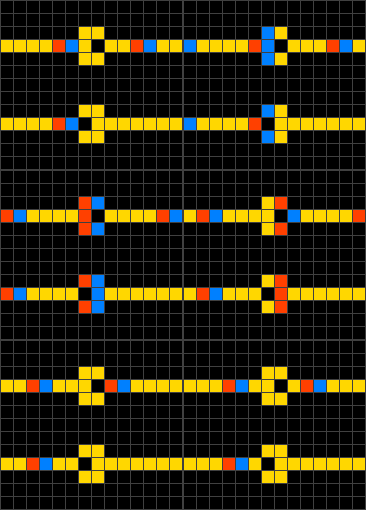
Wireworld 是一种元胞自动机 (Cellular automaton),类似的还有康威生命游戏 (Conway's Game of Life)。Wireworld 可以用来模拟电路逻辑,如下图的二极管:
Raylib 是一个用于游戏制作的 C 语言库,设计上高度模块化、高度简洁,以下是它的官方说明:
NOTE for ADVENTURERS: raylib is a programming library to enjoy videogames programming; no fancy interface, no visual helpers, no debug button… just coding in the most pure spartan-programmers way
本来是打算用 Bevy 来写的,但最近的 Rust 含量太多,受够了复杂过头的东西,所以这次用 C 语言,并且放弃诸如 Make 或 CMake 之类的构建系统,尽量保持一切简单可控。
运行 Raylib 基本示例
首先安装 Raylib 库,传统派一点,手动从 GitHub 上下载解压,不使用系统的包管理器。
wget "https://github.com/raysan5/raylib/releases/download/5.0/raylib-5.0_linux_amd64.tar.gz"
tar zxvf raylib-5.0_linux_amd64.tar.gz
官方给出的基本示例:
#include "raylib.h"

int main(void) {
    InitWindow(800, 450, "raylib [core] example - basic window");

    while (!WindowShouldClose()) {
        BeginDrawing();
        ClearBackground(RAYWHITE);
        DrawText("Congrats! You created your first window!", 190, 200, 20,
                 LIGHTGRAY);
        EndDrawing();
    }

    CloseWindow();

    return 0;
}
编译它需要指定头文件路径和静态库文件路径:
gcc main.c -o main -Wall -Wextra -pedantic -I raylib-5.0_linux_amd64/include/ -L raylib-5.0_linux_amd64/lib/ -l:libraylib.a -lm
这样得到的文件只依赖 libc 和 libm,Raylib 的部分被静态链接进去:
linux-vdso.so.1 (0x00007fff0e317000)
libm.so.6 => /usr/lib/libm.so.6 (0x000074151e365000)
libc.so.6 => /usr/lib/libc.so.6 (0x000074151e181000)
/lib64/ld-linux-x86-64.so.2 => /usr/lib64/ld-linux-x86-64.so.2 (0x000074151e5a5000)
动态链接也是同理,我认为这种游戏程序静态链接更合理。
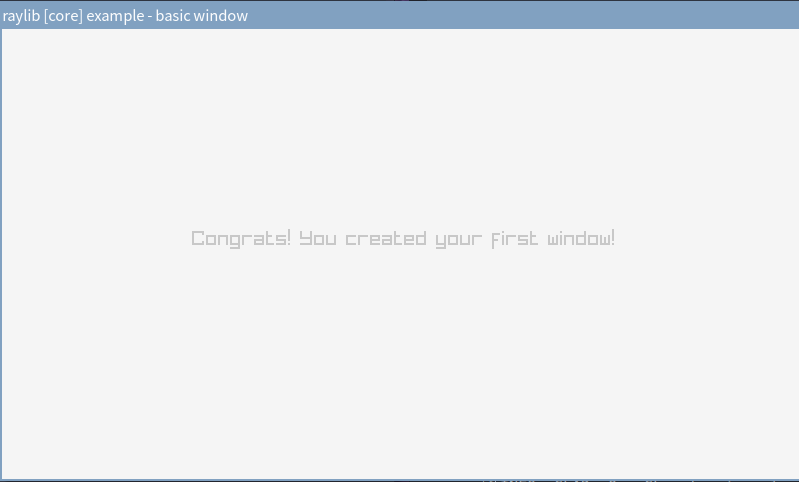
运行出现 800 x 450 的窗口,显示文字 Congrats! You created your first window!,字体还蛮好看的。
设置编辑器
我的 NeoVim 一片红,原因是我用了 clangd 作 LSP,它默认情况下没法识别 Raylib 库(没装在系统路径里)。可以用 bear 命令生成 compile_comannds.json 文件帮助 clangd 识别,只需要传入刚刚的编译命令就可以了:
bear -- gcc main.c -o main -Wall -Wextra -pedantic -I raylib-5.0_linux_amd64/include/ -L raylib-5.0_
linux_amd64/lib/ -l:libraylib.a -lm
[
  {
    "arguments": [
      "/usr/bin/gcc",
      "-c",
      "-Wall",
      "-Wextra",
      "-pedantic",
      "-I",
      "raylib-5.0_linux_amd64/include/",
      "-o",
      "main",
      "main.c"
    ],
    "directory": "/path/to/wireworld",
    "file": "/path/to/wireworld/main.c",
    "output": "/path/to/wireworld/main"
  }
]
总之先显示点什么
先简单摸索一下 Raylib 的 API。
模拟器比常规的游戏要简单,预计只有窗口管理、输入管理和 2D 图形显示三个功能,只需要使用两个模块:
它们都共用 raylib.h 头文件,不需要额外引入。
指定窗口的长宽和标题名称:
const int screenWidth = 800;
const int screenHeight = 450;

InitWindow(screenWidth, screenHeight, "Wireworld Simulator");
设置 60 帧每秒:
SetTargetFPS(60);
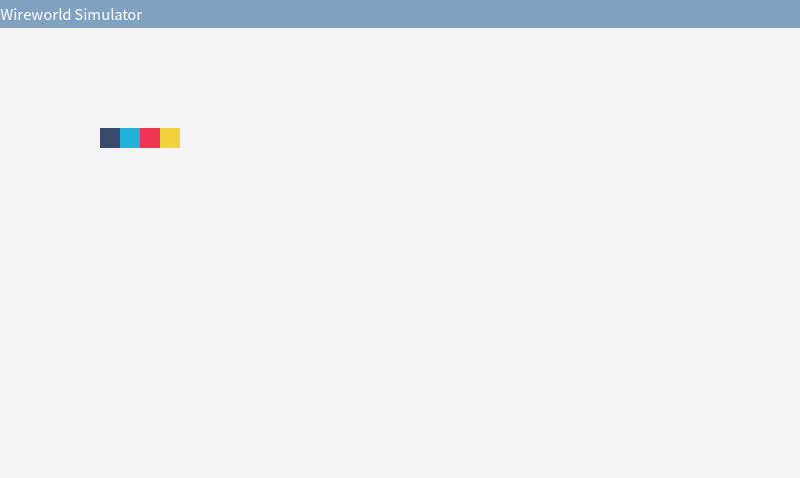
绘制 Wirewold 的四种细胞 (Cell),颜色是从 Color Hunt 上找的,符合红黄蓝黑配色:
- 空:黑色 (
#3B4A6B) - 电子头:蓝色 (
22B2DA) - 电子尾:红色 (
F23557) - 导体:黄色 (
F0D43A)
#define EMPTY_COLOR         CLITERAL(Color) { 59, 74, 107, 255 }
#define HEAD_COLOR          CLITERAL(Color) { 34, 178, 218, 255 }
#define TAIL_COLOR          CLITERAL(Color) { 242, 53, 87, 255 }
#define CONDUCTOR_COLOR     CLITERAL(Color) { 240, 212, 58, 255 }

DrawRectangle(100, 100, cellSize, cellSize, EMPTY_COLOR);
DrawRectangle(120, 100, cellSize, cellSize, HEAD_COLOR);
DrawRectangle(140, 100, cellSize, cellSize, TAIL_COLOR);
DrawRectangle(160, 100, cellSize, cellSize, CONDUCTOR_COLOR);
当前完整代码
 1#include "raylib.h"
 2
 3#define EMPTY_COLOR         CLITERAL(Color) { 59, 74, 107, 255 }
 4#define HEAD_COLOR          CLITERAL(Color) { 34, 178, 218, 255 }
 5#define TAIL_COLOR          CLITERAL(Color) { 242, 53, 87, 255 }
 6#define CONDUCTOR_COLOR     CLITERAL(Color) { 240, 212, 58, 255 }
 7
 8const int screenWidth = 800;
 9const int screenHeight = 450;
10
11const int cellSize = 20;
12
13int main(void) {
14
15    InitWindow(screenWidth, screenHeight, "Wireworld Simulator");
16
17    SetTargetFPS(60);
18
19    while (!WindowShouldClose()) {
20        BeginDrawing();
21        ClearBackground(RAYWHITE);
22
23        DrawRectangle(100, 100, cellSize, cellSize, EMPTY_COLOR);
24        DrawRectangle(120, 100, cellSize, cellSize, HEAD_COLOR);
25        DrawRectangle(140, 100, cellSize, cellSize, TAIL_COLOR);
26        DrawRectangle(160, 100, cellSize, cellSize, CONDUCTOR_COLOR);
27
28        EndDrawing();
29    }
30
31    CloseWindow();
32
33    return 0;
34}
绘制网格
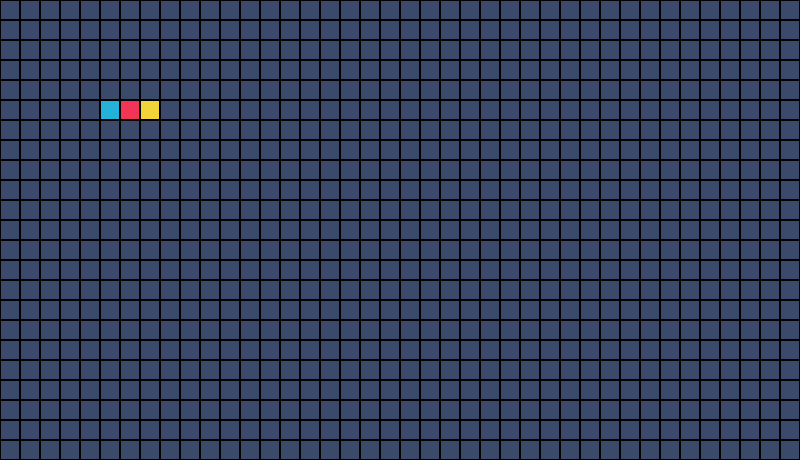
网格最讨人厌的是分界线,好在 Raylib 有一个绘制矩形边框的函数 DrawRectangleLines,直接使用格子边框作为网格分界线可以省去不少工作量。
for (int i = 0; i < screenWidth / cellSize; i++) {
    for (int j = 0; j < screenHeight / cellSize; j++) {
        DrawRectangle(i * cellSize, j * cellSize, cellSize, cellSize,
                      EMPTY_COLOR);
        DrawRectangleLines(i * cellSize, j * cellSize, cellSize,
                           cellSize, BLACK);
    }
}

DrawRectangle(100, 100, cellSize, cellSize, EMPTY_COLOR);
DrawRectangleLines(100, 100, cellSize, cellSize, BLACK);
DrawRectangle(120, 100, cellSize, cellSize, HEAD_COLOR);
DrawRectangleLines(120, 100, cellSize, cellSize, BLACK);
DrawRectangle(140, 100, cellSize, cellSize, TAIL_COLOR);
DrawRectangleLines(140, 100, cellSize, cellSize, BLACK);
DrawRectangle(160, 100, cellSize, cellSize, CONDUCTOR_COLOR);
DrawRectangleLines(160, 100, cellSize, cellSize, BLACK);
效果如下(高度改成了 460,这样可以被细胞大小整除):
这只是显示效果上的网格,对于网格数据,还是需要设计一个数据结构,比如二维数组。在二维数组中,每个元素存储细胞种类,比如「空」、「电子头」。
颜色、位置等信息不与单个细胞相关联,不需要额外保存在细胞中。
使用枚举表示细胞:
typedef enum { EMPTY, HEAD, TAIL, CONDUCTOR } Cell;
创建网格并初始化所有格子为空:
const int rows = screenHeight / cellSize;
const int cols = screenWidth / cellSize;

Cell grid[rows][cols];

for (int i = 0; i < rows; i++) {
    for (int j = 0; j < cols; j++) {
        grid[i][j] = EMPTY;
    }
}
使用 switch 根据格子类型返回对应颜色:
Color GetCellColor(Cell cell) {
    switch (cell) {
        case EMPTY:
            return EMPTY_COLOR;
        case HEAD:
            return HEAD_COLOR;
        case TAIL:
            return TAIL_COLOR;
        case CONDUCTOR:
            return CONDUCTOR_COLOR;
        default:
            return EMPTY_COLOR;
    }
}
在主循环中遍历这个数组并绘制每个细胞:
 1grid[5][5] = HEAD;
 2grid[5][6] = TAIL;
 3grid[5][7] = CONDUCTOR;
 4
 5while (!WindowShouldClose()) {
 6    BeginDrawing();
 7    ClearBackground(RAYWHITE);
 8
 9    for (int i = 0; i < rows; i++) {
10        for (int j = 0; j < cols; j++) {
11            Color cellColor = GetCellColor(grid[i][j]);
12            DrawRectangle(j * cellSize, i * cellSize, cellSize, cellSize,
13                          cellColor);
14            DrawRectangleLines(j * cellSize, i * cellSize, cellSize,
15                               cellSize, BLACK);
16        }
17    }
18
19    EndDrawing();
20}
当前完整代码
 1#include "raylib.h"
 2
 3#define EMPTY_COLOR         CLITERAL(Color) { 59, 74, 107, 255 }
 4#define HEAD_COLOR          CLITERAL(Color) { 34, 178, 218, 255 }
 5#define TAIL_COLOR          CLITERAL(Color) { 242, 53, 87, 255 }
 6#define CONDUCTOR_COLOR     CLITERAL(Color) { 240, 212, 58, 255 }
 7
 8const int screenWidth = 800;
 9const int screenHeight = 460;
10
11const int cellSize = 20;
12
13const int rows = screenHeight / cellSize;
14const int cols = screenWidth / cellSize;
15
16typedef enum { EMPTY, HEAD, TAIL, CONDUCTOR } Cell;
17
18Color GetCellColor(Cell cell) {
19    switch (cell) {
20        case EMPTY:
21            return EMPTY_COLOR;
22        case HEAD:
23            return HEAD_COLOR;
24        case TAIL:
25            return TAIL_COLOR;
26        case CONDUCTOR:
27            return CONDUCTOR_COLOR;
28        default:
29            return EMPTY_COLOR;
30    }
31}
32
33int main(void) {
34    InitWindow(screenWidth, screenHeight, "Wireworld Simulator");
35    SetTargetFPS(60);
36
37    Cell grid[rows][cols];
38
39    for (int i = 0; i < rows; i++) {
40        for (int j = 0; j < cols; j++) {
41            grid[i][j] = EMPTY;
42        }
43    }
44
45    grid[5][5] = HEAD;
46    grid[5][6] = TAIL;
47    grid[5][7] = CONDUCTOR;
48
49    while (!WindowShouldClose()) {
50        BeginDrawing();
51        ClearBackground(RAYWHITE);
52
53        for (int i = 0; i < rows; i++) {
54            for (int j = 0; j < cols; j++) {
55                Color cellColor = GetCellColor(grid[i][j]);
56                DrawRectangle(j * cellSize, i * cellSize, cellSize, cellSize,
57                              cellColor);
58                DrawRectangleLines(j * cellSize, i * cellSize, cellSize,
59                                   cellSize, BLACK);
60            }
61        }
62
63        EndDrawing();
64    }
65
66    CloseWindow();
67
68    return 0;
69}
Wireworld 规则
时间以离散的步伐进行,单位是「代」(generations)。
每代细胞行为规则:
- 空 -> 空
- 电子头 -> 电子尾
- 电子尾 -> 导体
- 当导体拥有一至两个电子头邻居时,导体 -> 电子头,否则导体不变
对应代码:
void UpdateGrid(Cell grid[rows][cols]) {
    Cell newGrid[rows][cols];

    for (int i = 0; i < rows; i++) {
        for (int j = 0; j < cols; j++) {
            switch (grid[i][j]) {
                case EMPTY:
                    newGrid[i][j] = EMPTY;
                    break;
                case HEAD:
                    newGrid[i][j] = TAIL;
                    break;
                case TAIL:
                    newGrid[i][j] = CONDUCTOR;
                    break;
                case CONDUCTOR: {
                    int headNeighbors = CountHeadNeighbors(grid, i, j);
                    if (headNeighbors == 1 || headNeighbors == 2) {
                        newGrid[i][j] = HEAD;
                    } else {
                        newGrid[i][j] = CONDUCTOR;
                    }
                } break;
            }
        }
    }

    memcpy(grid, newGrid, sizeof(newGrid));
}
不能边遍历边修改 grid,会影响到之后细胞的判断,需要创建一个新的网格 newGrid,在最后将 newGrid 复制给 grid(可以直接使用 memcpy)。
Wireworld 使用摩尔邻域 (Moore neighborhood),这意味着在上面的规则中,「相邻」表示在任何方向上(正交和对角线)都有一个单元(范围值为 1)。

CountHeadNeighbors 的实现:
int CountHeadNeighbors(Cell grid[rows][cols], int row, int col) {
    int headCount = 0;

    for (int i = -1; i <= 1; i++) {
        for (int j = -1; j <= 1; j++) {
            if (i == 0 && j == 0)
                continue;
            int newRow = row + i;
            int newCol = col + j;
            if (newRow >= 0 && newRow < rows && newCol >= 0 && newCol < cols) {
                if (grid[newRow][newCol] == HEAD) {
                    headCount++;
                }
            }
        }
    }

    return headCount;
}
将 UpdateGrid(grid); 加入主循环,并初始化一些细胞:
 1grid[5][5] = CONDUCTOR;
 2grid[5][6] = TAIL;
 3grid[5][7] = HEAD;
 4grid[5][8] = CONDUCTOR;
 5grid[5][9] = CONDUCTOR;
 6
 7grid[6][4] = CONDUCTOR;
 8grid[6][10] = CONDUCTOR;
 9
10grid[7][5] = CONDUCTOR;
11grid[7][6] = CONDUCTOR;
12grid[7][7] = CONDUCTOR;
13grid[7][8] = CONDUCTOR;
14grid[7][9] = CONDUCTOR;
15
16while (!WindowShouldClose()) {
17    BeginDrawing();
18    ClearBackground(RAYWHITE);
19
20    UpdateGrid(grid);
将 FPS 暂时设置为 5:
SetTargetFPS(5);
运行效果如图,一个时钟发射器:
当前完整代码
  1#include <string.h>
  2#include "raylib.h"
  3
  4#define EMPTY_COLOR         CLITERAL(Color) { 59, 74, 107, 255 }
  5#define HEAD_COLOR          CLITERAL(Color) { 34, 178, 218, 255 }
  6#define TAIL_COLOR          CLITERAL(Color) { 242, 53, 87, 255 }
  7#define CONDUCTOR_COLOR     CLITERAL(Color) { 240, 212, 58, 255 }
  8
  9const int screenWidth = 800;
 10const int screenHeight = 460;
 11
 12const int cellSize = 20;
 13
 14const int rows = screenHeight / cellSize;
 15const int cols = screenWidth / cellSize;
 16
 17typedef enum { EMPTY, HEAD, TAIL, CONDUCTOR } Cell;
 18
 19Color GetCellColor(Cell cell) {
 20    switch (cell) {
 21        case EMPTY:
 22            return EMPTY_COLOR;
 23        case HEAD:
 24            return HEAD_COLOR;
 25        case TAIL:
 26            return TAIL_COLOR;
 27        case CONDUCTOR:
 28            return CONDUCTOR_COLOR;
 29        default:
 30            return EMPTY_COLOR;
 31    }
 32}
 33
 34int CountHeadNeighbors(Cell grid[rows][cols], int row, int col) {
 35    int headCount = 0;
 36
 37    for (int i = -1; i <= 1; i++) {
 38        for (int j = -1; j <= 1; j++) {
 39            if (i == 0 && j == 0)
 40                continue;
 41            int newRow = row + i;
 42            int newCol = col + j;
 43            if (newRow >= 0 && newRow < rows && newCol >= 0 && newCol < cols) {
 44                if (grid[newRow][newCol] == HEAD) {
 45                    headCount++;
 46                }
 47            }
 48        }
 49    }
 50
 51    return headCount;
 52}
 53
 54void UpdateGrid(Cell grid[rows][cols]) {
 55    Cell newGrid[rows][cols];
 56
 57    for (int i = 0; i < rows; i++) {
 58        for (int j = 0; j < cols; j++) {
 59            switch (grid[i][j]) {
 60                case EMPTY:
 61                    newGrid[i][j] = EMPTY;
 62                    break;
 63                case HEAD:
 64                    newGrid[i][j] = TAIL;
 65                    break;
 66                case TAIL:
 67                    newGrid[i][j] = CONDUCTOR;
 68                    break;
 69                case CONDUCTOR: {
 70                    int headNeighbors = CountHeadNeighbors(grid, i, j);
 71                    if (headNeighbors == 1 || headNeighbors == 2) {
 72                        newGrid[i][j] = HEAD;
 73                    } else {
 74                        newGrid[i][j] = CONDUCTOR;
 75                    }
 76                } break;
 77            }
 78        }
 79    }
 80
 81    memcpy(grid, newGrid, sizeof(newGrid));
 82}
 83
 84int main(void) {
 85    InitWindow(screenWidth, screenHeight, "Wireworld Simulator");
 86    SetTargetFPS(5);
 87
 88    Cell grid[rows][cols];
 89
 90    for (int i = 0; i < rows; i++) {
 91        for (int j = 0; j < cols; j++) {
 92            grid[i][j] = EMPTY;
 93        }
 94    }
 95
 96    grid[5][5] = CONDUCTOR;
 97    grid[5][6] = TAIL;
 98    grid[5][7] = HEAD;
 99    grid[5][8] = CONDUCTOR;
100    grid[5][9] = CONDUCTOR;
101
102    grid[6][4] = CONDUCTOR;
103    grid[6][10] = CONDUCTOR;
104
105    grid[7][5] = CONDUCTOR;
106    grid[7][6] = CONDUCTOR;
107    grid[7][7] = CONDUCTOR;
108    grid[7][8] = CONDUCTOR;
109    grid[7][9] = CONDUCTOR;
110
111    while (!WindowShouldClose()) {
112        BeginDrawing();
113        ClearBackground(RAYWHITE);
114
115        UpdateGrid(grid);
116
117        for (int i = 0; i < rows; i++) {
118            for (int j = 0; j < cols; j++) {
119                Color cellColor = GetCellColor(grid[i][j]);
120                DrawRectangle(j * cellSize, i * cellSize, cellSize, cellSize,
121                              cellColor);
122                DrawRectangleLines(j * cellSize, i * cellSize, cellSize,
123                                   cellSize, BLACK);
124            }
125        }
126
127        EndDrawing();
128    }
129
130    CloseWindow();
131
132    return 0;
133}
暂停和播放
先实现简单的暂停和播放功能,按下空格键暂停,再按一次播放。
游戏只有两个状态:「暂停」和「播放」,不需要使用枚举。
int isPlaying = 0;
在按下空格时切换播放状态,且只有播放中才会更新网格:
if (IsKeyPressed(KEY_SPACE))
    isPlaying = !isPlaying;

if (isPlaying) {
    UpdateGrid(grid);
}
之前将 FPS 设置为 5 是因为一秒更新六十次网格实在太快,但此时又会因为帧率过低导致键盘输入概率捕获不到。所以我们需要真正意义上的每秒迭代 N 次(刷新 N 次网格),而不是依靠 FPS。
网格刷新速率
使用 GetFrameTime 获得最后一帧的绘制时间 (delta time),累加 elapsedTime,并在达到刷新间隔 refreshInterval 时刷新网格。
 1const int refreshRate = 5;
 2const float refreshInterval = 1.0f / refreshRate;
 3
 4float elapsedTime = 0.0f;
 5
 6while (!WindowShouldClose()) {
 7    BeginDrawing();
 8    ClearBackground(RAYWHITE);
 9
10    float frameTime = GetFrameTime();
11    elapsedTime += frameTime;
12
13    if (IsKeyPressed(KEY_SPACE))
14        isPlaying = !isPlaying;
15
16    if (isPlaying && elapsedTime >= refreshInterval) {
17        UpdateGrid(grid);
18        elapsedTime = 0.0f;
19    }
当前完整代码
  1#include <string.h>
  2#include "raylib.h"
  3
  4#define EMPTY_COLOR         CLITERAL(Color) { 59, 74, 107, 255 }
  5#define HEAD_COLOR          CLITERAL(Color) { 34, 178, 218, 255 }
  6#define TAIL_COLOR          CLITERAL(Color) { 242, 53, 87, 255 }
  7#define CONDUCTOR_COLOR     CLITERAL(Color) { 240, 212, 58, 255 }
  8
  9const int screenWidth = 800;
 10const int screenHeight = 460;
 11
 12const int cellSize = 20;
 13
 14const int rows = screenHeight / cellSize;
 15const int cols = screenWidth / cellSize;
 16
 17int isPlaying = 0;
 18
 19const int refreshRate = 5;
 20const float refreshInterval = 1.0f / refreshRate;
 21
 22typedef enum { EMPTY, HEAD, TAIL, CONDUCTOR } Cell;
 23
 24Color GetCellColor(Cell cell) {
 25    switch (cell) {
 26        case EMPTY:
 27            return EMPTY_COLOR;
 28        case HEAD:
 29            return HEAD_COLOR;
 30        case TAIL:
 31            return TAIL_COLOR;
 32        case CONDUCTOR:
 33            return CONDUCTOR_COLOR;
 34        default:
 35            return EMPTY_COLOR;
 36    }
 37}
 38
 39int CountHeadNeighbors(Cell grid[rows][cols], int row, int col) {
 40    int headCount = 0;
 41
 42    for (int i = -1; i <= 1; i++) {
 43        for (int j = -1; j <= 1; j++) {
 44            if (i == 0 && j == 0)
 45                continue;
 46            int newRow = row + i;
 47            int newCol = col + j;
 48            if (newRow >= 0 && newRow < rows && newCol >= 0 && newCol < cols) {
 49                if (grid[newRow][newCol] == HEAD) {
 50                    headCount++;
 51                }
 52            }
 53        }
 54    }
 55
 56    return headCount;
 57}
 58
 59void UpdateGrid(Cell grid[rows][cols]) {
 60    Cell newGrid[rows][cols];
 61
 62    for (int i = 0; i < rows; i++) {
 63        for (int j = 0; j < cols; j++) {
 64            switch (grid[i][j]) {
 65                case EMPTY:
 66                    newGrid[i][j] = EMPTY;
 67                    break;
 68                case HEAD:
 69                    newGrid[i][j] = TAIL;
 70                    break;
 71                case TAIL:
 72                    newGrid[i][j] = CONDUCTOR;
 73                    break;
 74                case CONDUCTOR: {
 75                    int headNeighbors = CountHeadNeighbors(grid, i, j);
 76                    if (headNeighbors == 1 || headNeighbors == 2) {
 77                        newGrid[i][j] = HEAD;
 78                    } else {
 79                        newGrid[i][j] = CONDUCTOR;
 80                    }
 81                } break;
 82            }
 83        }
 84    }
 85
 86    memcpy(grid, newGrid, sizeof(newGrid));
 87}
 88
 89int main(void) {
 90    InitWindow(screenWidth, screenHeight, "Wireworld Simulator");
 91    SetTargetFPS(60);
 92
 93    Cell grid[rows][cols];
 94    for (int i = 0; i < rows; i++) {
 95        for (int j = 0; j < cols; j++) {
 96            grid[i][j] = EMPTY;
 97        }
 98    }
 99
100    grid[5][5] = CONDUCTOR;
101    grid[5][6] = TAIL;
102    grid[5][7] = HEAD;
103    grid[5][8] = CONDUCTOR;
104    grid[5][9] = CONDUCTOR;
105
106    grid[6][4] = CONDUCTOR;
107    grid[6][10] = CONDUCTOR;
108
109    grid[7][5] = CONDUCTOR;
110    grid[7][6] = CONDUCTOR;
111    grid[7][7] = CONDUCTOR;
112    grid[7][8] = CONDUCTOR;
113    grid[7][9] = CONDUCTOR;
114
115    float elapsedTime = 0.0f;
116
117    while (!WindowShouldClose()) {
118        BeginDrawing();
119        ClearBackground(RAYWHITE);
120
121        float frameTime = GetFrameTime();
122        elapsedTime += frameTime;
123
124        if (IsKeyPressed(KEY_SPACE))
125            isPlaying = !isPlaying;
126
127        if (isPlaying && elapsedTime >= refreshInterval) {
128            UpdateGrid(grid);
129            elapsedTime = 0.0f;
130        }
131
132        for (int i = 0; i < rows; i++) {
133            for (int j = 0; j < cols; j++) {
134                Color cellColor = GetCellColor(grid[i][j]);
135                DrawRectangle(j * cellSize, i * cellSize, cellSize, cellSize,
136                              cellColor);
137                DrawRectangleLines(j * cellSize, i * cellSize, cellSize,
138                                   cellSize, BLACK);
139            }
140        }
141
142        EndDrawing();
143    }
144
145    CloseWindow();
146
147    return 0;
148}
高亮预选细胞
制作细胞位置预览效果:鼠标放置在的单元格边框会进行高亮。
使用 GetMousePosition 获得鼠标位置,并计算对应的细胞位置,使用 DrawRectangleLines 绘制高亮色边框。
 1for (int i = 0; i < rows; i++) {
 2    for (int j = 0; j < cols; j++) {
 3        Color cellColor = GetCellColor(grid[i][j]);
 4        DrawRectangle(j * cellSize, i * cellSize, cellSize, cellSize,
 5                      cellColor);
 6        DrawRectangleLines(j * cellSize, i * cellSize, cellSize,
 7                           cellSize, BLACK);
 8    }
 9}
10
11Vector2 mousePosition = GetMousePosition();
12int mouseYGridPos = (int)(mousePosition.y / cellSize);
13int mouseXGridPos = (int)(mousePosition.x / cellSize);
14DrawRectangleLines(mouseXGridPos * cellSize, mouseYGridPos * cellSize,
15                   cellSize, cellSize, WHITE);
为了避免与红黄蓝细胞颜色相近,高亮色选了纯白,正好也和网格边框颜色形成对比。
创建细胞
方案一
方案一是 xvlv.io/WireWorld/ 网站的按键配置:
- 鼠标左击:放置导线,目标细胞不为空时将其设置为空
- 鼠标右击:放置电子头,或将电子头转换为导线
代码如下,顺带加上了按键显示:
Color cellColor;
if (IsMouseButtonPressed(MOUSE_BUTTON_LEFT)) {
    if (grid[mouseYGridPos][mouseXGridPos] != EMPTY) {
        grid[mouseYGridPos][mouseXGridPos] = EMPTY;
        cellColor = EMPTY_COLOR;
    } else {
        grid[mouseYGridPos][mouseXGridPos] = CONDUCTOR;
        cellColor = CONDUCTOR_COLOR;
    }
    DrawRectangle(mouseXGridPos * cellSize, mouseYGridPos * cellSize,
                  cellSize, cellSize, cellColor);
    DrawRectangleLines(mouseXGridPos * cellSize,
                       mouseYGridPos * cellSize, cellSize, cellSize,
                       BLACK);
} else if (IsMouseButtonPressed(MOUSE_BUTTON_RIGHT)) {
    if (grid[mouseYGridPos][mouseXGridPos] != HEAD) {
        grid[mouseYGridPos][mouseXGridPos] = HEAD;
        cellColor = EMPTY_COLOR;
    } else {
        grid[mouseYGridPos][mouseXGridPos] = CONDUCTOR;
        cellColor = CONDUCTOR_COLOR;
    }
    DrawRectangle(mouseXGridPos * cellSize, mouseYGridPos * cellSize,
                  cellSize, cellSize, cellColor);
    DrawRectangleLines(mouseXGridPos * cellSize,
                       mouseYGridPos * cellSize, cellSize, cellSize,
                       BLACK);
}

if (IsMouseButtonDown(MOUSE_BUTTON_LEFT)) {
    DrawText("MOUSE: LEFT", 20, 420, 20, CONDUCTOR_COLOR);
} else if (IsMouseButtonDown(MOUSE_BUTTON_RIGHT)) {
    DrawText("MOUSE: RIGHT", 20, 420, 20, HEAD_COLOR);
} else {
    DrawText("MOUSE: NONE", 20, 420, 20, BROWN);
}
这种方案不能手动放置电子尾。
方案一完整代码
  1#include <string.h>
  2#include "raylib.h"
  3
  4#define EMPTY_COLOR      \
  5    CLITERAL(Color) {    \
  6        59, 74, 107, 255 \
  7    }
  8#define HEAD_COLOR        \
  9    CLITERAL(Color) {     \
 10        34, 178, 218, 255 \
 11    }
 12#define TAIL_COLOR       \
 13    CLITERAL(Color) {    \
 14        242, 53, 87, 255 \
 15    }
 16#define CONDUCTOR_COLOR   \
 17    CLITERAL(Color) {     \
 18        240, 212, 58, 255 \
 19    }
 20
 21const int screenWidth = 800;
 22const int screenHeight = 460;
 23
 24const int cellSize = 20;
 25
 26const int rows = screenHeight / cellSize;
 27const int cols = screenWidth / cellSize;
 28
 29int isPlaying = 0;
 30
 31const int refreshRate = 5;
 32const float refreshInterval = 1.0f / refreshRate;
 33
 34typedef enum { EMPTY, HEAD, TAIL, CONDUCTOR } Cell;
 35
 36Color GetCellColor(Cell cell) {
 37    switch (cell) {
 38        case EMPTY:
 39            return EMPTY_COLOR;
 40        case HEAD:
 41            return HEAD_COLOR;
 42        case TAIL:
 43            return TAIL_COLOR;
 44        case CONDUCTOR:
 45            return CONDUCTOR_COLOR;
 46        default:
 47            return EMPTY_COLOR;
 48    }
 49}
 50
 51int CountHeadNeighbors(Cell grid[rows][cols], int row, int col) {
 52    int headCount = 0;
 53
 54    for (int y = -1; y <= 1; y++) {
 55        for (int x = -1; x <= 1; x++) {
 56            if (y == 0 && x == 0)
 57                continue;
 58            int newRow = row + y;
 59            int newCol = col + x;
 60            if (newRow >= 0 && newRow < rows && newCol >= 0 && newCol < cols) {
 61                if (grid[newRow][newCol] == HEAD) {
 62                    headCount++;
 63                }
 64            }
 65        }
 66    }
 67
 68    return headCount;
 69}
 70
 71void UpdateGrid(Cell grid[rows][cols]) {
 72    Cell newGrid[rows][cols];
 73
 74    for (int y = 0; y < rows; y++) {
 75        for (int x = 0; x < cols; x++) {
 76            switch (grid[y][x]) {
 77                case EMPTY:
 78                    newGrid[y][x] = EMPTY;
 79                    break;
 80                case HEAD:
 81                    newGrid[y][x] = TAIL;
 82                    break;
 83                case TAIL:
 84                    newGrid[y][x] = CONDUCTOR;
 85                    break;
 86                case CONDUCTOR: {
 87                    int headNeighbors = CountHeadNeighbors(grid, y, x);
 88                    if (headNeighbors == 1 || headNeighbors == 2) {
 89                        newGrid[y][x] = HEAD;
 90                    } else {
 91                        newGrid[y][x] = CONDUCTOR;
 92                    }
 93                } break;
 94            }
 95        }
 96    }
 97
 98    memcpy(grid, newGrid, sizeof(newGrid));
 99}
100
101int main(void) {
102    InitWindow(screenWidth, screenHeight, "Wireworld Simulator");
103    SetTargetFPS(60);
104
105    Cell grid[rows][cols];
106    for (int y = 0; y < rows; y++) {
107        for (int x = 0; x < cols; x++) {
108            grid[y][x] = EMPTY;
109        }
110    }
111
112    float elapsedTime = 0.0f;
113
114    while (!WindowShouldClose()) {
115        BeginDrawing();
116        ClearBackground(RAYWHITE);
117
118        float frameTime = GetFrameTime();
119        elapsedTime += frameTime;
120
121        if (IsKeyPressed(KEY_SPACE))
122            isPlaying = !isPlaying;
123
124        if (isPlaying && elapsedTime >= refreshInterval) {
125            UpdateGrid(grid);
126            elapsedTime = 0.0f;
127        }
128
129        for (int y = 0; y < rows; y++) {
130            for (int x = 0; x < cols; x++) {
131                Color cellColor = GetCellColor(grid[y][x]);
132                DrawRectangle(x * cellSize, y * cellSize, cellSize, cellSize,
133                              cellColor);
134                DrawRectangleLines(x * cellSize, y * cellSize, cellSize,
135                                   cellSize, BLACK);
136            }
137        }
138
139        Vector2 mousePosition = GetMousePosition();
140        int mouseYGridPos = (int)(mousePosition.y / cellSize);
141        int mouseXGridPos = (int)(mousePosition.x / cellSize);
142        DrawRectangleLines(mouseXGridPos * cellSize, mouseYGridPos * cellSize,
143                           cellSize, cellSize, WHITE);
144
145        Color cellColor;
146        if (IsMouseButtonPressed(MOUSE_BUTTON_LEFT)) {
147            if (grid[mouseYGridPos][mouseXGridPos] != EMPTY) {
148                grid[mouseYGridPos][mouseXGridPos] = EMPTY;
149                cellColor = EMPTY_COLOR;
150            } else {
151                grid[mouseYGridPos][mouseXGridPos] = CONDUCTOR;
152                cellColor = CONDUCTOR_COLOR;
153            }
154            DrawRectangle(mouseXGridPos * cellSize, mouseYGridPos * cellSize,
155                          cellSize, cellSize, cellColor);
156            DrawRectangleLines(mouseXGridPos * cellSize,
157                               mouseYGridPos * cellSize, cellSize, cellSize,
158                               BLACK);
159        } else if (IsMouseButtonPressed(MOUSE_BUTTON_RIGHT)) {
160            if (grid[mouseYGridPos][mouseXGridPos] != HEAD) {
161                grid[mouseYGridPos][mouseXGridPos] = HEAD;
162                cellColor = EMPTY_COLOR;
163            } else {
164                grid[mouseYGridPos][mouseXGridPos] = CONDUCTOR;
165                cellColor = CONDUCTOR_COLOR;
166            }
167            DrawRectangle(mouseXGridPos * cellSize, mouseYGridPos * cellSize,
168                          cellSize, cellSize, cellColor);
169            DrawRectangleLines(mouseXGridPos * cellSize,
170                               mouseYGridPos * cellSize, cellSize, cellSize,
171                               BLACK);
172        }
173
174        if (IsMouseButtonDown(MOUSE_BUTTON_LEFT)) {
175            DrawText("MOUSE: LEFT", 20, 420, 20, CONDUCTOR_COLOR);
176        } else if (IsMouseButtonDown(MOUSE_BUTTON_RIGHT)) {
177            DrawText("MOUSE: RIGHT", 20, 420, 20, HEAD_COLOR);
178        } else {
179            DrawText("MOUSE: NONE", 20, 420, 20, BROWN);
180        }
181
182        EndDrawing();
183    }
184
185    CloseWindow();
186
187    return 0;
188}
方案二
方案二是 danprince.github.io/wireworld/ 网站的按键配置。
它使用数字键 1234 分别代表空、导体、电子头、电子尾,按住鼠标左键放置对应细胞。我更喜欢这个方案,之后的代码都会基于这个方案。
代码实现如下:
Vector2 mousePosition = GetMousePosition();
int mouseYGridPos = (int)(mousePosition.y / cellSize);
int mouseXGridPos = (int)(mousePosition.x / cellSize);

if (IsKeyPressed(KEY_ONE) || IsKeyPressed(KEY_KP_1))
    selectCellType = EMPTY;
else if (IsKeyPressed(KEY_TWO) || IsKeyPressed(KEY_KP_2))
    selectCellType = CONDUCTOR;
else if (IsKeyPressed(KEY_THREE) || IsKeyPressed(KEY_KP_3))
    selectCellType = HEAD;
else if (IsKeyPressed(KEY_FOUR) || IsKeyPressed(KEY_KP_4))
    selectCellType = TAIL;

if (IsMouseButtonDown(MOUSE_BUTTON_LEFT)) {
    grid[mouseYGridPos][mouseXGridPos] = selectCellType;
    DrawCell(mouseXGridPos, mouseYGridPos,
             GetCellColor(selectCellType));
}

DrawCellLines(mouseXGridPos, mouseYGridPos, WHITE);
个人认为预选高亮放在后面(优先级更高)会比较好,能时刻看清当前选中细胞在哪,哪怕是按住鼠标放置细胞时。
DrawCell 和 DrawCellLines 是对 DrawRectangle 和 DrawRectangleLines 的封装:
void DrawCell(int xGridPos, int yGridPos, Color cellColor) {
    DrawRectangle(xGridPos * cellSize, yGridPos * cellSize, cellSize, cellSize,
                  cellColor);
    DrawRectangleLines(xGridPos * cellSize, yGridPos * cellSize, cellSize,
                       cellSize, BLACK);
}

void DrawCellLines(int xGridPos, int yGridPos, Color cellColor) {
    DrawRectangleLines(xGridPos * cellSize, yGridPos * cellSize, cellSize,
                       cellSize, cellColor);
}
接下来还需要在右上角添加四个色块,用于指示当前选中的细胞类型:
const int indicatorSize = cellSize;
const int indicatorPadding = cellSize / 2;
const int indicatorX = screenWidth - indicatorSize * 4 - indicatorPadding;
const int indicatorY = indicatorPadding;

void DrawIndicators(void) {
    Cell cellTypes[] = {EMPTY, CONDUCTOR, HEAD, TAIL};
    for (int i = 0; i < 4; i++) {
        int x = indicatorX + indicatorSize * i;
        DrawRectangle(x, indicatorY, indicatorSize, indicatorSize,
                      GetCellColor(cellTypes[i]));
        DrawRectangleLines(x, indicatorY, indicatorSize, indicatorSize, BLACK);
        if (selectCellType == cellTypes[i]) {
            DrawRectangleLines(x, indicatorY, indicatorSize, indicatorSize,
                               WHITE);
        }
    }
}
效果如下:
方案二完整代码
  1#include <string.h>
  2#include "raylib.h"
  3
  4#define EMPTY_COLOR      \
  5    CLITERAL(Color) {    \
  6        59, 74, 107, 255 \
  7    }
  8#define HEAD_COLOR        \
  9    CLITERAL(Color) {     \
 10        34, 178, 218, 255 \
 11    }
 12#define TAIL_COLOR       \
 13    CLITERAL(Color) {    \
 14        242, 53, 87, 255 \
 15    }
 16#define CONDUCTOR_COLOR   \
 17    CLITERAL(Color) {     \
 18        240, 212, 58, 255 \
 19    }
 20
 21typedef enum { EMPTY, CONDUCTOR, HEAD, TAIL } Cell;
 22
 23const int screenWidth = 800;
 24const int screenHeight = 460;
 25
 26const int cellSize = 20;
 27
 28const int indicatorSize = cellSize;
 29const int indicatorPadding = cellSize / 2;
 30const int indicatorX = screenWidth - indicatorSize * 4 - indicatorPadding;
 31const int indicatorY = indicatorPadding;
 32
 33const int rows = screenHeight / cellSize;
 34const int cols = screenWidth / cellSize;
 35
 36int isPlaying = 0;
 37
 38const int refreshRate = 5;
 39const float refreshInterval = 1.0f / refreshRate;
 40
 41Cell selectCellType = EMPTY;
 42
 43Color GetCellColor(Cell cell) {
 44    switch (cell) {
 45        case EMPTY:
 46            return EMPTY_COLOR;
 47        case HEAD:
 48            return HEAD_COLOR;
 49        case TAIL:
 50            return TAIL_COLOR;
 51        case CONDUCTOR:
 52            return CONDUCTOR_COLOR;
 53        default:
 54            return EMPTY_COLOR;
 55    }
 56}
 57
 58int CountHeadNeighbors(Cell grid[rows][cols], int row, int col) {
 59    int headCount = 0;
 60
 61    for (int y = -1; y <= 1; y++) {
 62        for (int x = -1; x <= 1; x++) {
 63            if (y == 0 && x == 0)
 64                continue;
 65            int newRow = row + y;
 66            int newCol = col + x;
 67            if (newRow >= 0 && newRow < rows && newCol >= 0 && newCol < cols) {
 68                if (grid[newRow][newCol] == HEAD) {
 69                    headCount++;
 70                }
 71            }
 72        }
 73    }
 74
 75    return headCount;
 76}
 77
 78void UpdateGrid(Cell grid[rows][cols]) {
 79    Cell newGrid[rows][cols];
 80
 81    for (int y = 0; y < rows; y++) {
 82        for (int x = 0; x < cols; x++) {
 83            switch (grid[y][x]) {
 84                case EMPTY:
 85                    newGrid[y][x] = EMPTY;
 86                    break;
 87                case HEAD:
 88                    newGrid[y][x] = TAIL;
 89                    break;
 90                case TAIL:
 91                    newGrid[y][x] = CONDUCTOR;
 92                    break;
 93                case CONDUCTOR: {
 94                    int headNeighbors = CountHeadNeighbors(grid, y, x);
 95                    if (headNeighbors == 1 || headNeighbors == 2) {
 96                        newGrid[y][x] = HEAD;
 97                    } else {
 98                        newGrid[y][x] = CONDUCTOR;
 99                    }
100                } break;
101            }
102        }
103    }
104
105    memcpy(grid, newGrid, sizeof(newGrid));
106}
107
108void DrawCell(int xGridPos, int yGridPos, Color cellColor) {
109    DrawRectangle(xGridPos * cellSize, yGridPos * cellSize, cellSize, cellSize,
110                  cellColor);
111    DrawRectangleLines(xGridPos * cellSize, yGridPos * cellSize, cellSize,
112                       cellSize, BLACK);
113}
114
115void DrawCellLines(int xGridPos, int yGridPos, Color cellColor) {
116    DrawRectangleLines(xGridPos * cellSize, yGridPos * cellSize, cellSize,
117                       cellSize, cellColor);
118}
119
120int main(void) {
121    InitWindow(screenWidth, screenHeight, "Wireworld Simulator");
122    SetTargetFPS(60);
123
124    Cell grid[rows][cols];
125    for (int y = 0; y < rows; y++) {
126        for (int x = 0; x < cols; x++) {
127            grid[y][x] = EMPTY;
128        }
129    }
130
131    float elapsedTime = 0.0f;
132
133    while (!WindowShouldClose()) {
134        BeginDrawing();
135        ClearBackground(RAYWHITE);
136
137        float frameTime = GetFrameTime();
138        elapsedTime += frameTime;
139
140        if (IsKeyPressed(KEY_SPACE))
141            isPlaying = !isPlaying;
142
143        if (isPlaying && elapsedTime >= refreshInterval) {
144            UpdateGrid(grid);
145            elapsedTime = 0.0f;
146        }
147
148        for (int y = 0; y < rows; y++) {
149            for (int x = 0; x < cols; x++) {
150                Color cellColor = GetCellColor(grid[y][x]);
151                DrawCell(x, y, cellColor);
152            }
153        }
154
155        Vector2 mousePosition = GetMousePosition();
156        int mouseYGridPos = (int)(mousePosition.y / cellSize);
157        int mouseXGridPos = (int)(mousePosition.x / cellSize);
158
159        if (IsKeyPressed(KEY_ONE) || IsKeyPressed(KEY_KP_1))
160            selectCellType = EMPTY;
161        else if (IsKeyPressed(KEY_TWO) || IsKeyPressed(KEY_KP_2))
162            selectCellType = CONDUCTOR;
163        else if (IsKeyPressed(KEY_THREE) || IsKeyPressed(KEY_KP_3))
164            selectCellType = HEAD;
165        else if (IsKeyPressed(KEY_FOUR) || IsKeyPressed(KEY_KP_4))
166            selectCellType = TAIL;
167
168        if (IsMouseButtonDown(MOUSE_BUTTON_LEFT)) {
169            grid[mouseYGridPos][mouseXGridPos] = selectCellType;
170            DrawCell(mouseXGridPos, mouseYGridPos,
171                     GetCellColor(selectCellType));
172        }
173
174        DrawCellLines(mouseXGridPos, mouseYGridPos, WHITE);
175
176        Cell cellTypes[] = {EMPTY, CONDUCTOR, HEAD, TAIL};
177        for (int i = 0; i < 4; i++) {
178            int x = indicatorX + indicatorSize * i;
179            DrawRectangle(x, indicatorY, indicatorSize, indicatorSize,
180                          GetCellColor(cellTypes[i]));
181            DrawRectangleLines(x, indicatorY, indicatorSize, indicatorSize, BLACK);
182            if (selectCellType == cellTypes[i]) {
183                DrawRectangleLines(x, indicatorY, indicatorSize, indicatorSize,
184                                   WHITE);
185            }
186        }
187
188        EndDrawing();
189    }
190
191    CloseWindow();
192
193    return 0;
194}
绘制播放按钮
按钮兼顾了状态切换和状态显示的功能,使用一个按钮即可表示当前是「播放」还是「暂停」状态,点击切换另一状态时也不会令人困惑。恰到好处的信息量与操作复杂程度。
在左上角绘制播放按钮,播放状态是两条竖着的矩形,暂停状态是个等腰三角:
const int buttonX = cellSize / 2;
const int buttonY = cellSize / 2;
const int buttonSize = cellSize;
const int barWidth = buttonSize / 4;
const int barGap = barWidth;

if (isPlaying) {
    DrawRectangle(buttonX, buttonY, barWidth, buttonSize, WHITE);
    DrawRectangle(buttonX + barWidth + barGap, buttonY, barWidth,
                  buttonSize, WHITE);
} else {
    Vector2 v1 = (Vector2){buttonX, buttonY};
    Vector2 v2 = (Vector2){buttonX, buttonY + buttonSize};
    Vector2 v3 =
        (Vector2){buttonX + buttonSize, (buttonY + buttonSize / 2.0)};
    DrawTriangle(v1, v2, v3, WHITE);
}
整理代码
将处理用户输入的代码封装到 HandleUserInput 函数里:
void HandleUserInput(void) {
    Vector2 mousePosition = GetMousePosition();
    int mouseYGridPos = (int)(mousePosition.y / cellSize);
    int mouseXGridPos = (int)(mousePosition.x / cellSize);

    if (IsKeyPressed(KEY_SPACE))
        isPlaying = !isPlaying;

    if (IsKeyPressed(KEY_ONE) || IsKeyPressed(KEY_KP_1))
        selectCellType = EMPTY;
    else if (IsKeyPressed(KEY_TWO) || IsKeyPressed(KEY_KP_2))
        selectCellType = CONDUCTOR;
    else if (IsKeyPressed(KEY_THREE) || IsKeyPressed(KEY_KP_3))
        selectCellType = HEAD;
    else if (IsKeyPressed(KEY_FOUR) || IsKeyPressed(KEY_KP_4))
        selectCellType = TAIL;

    if (IsMouseButtonDown(MOUSE_BUTTON_LEFT)) {
        grid[mouseYGridPos][mouseXGridPos] = selectCellType;
        DrawCell(mouseXGridPos, mouseYGridPos, GetCellColor(selectCellType));
    }

    DrawCellLines(mouseXGridPos, mouseYGridPos, WHITE);
}
将绘制指示器的代码封装到 DrawIndicators 函数里:
void DrawIndicators(void) {
    Cell cellTypes[] = {EMPTY, CONDUCTOR, HEAD, TAIL};
    for (int i = 0; i < 4; i++) {
        int x = indicatorX + indicatorSize * i;
        DrawRectangle(x, indicatorY, indicatorSize, indicatorSize,
                      GetCellColor(cellTypes[i]));
        DrawRectangleLines(x, indicatorY, indicatorSize, indicatorSize, BLACK);
        if (selectCellType == cellTypes[i]) {
            DrawRectangleLines(x, indicatorY, indicatorSize, indicatorSize,
                               WHITE);
        }
    }
}
将绘制按钮的代码封装到 DrawPlayButton 函数里:
void DrawPlayButton(void) {
    if (isPlaying) {
        DrawRectangle(buttonX, buttonY, barWidth, buttonSize, WHITE);
        DrawRectangle(buttonX + barWidth + barGap, buttonY, barWidth, buttonSize,
                      WHITE);
    } else {
        Vector2 v1 = (Vector2){buttonX, buttonY};
        Vector2 v2 = (Vector2){buttonX, buttonY + buttonSize};
        Vector2 v3 =
            (Vector2){buttonX + buttonSize, (buttonY + buttonSize / 2.0)};
        DrawTriangle(v1, v2, v3, WHITE);
    }
}
将网格数组 grid 放在堆上,并将其指针作为全局变量,在 main 函数开始和结束时分别初始化和释放内存。
Cell** grid;

void InitGrid(void) {
    grid = malloc(rows * sizeof(Cell*));
    for (int y = 0; y < rows; y++) {
        grid[y] = malloc(cols * sizeof(Cell));
    }

    for (int y = 0; y < rows; y++) {
        for (int x = 0; x < cols; x++) {
            grid[y][x] = EMPTY;
        }
    }
}

void FreeGrid(void) {
    for (int i = 0; i < rows; i++) {
        free(grid[i]);
    }
    free(grid);
}
UpdateGrid 函数中的 memcpy 不能用了,因为 malloc 分配出的 grid 内存布局与栈上的二维数组 newGrid 内存布局不一致:
 1void UpdateGrid(void) {
 2    Cell newGrid[rows][cols];
 3
 4    for (int y = 0; y < rows; y++) {
 5        for (int x = 0; x < cols; x++) {
 6            switch (grid[y][x]) {
 7                case EMPTY:
 8                    newGrid[y][x] = EMPTY;
 9                    break;
10                case HEAD:
11                    newGrid[y][x] = TAIL;
12                    break;
13                case TAIL:
14                    newGrid[y][x] = CONDUCTOR;
15                    break;
16                case CONDUCTOR: {
17                    int headNeighbors = CountHeadNeighbors(y, x);
18                    if (headNeighbors == 1 || headNeighbors == 2) {
19                        newGrid[y][x] = HEAD;
20                    } else {
21                        newGrid[y][x] = CONDUCTOR;
22                    }
23                } break;
24            }
25        }
26    }
27
28    for (int y = 0; y < rows; y++) {
29        for (int x = 0; x < cols; x++) {
30            grid[y][x] = newGrid[y][x];
31        }
32    }
33}
这样子主函数就非常干净了:
int main(void) {
    InitWindow(screenWidth, screenHeight, "Wireworld Simulator");
    SetTargetFPS(60);

    InitGrid();

    float elapsedTime = 0.0f;

    while (!WindowShouldClose()) {
        BeginDrawing();
        ClearBackground(RAYWHITE);

        float frameTime = GetFrameTime();
        elapsedTime += frameTime;

        if (isPlaying && elapsedTime >= refreshInterval) {
            UpdateGrid();
            elapsedTime = 0.0f;
        }

        for (int y = 0; y < rows; y++) {
            for (int x = 0; x < cols; x++) {
                Color cellColor = GetCellColor(grid[y][x]);
                DrawCell(x, y, cellColor);
            }
        }

        HandleUserInput();

        DrawIndicators();

        DrawPlayButton();

        EndDrawing();
    }

    CloseWindow();

    FreeGrid();

    return 0;
}
当前完整代码
  1#include <stdlib.h>
  2#include "raylib.h"
  3
  4#define EMPTY_COLOR      \
  5    CLITERAL(Color) {    \
  6        59, 74, 107, 255 \
  7    }
  8#define HEAD_COLOR        \
  9    CLITERAL(Color) {     \
 10        34, 178, 218, 255 \
 11    }
 12#define TAIL_COLOR       \
 13    CLITERAL(Color) {    \
 14        242, 53, 87, 255 \
 15    }
 16#define CONDUCTOR_COLOR   \
 17    CLITERAL(Color) {     \
 18        240, 212, 58, 255 \
 19    }
 20
 21typedef enum { EMPTY, CONDUCTOR, HEAD, TAIL } Cell;
 22
 23const int screenWidth = 800;
 24const int screenHeight = 460;
 25
 26const int cellSize = 20;
 27
 28const int indicatorSize = cellSize;
 29const int indicatorPadding = cellSize / 2;
 30const int indicatorX = screenWidth - indicatorSize * 4 - indicatorPadding;
 31const int indicatorY = indicatorPadding;
 32
 33const int buttonX = cellSize / 2;
 34const int buttonY = cellSize / 2;
 35const int buttonSize = cellSize;
 36const int barWidth = buttonSize / 4;
 37const int barGap = barWidth;
 38
 39const int rows = screenHeight / cellSize;
 40const int cols = screenWidth / cellSize;
 41
 42int isPlaying = 0;
 43
 44const int refreshRate = 5;
 45const float refreshInterval = 1.0f / refreshRate;
 46
 47Cell selectCellType = EMPTY;
 48
 49Cell** grid;
 50
 51Color GetCellColor(Cell cell) {
 52    switch (cell) {
 53        case EMPTY:
 54            return EMPTY_COLOR;
 55        case HEAD:
 56            return HEAD_COLOR;
 57        case TAIL:
 58            return TAIL_COLOR;
 59        case CONDUCTOR:
 60            return CONDUCTOR_COLOR;
 61        default:
 62            return EMPTY_COLOR;
 63    }
 64}
 65
 66int CountHeadNeighbors(int row, int col) {
 67    int headCount = 0;
 68
 69    for (int y = -1; y <= 1; y++) {
 70        for (int x = -1; x <= 1; x++) {
 71            if (y == 0 && x == 0)
 72                continue;
 73            int newRow = row + y;
 74            int newCol = col + x;
 75            if (newRow >= 0 && newRow < rows && newCol >= 0 && newCol < cols) {
 76                if (grid[newRow][newCol] == HEAD) {
 77                    headCount++;
 78                }
 79            }
 80        }
 81    }
 82
 83    return headCount;
 84}
 85
 86void InitGrid(void) {
 87    grid = malloc(rows * sizeof(Cell*));
 88    for (int y = 0; y < rows; y++) {
 89        grid[y] = malloc(cols * sizeof(Cell));
 90    }
 91
 92    for (int y = 0; y < rows; y++) {
 93        for (int x = 0; x < cols; x++) {
 94            grid[y][x] = EMPTY;
 95        }
 96    }
 97}
 98
 99void FreeGrid(void) {
100    for (int i = 0; i < rows; i++) {
101        free(grid[i]);
102    }
103    free(grid);
104}
105
106void UpdateGrid(void) {
107    Cell newGrid[rows][cols];
108
109    for (int y = 0; y < rows; y++) {
110        for (int x = 0; x < cols; x++) {
111            switch (grid[y][x]) {
112                case EMPTY:
113                    newGrid[y][x] = EMPTY;
114                    break;
115                case HEAD:
116                    newGrid[y][x] = TAIL;
117                    break;
118                case TAIL:
119                    newGrid[y][x] = CONDUCTOR;
120                    break;
121                case CONDUCTOR: {
122                    int headNeighbors = CountHeadNeighbors(y, x);
123                    if (headNeighbors == 1 || headNeighbors == 2) {
124                        newGrid[y][x] = HEAD;
125                    } else {
126                        newGrid[y][x] = CONDUCTOR;
127                    }
128                } break;
129            }
130        }
131    }
132
133    for (int y = 0; y < rows; y++) {
134        for (int x = 0; x < cols; x++) {
135            grid[y][x] = newGrid[y][x];
136        }
137    }
138}
139
140void DrawCell(int xGridPos, int yGridPos, Color cellColor) {
141    DrawRectangle(xGridPos * cellSize, yGridPos * cellSize, cellSize, cellSize,
142                  cellColor);
143    DrawRectangleLines(xGridPos * cellSize, yGridPos * cellSize, cellSize,
144                       cellSize, BLACK);
145}
146
147void DrawCellLines(int xGridPos, int yGridPos, Color cellColor) {
148    DrawRectangleLines(xGridPos * cellSize, yGridPos * cellSize, cellSize,
149                       cellSize, cellColor);
150}
151
152void DrawIndicators(void) {
153    Cell cellTypes[] = {EMPTY, CONDUCTOR, HEAD, TAIL};
154    for (int i = 0; i < 4; i++) {
155        int x = indicatorX + indicatorSize * i;
156        DrawRectangle(x, indicatorY, indicatorSize, indicatorSize,
157                      GetCellColor(cellTypes[i]));
158        DrawRectangleLines(x, indicatorY, indicatorSize, indicatorSize, BLACK);
159        if (selectCellType == cellTypes[i]) {
160            DrawRectangleLines(x, indicatorY, indicatorSize, indicatorSize,
161                               WHITE);
162        }
163    }
164}
165
166void DrawPlayButton(void) {
167    if (isPlaying) {
168        DrawRectangle(buttonX, buttonY, barWidth, buttonSize, WHITE);
169        DrawRectangle(buttonX + barWidth + barGap, buttonY, barWidth, buttonSize,
170                      WHITE);
171    } else {
172        Vector2 v1 = (Vector2){buttonX, buttonY};
173        Vector2 v2 = (Vector2){buttonX, buttonY + buttonSize};
174        Vector2 v3 =
175            (Vector2){buttonX + buttonSize, (buttonY + buttonSize / 2.0)};
176        DrawTriangle(v1, v2, v3, WHITE);
177    }
178}
179
180void HandleUserInput(void) {
181    Vector2 mousePosition = GetMousePosition();
182    int mouseYGridPos = (int)(mousePosition.y / cellSize);
183    int mouseXGridPos = (int)(mousePosition.x / cellSize);
184
185    if (IsKeyPressed(KEY_SPACE))
186        isPlaying = !isPlaying;
187
188    if (IsKeyPressed(KEY_ONE) || IsKeyPressed(KEY_KP_1))
189        selectCellType = EMPTY;
190    else if (IsKeyPressed(KEY_TWO) || IsKeyPressed(KEY_KP_2))
191        selectCellType = CONDUCTOR;
192    else if (IsKeyPressed(KEY_THREE) || IsKeyPressed(KEY_KP_3))
193        selectCellType = HEAD;
194    else if (IsKeyPressed(KEY_FOUR) || IsKeyPressed(KEY_KP_4))
195        selectCellType = TAIL;
196
197    if (IsMouseButtonDown(MOUSE_BUTTON_LEFT)) {
198        grid[mouseYGridPos][mouseXGridPos] = selectCellType;
199        DrawCell(mouseXGridPos, mouseYGridPos, GetCellColor(selectCellType));
200    }
201
202    DrawCellLines(mouseXGridPos, mouseYGridPos, WHITE);
203}
204
205int main(void) {
206    InitWindow(screenWidth, screenHeight, "Wireworld Simulator");
207    SetTargetFPS(60);
208
209    InitGrid();
210
211    float elapsedTime = 0.0f;
212
213    while (!WindowShouldClose()) {
214        BeginDrawing();
215        ClearBackground(RAYWHITE);
216
217        float frameTime = GetFrameTime();
218        elapsedTime += frameTime;
219
220        if (isPlaying && elapsedTime >= refreshInterval) {
221            UpdateGrid();
222            elapsedTime = 0.0f;
223        }
224
225        for (int y = 0; y < rows; y++) {
226            for (int x = 0; x < cols; x++) {
227                Color cellColor = GetCellColor(grid[y][x]);
228                DrawCell(x, y, cellColor);
229            }
230        }
231
232        HandleUserInput();
233
234        DrawIndicators();
235
236        DrawPlayButton();
237
238        EndDrawing();
239    }
240
241    CloseWindow();
242
243    FreeGrid();
244
245    return 0;
246}
按钮点击
当鼠标左键按下时,使用 CheckCollisionPointRec 检测鼠标位置是否在按钮范围内,以此判断是否按下按钮。当按下按钮时,不绘制细胞。
Rectangle buttonRect = {buttonX, buttonY, buttonSize, buttonSize};
Rectangle indicatorRect = {indicatorX, indicatorY, indicatorSize * 4,
                           indicatorSize};

if (IsMouseButtonPressed(MOUSE_BUTTON_LEFT)) {
    if (CheckCollisionPointRec(mousePosition, buttonRect))
        isPlaying = !isPlaying;

    for (int i = 0; i < 4; i++) {
        int x = indicatorX + indicatorSize * i;
        Rectangle indicatorRect = {x, indicatorY, indicatorSize,
                                   indicatorSize};
        if (CheckCollisionPointRec(mousePosition, indicatorRect)) {
            selectCellType = cellTypes[i];
            break;
        }
    }
}

if (IsMouseButtonDown(MOUSE_BUTTON_LEFT) &&
    !CheckCollisionPointRec(mousePosition, buttonRect) &&
    !CheckCollisionPointRec(mousePosition, indicatorRect)) {
    grid[mouseYGridPos][mouseXGridPos] = selectCellType;
    DrawCell(mouseXGridPos, mouseYGridPos, GetCellColor(selectCellType));
}
单次迭代
在暂停时按下 N 键进行单次迭代:
if (IsKeyPressed(KEY_G) && !isPlaying) {
    UpdateGrid(grid);
}
当然按钮也是需要的。单次迭代的按钮形状,是暂停与播放状态的按钮形状相结合,放置在播放按钮后面:
const int nextButtonX = playButtonX + playButtonSize + cellSize / 2;
const int nextButtonY = cellSize / 2;
const int nextButtonSize = cellSize;
const int nextButtonBarWidth = playButtonSize / 4;

void DrawNextButton(void) {
    if (!isPlaying) {
        Vector2 v1 = (Vector2){nextButtonX, nextButtonY};
        Vector2 v2 = (Vector2){nextButtonX, nextButtonY + nextButtonSize};
        Vector2 v3 = (Vector2){nextButtonX + nextButtonSize,
                               (nextButtonY + nextButtonSize / 2.0)};
        DrawTriangle(v1, v2, v3, WHITE);
        DrawRectangle(nextButtonX + nextButtonSize - nextButtonBarWidth,
                      nextButtonY, nextButtonBarWidth, nextButtonSize, WHITE);
    }
}
点击的实现与之前差不多,但要注意只有在暂停时(显示时)才可以点击:
 1Rectangle nextButtonRect = {nextButtonX, nextButtonY, nextButtonSize,
 2                            nextButtonSize};
 3
 4if (IsMouseButtonPressed(MOUSE_BUTTON_LEFT)) {
 5    if (CheckCollisionPointRec(mousePosition, playButtonRect))
 6        isPlaying = !isPlaying;
 7
 8    if (CheckCollisionPointRec(mousePosition, nextButtonRect) && !isPlaying)
 9        UpdateGrid();
10
11    for (int i = 0; i < 4; i++) {
12        int x = indicatorX + indicatorSize * i;
13        Rectangle indicatorRect = {x, indicatorY, indicatorSize,
14                                   indicatorSize};
15        if (CheckCollisionPointRec(mousePosition, indicatorRect)) {
16            selectCellType = cellTypes[i];
17            break;
18        }
19    }
20}
21
22if (IsMouseButtonDown(MOUSE_BUTTON_LEFT) &&
23    !CheckCollisionPointRec(mousePosition, playButtonRect) &&
24    !CheckCollisionPointRec(mousePosition, nextButtonRect) &&
25    !CheckCollisionPointRec(mousePosition, indicatorRect)) {
26    grid[mouseYGridPos][mouseXGridPos] = selectCellType;
27    DrawCell(mouseXGridPos, mouseYGridPos, GetCellColor(selectCellType));
28}
当前完整代码
  1#include <stdlib.h>
  2#include "raylib.h"
  3
  4#define EMPTY_COLOR      \
  5    CLITERAL(Color) {    \
  6        59, 74, 107, 255 \
  7    }
  8#define HEAD_COLOR        \
  9    CLITERAL(Color) {     \
 10        34, 178, 218, 255 \
 11    }
 12#define TAIL_COLOR       \
 13    CLITERAL(Color) {    \
 14        242, 53, 87, 255 \
 15    }
 16#define CONDUCTOR_COLOR   \
 17    CLITERAL(Color) {     \
 18        240, 212, 58, 255 \
 19    }
 20
 21typedef enum { EMPTY, CONDUCTOR, HEAD, TAIL } Cell;
 22
 23const int screenWidth = 800;
 24const int screenHeight = 460;
 25
 26const int cellSize = 20;
 27
 28const int indicatorSize = cellSize;
 29const int indicatorPadding = cellSize / 2;
 30const int indicatorX = screenWidth - indicatorSize * 4 - indicatorPadding;
 31const int indicatorY = indicatorPadding;
 32
 33const int playButtonX = cellSize / 2;
 34const int playButtonY = cellSize / 2;
 35const int playButtonSize = cellSize;
 36const int playButtonBarWidth = playButtonSize / 4;
 37const int playButtonBarGap = playButtonBarWidth;
 38
 39const int nextButtonX = playButtonX + playButtonSize + cellSize / 2;
 40const int nextButtonY = cellSize / 2;
 41const int nextButtonSize = cellSize;
 42const int nextButtonBarWidth = playButtonSize / 4;
 43
 44const int rows = screenHeight / cellSize;
 45const int cols = screenWidth / cellSize;
 46
 47int isPlaying = 0;
 48
 49const int refreshRate = 5;
 50const float refreshInterval = 1.0f / refreshRate;
 51
 52Cell selectCellType = EMPTY;
 53Cell cellTypes[] = {EMPTY, CONDUCTOR, HEAD, TAIL};
 54
 55Cell** grid;
 56
 57Color GetCellColor(Cell cell) {
 58    switch (cell) {
 59        case EMPTY:
 60            return EMPTY_COLOR;
 61        case HEAD:
 62            return HEAD_COLOR;
 63        case TAIL:
 64            return TAIL_COLOR;
 65        case CONDUCTOR:
 66            return CONDUCTOR_COLOR;
 67        default:
 68            return EMPTY_COLOR;
 69    }
 70}
 71
 72int CountHeadNeighbors(int row, int col) {
 73    int headCount = 0;
 74
 75    for (int y = -1; y <= 1; y++) {
 76        for (int x = -1; x <= 1; x++) {
 77            if (y == 0 && x == 0)
 78                continue;
 79            int newRow = row + y;
 80            int newCol = col + x;
 81            if (newRow >= 0 && newRow < rows && newCol >= 0 && newCol < cols) {
 82                if (grid[newRow][newCol] == HEAD) {
 83                    headCount++;
 84                }
 85            }
 86        }
 87    }
 88
 89    return headCount;
 90}
 91
 92void InitGrid(void) {
 93    grid = malloc(rows * sizeof(Cell*));
 94    for (int y = 0; y < rows; y++) {
 95        grid[y] = malloc(cols * sizeof(Cell));
 96    }
 97
 98    for (int y = 0; y < rows; y++) {
 99        for (int x = 0; x < cols; x++) {
100            grid[y][x] = EMPTY;
101        }
102    }
103}
104
105void FreeGrid(void) {
106    for (int i = 0; i < rows; i++) {
107        free(grid[i]);
108    }
109    free(grid);
110}
111
112void UpdateGrid(void) {
113    Cell newGrid[rows][cols];
114
115    for (int y = 0; y < rows; y++) {
116        for (int x = 0; x < cols; x++) {
117            switch (grid[y][x]) {
118                case EMPTY:
119                    newGrid[y][x] = EMPTY;
120                    break;
121                case HEAD:
122                    newGrid[y][x] = TAIL;
123                    break;
124                case TAIL:
125                    newGrid[y][x] = CONDUCTOR;
126                    break;
127                case CONDUCTOR: {
128                    int headNeighbors = CountHeadNeighbors(y, x);
129                    if (headNeighbors == 1 || headNeighbors == 2) {
130                        newGrid[y][x] = HEAD;
131                    } else {
132                        newGrid[y][x] = CONDUCTOR;
133                    }
134                } break;
135            }
136        }
137    }
138
139    for (int y = 0; y < rows; y++) {
140        for (int x = 0; x < cols; x++) {
141            grid[y][x] = newGrid[y][x];
142        }
143    }
144}
145
146void DrawCell(int xGridPos, int yGridPos, Color cellColor) {
147    DrawRectangle(xGridPos * cellSize, yGridPos * cellSize, cellSize, cellSize,
148                  cellColor);
149    DrawRectangleLines(xGridPos * cellSize, yGridPos * cellSize, cellSize,
150                       cellSize, BLACK);
151}
152
153void DrawCellLines(int xGridPos, int yGridPos, Color cellColor) {
154    DrawRectangleLines(xGridPos * cellSize, yGridPos * cellSize, cellSize,
155                       cellSize, cellColor);
156}
157
158void DrawIndicators(void) {
159    for (int i = 0; i < 4; i++) {
160        int x = indicatorX + indicatorSize * i;
161        DrawRectangle(x, indicatorY, indicatorSize, indicatorSize,
162                      GetCellColor(cellTypes[i]));
163        DrawRectangleLines(x, indicatorY, indicatorSize, indicatorSize, BLACK);
164        if (selectCellType == cellTypes[i]) {
165            DrawRectangleLines(x, indicatorY, indicatorSize, indicatorSize,
166                               WHITE);
167        }
168    }
169}
170
171void DrawPlayButton(void) {
172    if (isPlaying) {
173        DrawRectangle(playButtonX, playButtonY, playButtonBarWidth,
174                      playButtonSize, WHITE);
175        DrawRectangle(playButtonX + playButtonBarWidth + playButtonBarGap,
176                      playButtonY, playButtonBarWidth, playButtonSize, WHITE);
177    } else {
178        Vector2 v1 = (Vector2){playButtonX, playButtonY};
179        Vector2 v2 = (Vector2){playButtonX, playButtonY + playButtonSize};
180        Vector2 v3 = (Vector2){playButtonX + playButtonSize,
181                               (playButtonY + playButtonSize / 2.0)};
182        DrawTriangle(v1, v2, v3, WHITE);
183    }
184}
185
186void DrawNextButton(void) {
187    if (!isPlaying) {
188        Vector2 v1 = (Vector2){nextButtonX, nextButtonY};
189        Vector2 v2 = (Vector2){nextButtonX, nextButtonY + nextButtonSize};
190        Vector2 v3 = (Vector2){nextButtonX + nextButtonSize,
191                               (nextButtonY + nextButtonSize / 2.0)};
192        DrawTriangle(v1, v2, v3, WHITE);
193        DrawRectangle(nextButtonX + nextButtonSize - nextButtonBarWidth,
194                      nextButtonY, nextButtonBarWidth, nextButtonSize, WHITE);
195    }
196}
197
198void HandleUserInput(void) {
199    Vector2 mousePosition = GetMousePosition();
200    int mouseYGridPos = (int)(mousePosition.y / cellSize);
201    int mouseXGridPos = (int)(mousePosition.x / cellSize);
202
203    Rectangle playButtonRect = {playButtonX, playButtonY, playButtonSize,
204                                playButtonSize};
205    Rectangle nextButtonRect = {nextButtonX, nextButtonY, nextButtonSize,
206                                nextButtonSize};
207    Rectangle indicatorRect = {indicatorX, indicatorY, indicatorSize * 4,
208                               indicatorSize};
209
210    if (IsKeyPressed(KEY_SPACE))
211        isPlaying = !isPlaying;
212
213    if (IsKeyPressed(KEY_N) && !isPlaying) {
214        UpdateGrid();
215    }
216
217    if (IsKeyPressed(KEY_ONE) || IsKeyPressed(KEY_KP_1))
218        selectCellType = EMPTY;
219    else if (IsKeyPressed(KEY_TWO) || IsKeyPressed(KEY_KP_2))
220        selectCellType = CONDUCTOR;
221    else if (IsKeyPressed(KEY_THREE) || IsKeyPressed(KEY_KP_3))
222        selectCellType = HEAD;
223    else if (IsKeyPressed(KEY_FOUR) || IsKeyPressed(KEY_KP_4))
224        selectCellType = TAIL;
225
226    if (IsMouseButtonPressed(MOUSE_BUTTON_LEFT)) {
227        if (CheckCollisionPointRec(mousePosition, playButtonRect))
228            isPlaying = !isPlaying;
229
230        if (CheckCollisionPointRec(mousePosition, nextButtonRect) && !isPlaying)
231            UpdateGrid();
232
233        for (int i = 0; i < 4; i++) {
234            int x = indicatorX + indicatorSize * i;
235            Rectangle indicatorRect = {x, indicatorY, indicatorSize,
236                                       indicatorSize};
237            if (CheckCollisionPointRec(mousePosition, indicatorRect)) {
238                selectCellType = cellTypes[i];
239                break;
240            }
241        }
242    }
243
244    if (IsMouseButtonDown(MOUSE_BUTTON_LEFT) &&
245        !CheckCollisionPointRec(mousePosition, playButtonRect) &&
246        !CheckCollisionPointRec(mousePosition, nextButtonRect) &&
247        !CheckCollisionPointRec(mousePosition, indicatorRect)) {
248        grid[mouseYGridPos][mouseXGridPos] = selectCellType;
249        DrawCell(mouseXGridPos, mouseYGridPos, GetCellColor(selectCellType));
250    }
251
252    DrawCellLines(mouseXGridPos, mouseYGridPos, WHITE);
253}
254
255int main(void) {
256    InitWindow(screenWidth, screenHeight, "Wireworld Simulator");
257    SetTargetFPS(60);
258
259    InitGrid();
260
261    float elapsedTime = 0.0f;
262
263    while (!WindowShouldClose()) {
264        BeginDrawing();
265        ClearBackground(RAYWHITE);
266
267        float frameTime = GetFrameTime();
268        elapsedTime += frameTime;
269
270        if (isPlaying && elapsedTime >= refreshInterval) {
271            UpdateGrid();
272            elapsedTime = 0.0f;
273        }
274
275        for (int y = 0; y < rows; y++) {
276            for (int x = 0; x < cols; x++) {
277                Color cellColor = GetCellColor(grid[y][x]);
278                DrawCell(x, y, cellColor);
279            }
280        }
281
282        HandleUserInput();
283
284        DrawIndicators();
285
286        DrawPlayButton();
287
288        DrawNextButton();
289
290        EndDrawing();
291    }
292
293    CloseWindow();
294
295    FreeGrid();
296
297    return 0;
298}
清除网格
将设置所有细胞为空的代码放在 ClearGrid 函数里:
void ClearGrid(void) {
    for (int y = 0; y < rows; y++) {
        for (int x = 0; x < cols; x++) {
            grid[y][x] = EMPTY;
        }
    }
}

void InitGrid(void) {
    grid = malloc(rows * sizeof(Cell*));
    for (int y = 0; y < rows; y++) {
        grid[y] = malloc(cols * sizeof(Cell));
    }
    ClearGrid();
}
按下 C 键时清除网格:
if (IsKeyPressed(KEY_C)) {
    ClearGrid();
}
总结
最终代码见 github.com/13m0n4de/wireworld/blob/main/main.c。
暂时就到这里,设置和无限画布功能之后再写吧,这篇文章有点长了。
Raylib 真的很好用,找回了不少开发游戏的快乐。
下一部分。